#include <PdfImport.h>
Public Types | |
| enum | ImportResult { success , fail , bad_password , bad_file , bad_database , encrypted_file , invalid_page_number , image_file_error , no_objects_imported , font_file_error } |
Public Member Functions | |
| virtual ImportResult | import ()=0 |
| virtual OdRxDictionaryPtr | properties ()=0 |
| virtual void | setPreferableFontCallback (PreferableFontCallback callback)=0 |
 Public Member Functions inherited from OdRxObject Public Member Functions inherited from OdRxObject | |
| ODRX_HEAP_OPERATORS () | |
| OdRxObject () | |
| virtual | ~OdRxObject () |
| virtual OdRxObject * | queryX (const OdRxClass *pClass) const |
| virtual OdRxObject * | x (const OdRxClass *pClass) const |
| virtual OdRxClass * | isA () const |
| virtual void | addRef ()=0 |
| virtual void | release ()=0 |
| virtual long | numRefs () const |
| bool | isKindOf (const OdRxClass *pClass) const |
| virtual OdRxObjectPtr | clone () const |
| virtual void | copyFrom (const OdRxObject *pSource) |
| virtual OdRx::Ordering | comparedTo (const OdRxObject *pOther) const |
| virtual bool | isEqualTo (const OdRxObject *pOther) const |
Additional Inherited Members | |
| Static Public Member Functions inherited from OdRxObject | |
| static OdRxObjectPtr | cast (const OdRxObject *pointer) |
| static OdRxClass * | desc () |
| static void | rxInit () |
| static void | rxUninit () |
Detailed Description
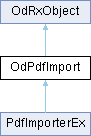
An abstract class that represents the interface for the import from a PDF file. <group OdPdfImport_Classes>
Definition at line 67 of file PdfImport.h.
Member Enumeration Documentation
◆ ImportResult
Contains a list of the PDF import operation results that are handled by the <link OdPdfImportModule, PDF import module>.
Definition at line 73 of file PdfImport.h.
Member Function Documentation
◆ import()
|
pure virtual |
Imports a PDF file's contents to a drawing database with specified properties. This method should be reimplemented to provide the functionality for importing from a PDF file.
- Returns
- A value of the <link OdPdfImport::ImportResult, ImportResult> enumeration that contains the result of the import process.
- Remarks
- To specify import properties, use the <link OdPdfImport::properties, properties()> method to get access to the import properties dictionary object.
Implemented in PdfImporterEx.
◆ properties()
|
pure virtual |
Retrieves a dictionary object that contains the set of PDF import properties.
- Returns
- A smart pointer to the dictionary object that contains properties used for the import of a PDF file's content to a drawing database.
- Remarks
- The list of supported properties for the PDF import operation is represented in the table below.
Property Name Description Database A target database object (an instance of the OdDbDatabase class). The contents of the PDF file are imported to this database. PdfPath A full path to the imported PDF file. Password A password for the input PDF file (empty by default). PageNumber A page number of the input PDF file. Starts from 1 (by default). LayersUseType A method that determines how imported objects should be assigned to layers in the target database. ImportVectorGeometry A flag that determines whether the PDF geometry data types are imported (true by default). ImportSolidFills A flag that determines whether all solid-filled areas are imported (true by default). ImportTrueTypeText A flag that determines whether text objects that use TrueType fonts should be imported (true by default). Some symbols exported from a PDF document may display incorrectly because the PDF document uses symbols that the origin TrueType font does not contain. To correctly display all symbols, switch on the ImportTrueTypeTextAsGeometry option for the import process. ImportWidgets A flag that determines whether widget (text fields, buttons, etc.) data types are imported. Widgets are imported as a set of geometric objects, solid-filled objects, images, and text, so enabling options to import these corresponding objects affects the import of widgets. By default, the property is equal to true. ImportRasterImages A flag that determines whether raster images are imported by saving them as PNG files and attaching them to the current drawing (true by default). ImportGradientFills A flag that determines whether shaded objects are imported as images by saving them as PNG files and attaching them to the current drawing (true by default). ImportAsBlock A flag that determines whether the PDF file is imported as a block, not as separate objects (false by default). JoinLineAndArcSegments A flag that determines whether contiguous segments are joined into a polyline if it is possible (true by default). ConvertSolidsToHatches A flag that determines whether 2D solid objects are converted to solid-filled hatches (true by default). ApplyLineweight A flag that determines whether lineweight properties of the imported objects remain (if true) or are ignored (if false). By default, the property is equal to true. ImportTrueTypeTextAsGeometry A flag that determines whether text objects that use TrueType fonts are imported as polylines and solid-filled hatches (false by default). To import text as geometry, switch on the ImportVectorGeometry and ImportSolidFills import options. Scaling Specifies the scale factor for imported objects (equal to 1.0 by default). Rotation Specifies the rotation angle for imported objects (equal to 0.0 by default). InsertionPointX The x-coordinate of the imported PDF content location relative to the location of the current UCS (equal to 0.0 by default). InsertionPointY The y-coordinate of the imported PDF content location relative to the location of the current UCS (equal to 0.0 by default). UseProgressMeter A flag that determines whether a progress meter is used for the import (true by default). Using the progress meter can reduce performance. UseGeometryOptimization A flag that determines whether a geometry optimization algorithm is used for the import (true by default). ImportType3AsTrueTypeText A flag that determines whether text objects that use Type3 fonts are imported as objects that use TrueType fonts (false by default). Some symbols exported from a PDF document may display incorrectly because the PDF document uses Type3 font glyphs that the origin TrueType font does not contain. ImportPatternAndClipTextAsText A flag that determines whether text objects represented as a clip outline or as a pattern filled object are imported as text objects(defaults to true). UseRgbColor A flag that determines whether RGB colors are used or colors are selected from the palette, if possible (false by default). ImportInvalidTTTextAsGeometry A flag that determines whether text objects that use invalid TrueType fonts are imported as polylines and solid-filled hatches (true by default). UseClipping A flag that determines whether clipping is used during import (false by default). UsePageBorderClipping A flag that determines whether clipping is used at the border of the page (false by default). Used only if the UseClipping option is turned on. UseImageClipping A flag that determines whether image clipping is used during import (false by default). The image is modified on import so that the clipped part of the image becomes transparent. Used only if the UseClipping option is turned on. TakeAddMeasurementFactors A flag that determines whether additional measurement factors are used for the PDF page (true by default). CombineTextObjects A flag that determines whether text objects that use the same font and are on the same line are combined (false by default). CharSpaceFactor Specifies the factor for the width of the space between characters in words (equal to 0.6 by default). If the distance between text objects in a string is less than the width of the space taken from the font metric multiplied by this factor, the text objects are combined into one word. Used only if the CombineTextObjects option is turned on. SpaceFactor Defines the factor for the width of the space between words on a line (equal to 1.5 by default). If the distance between text objects in a string is greater than the width of the space between characters in a word (specified by CharSpaceFactor) but less than the width of the space taken from the font metrics multiplied by this factor, the text objects are combined into one word. Used only if the CombineTextObjects option is turned on. UsePdfTransparency A flag that determines whether transparency for geometric objects is used from a PDF stream (if true) or set to 50% for objects that will be imported as solid-filled areas (if false). By default, the property is equal to false. ImportHyperlinkMethod Defines how hyperlinks are imported. Can accept the following values: 0 - Import as a hyperlink (OdDbHyperlink) belonging to an entity. Hyperlinks are assigned to entities if the hyperlink's bounding box contains an entity bounding box and the hyperlink with the smallest bounding box is selected. The other hyperlinks are ignored. 1 - Hyperlinks are imported as transparent OdDbHatch objects with assigned OdDbHyperlinks. In this case, all hyperlinks are imported over other objects and according to the drawing order. 2 - Mixed method. Hyperlinks are imported as in mode "0". If the hyperlink does not match the conditions of this mode, it is imported as a transparent hatch object with OdDbHyperlinks assigned to it. The default value is 0. ConsiderINSUNITS A flag that determines whether the INSUNITS value is used when importing a PDF file. If true, all imported object dimensions are scaled according to the INSUNITS value. By default the property is false. Type3TextDefaultFont The name of the font that is used when importing text objects that use a Type3 font. Can take the value of a TrueType typeface name or a Unifont filename. By default, the value of this property is empty. ImagePath String parameter that determines the directory to save the images when importing a PDF file. If not specified, the value of the PDFIMPORTIMAGEPATH system variable is used; if the system variable value is also not specified, the images are saved in the application's temporary directory. By default, the value of the property is empty. ExtractEmbeddedFonts A flag that determines whether extraction of embedded fonts is supported. Embedded font extraction is used only if it is possible (by default the flag equals false). EmbeddedFontsPath String parameter that determines the path to the directory where embedded fonts are extracted during the PDF import operation. If a path to the directory is not specified, embedded fonts are extracted to the application's temporary directory. By default, the value of the property is empty. TryFixUnicodeTable A flag that determines whether ToUnicode table fixing for CID and Type3 fonts is supported in cases when it is possible. By default, the property value is equal to false. DPIForImagePattern Defines DPI for objects with pattern fill. If the flag UseDownScaleForImagePattern is false, the image pattern is only upscaled, otherwise downscaling is possible. The default value is 300. UseDownScaleForImagePattern A flag that determines whether image patterns will be downscaled on import (DPI for these images patterns is set by DPIForImagePattern property). By default, the property value is equal to false. LineTypeFromCollinearDashes A flag that determines whether collinear segments will be imported as line objects with a line style, if possible. By default, the property value is equal to false.
Implemented in PdfImporterEx.
◆ setPreferableFontCallback()
|
pure virtual |
Sets a function to select the preferred font.
- Parameters
-
callback [in] A pointer to the function that implements the selection of the preferred font.
- Remarks
- If the font name is changed by calling a function that selects the preferable font, the Type3TextDefaultFont option is ignored.
Implemented in PdfImporterEx.
The documentation for this class was generated from the following file:
Generated on Tue Apr 15 2025 11:30:33