#include <PdfPublishDocument.h>
Public Member Functions | |
| ODRX_DECLARE_MEMBERS (OdDocument) | |
| ODRX_HEAP_OPERATORS () | |
| virtual | ~OdDocument () |
| void | setVersion (const OdPDF::PDFFormatVersions version) |
| void | setInformation (const OdString &title, const OdString &author, const OdString &subject, const OdString &creator) |
| void | addJavaScript (const OdString &name, const OdString &source, const Source::Type source_type=Source::kCode) |
| void | addIconImage (const OdString &name, const OdImagePtr &image) |
| void | addPage (const OdPagePtr &page) |
| void | addAttachment (const OdAttachedFilePtr &file) |
| void | setCollection (const OdCollectionPtr &collection) |
| void | setUserPassword (const OdString &user_password) |
| void | setOwnerPassword (const OdString &owner_password) |
| void | setAccessPermissionFlags (const AccessPermissions::AccessPermissionsFlags flags) |
| void | appendRootBookmark (const OdBookmarkPtr bookmark) |
| void | setRootBookmarks (const OdBookmarkPtrArray &bookmarks) |
| void | getVersion (OdPDF::PDFFormatVersions &version) const |
| void | getInformation (OdString &title, OdString &author, OdString &subject, OdString &creator) const |
| void | getJavaScripts (OdStringArray &names, OdStringArray &sources, OdSourceTypeArray &source_types) const |
| void | getIconImages (OdStringArray &names, OdImagePtrArray &images) const |
| void | getPages (OdPagePtrArray &pages) const |
| void | getAttachments (OdAttachedFilePtrArray &files) const |
| void | getCollection (OdCollectionPtr &collection) const |
| void | getUserPassword (OdString &user_password) const |
| void | getOwnerPassword (OdString &owner_password) const |
| AccessPermissions::AccessPermissionsFlags | getAccessPermissionFlags () const |
| void | getRootBookmarks (OdBookmarkPtrArray &bookmarks) const |
| void | setHostServices (OdDbBaseHostAppServices *pHostApp) |
| OdDbBaseHostAppServices * | appServices () const |
 Public Member Functions inherited from OdPdfPublish::OdObject Public Member Functions inherited from OdPdfPublish::OdObject | |
| ODRX_DECLARE_MEMBERS (OdObject) | |
| ODRX_HEAP_OPERATORS () | |
| virtual | ~OdObject () |
| virtual bool | isEmpty () const |
| virtual bool | isValid () const |
| virtual void | clear () |
| Public Member Functions inherited from OdRxObject | |
| ODRX_HEAP_OPERATORS () | |
| OdRxObject () | |
| virtual | ~OdRxObject () |
| virtual OdRxObject * | queryX (const OdRxClass *pClass) const |
| virtual OdRxObject * | x (const OdRxClass *pClass) const |
| virtual OdRxClass * | isA () const |
| virtual void | addRef ()=0 |
| virtual void | release ()=0 |
| virtual long | numRefs () const |
| bool | isKindOf (const OdRxClass *pClass) const |
| virtual OdRxObjectPtr | clone () const |
| virtual void | copyFrom (const OdRxObject *pSource) |
| virtual OdRx::Ordering | comparedTo (const OdRxObject *pOther) const |
| virtual bool | isEqualTo (const OdRxObject *pOther) const |
Protected Member Functions | |
| OdDocument () | |
| Protected Member Functions inherited from OdPdfPublish::OdObject | |
| OdObject (OdPublishObjectImpl *pImpl) | |
Additional Inherited Members | |
| Static Public Member Functions inherited from OdRxObject | |
| static OdRxObjectPtr | cast (const OdRxObject *pointer) |
| static OdRxClass * | desc () |
| static void | rxInit () |
| static void | rxUninit () |
Detailed Description
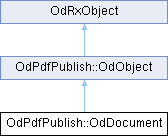
This class implements working with a .pdf document created with Publish SDK. A document is a container for other elements and controls (such as <link OdPdfPublish::OdPage, pages>, <link OdPdfPublish::OdImage, images>, <link OdPdfPublish::OdLink, links>, <link OdPdfPublish::OdAnnotation, annotations>, and so on).
Definition at line 54 of file PdfPublishDocument.h.
Constructor & Destructor Documentation
◆ OdDocument()
|
protected |
◆ ~OdDocument()
|
virtual |
Destroys the Publish SDK document.
Member Function Documentation
◆ addAttachment()
| void OdPdfPublish::OdDocument::addAttachment | ( | const OdAttachedFilePtr & | file | ) |
Adds a new attachment file to the ODA Publish document.
- Parameters
-
file [in] A smart pointer to a attached file object.
- Remarks
- Ignored if the Collection is set.
◆ addIconImage()
Adds a new icon <link OdPdfPublish::OdImage, image> to the Publish SDK document.
- Parameters
-
name [in] A name of an icon image. image [in] A smart pointer to an image object.
- See also
- <link OdPdfPublish::OdImage, OdImage class>.
◆ addJavaScript()
| void OdPdfPublish::OdDocument::addJavaScript | ( | const OdString & | name, |
| const OdString & | source, | ||
| const Source::Type | source_type = Source::kCode ) |
Adds a new JavaScript scenario to the Publish SDK document.
- Parameters
-
name [in] A name of a JavaScript scenario. source [in] Source code text of a JavaScript scenario. source_type [in] JavaScript scenario source type.
- Remarks
- The script name must be unique in the set of document scripts.
- See also
- <link OdPdfPublish::Source::Type, Source::Type enumeration>.
◆ addPage()
| void OdPdfPublish::OdDocument::addPage | ( | const OdPagePtr & | page | ) |
Adds a new <link OdPdfPublish::OdPage, page> to the Publish SDK document.
- Parameters
-
page [in] A smart pointer to the OdPage object that should be added.
- See also
- <link OdPdfPublish::OdPage, OdPage class>.
◆ appendRootBookmark()
| void OdPdfPublish::OdDocument::appendRootBookmark | ( | const OdBookmarkPtr | bookmark | ) |
Appends a new root <link OdPdfPublish::OdBookmark, bookmark> to the PDF document.
- Parameters
-
bookmark [in] A smart pointer to the <link OdPdfPublish::OdBookmark, OdBookmark> object.
- See also
- <link OdPdfPublish::OdBookmark, OdBookmark class>.
◆ appServices()
| OdDbBaseHostAppServices * OdPdfPublish::OdDocument::appServices | ( | ) | const |
Gets the current application services object for the document.
- Returns
- Returns a pointer to the database application services object.
◆ getAccessPermissionFlags()
| AccessPermissions::AccessPermissionsFlags OdPdfPublish::OdDocument::getAccessPermissionFlags | ( | ) | const |
Returns the flag <link OdPdfPublish::AccessPermissions, access permission flags> for the output PDF document.
- Returns
- A value of the <link OdPdfPublish::AccessPermissions, AccessPermissions> data type that represents the current access permission flags.
◆ getAttachments()
| void OdPdfPublish::OdDocument::getAttachments | ( | OdAttachedFilePtrArray & | files | ) | const |
Returns a collection of attached file object. The method fills a passed collection of attached file object and returns it to the calling subroutine.
- Parameters
-
files [out] A placeholder for collection of attached file object.
◆ getCollection()
| void OdPdfPublish::OdDocument::getCollection | ( | OdCollectionPtr & | collection | ) | const |
Returns the current collection object. The method fills a passed collection object and returns it to the calling subroutine.
- Parameters
-
collection [out] A placeholder for collection object.
◆ getIconImages()
| void OdPdfPublish::OdDocument::getIconImages | ( | OdStringArray & | names, |
| OdImagePtrArray & | images ) const |
Returns a collection of icon <link OdPdfPublish::OdImage, images> from the Publish SDK document. This method fills the passed string array and smart pointer array with image names and pointers to image objects, then returns them to a calling subroutine.
- Parameters
-
names [out] A placeholder for icon image names. images [out] A placeholder for an array of smart pointers that point to the document icon images.
- See also
- <link OdPdfPublish::OdImage, OdImage class>.
◆ getInformation()
| void OdPdfPublish::OdDocument::getInformation | ( | OdString & | title, |
| OdString & | author, | ||
| OdString & | subject, | ||
| OdString & | creator ) const |
Returns the current common information about the Publish SDK document. This method fills the passed strings and returns them to a calling subroutine.
- Parameters
-
title [out] A placeholder for the document title. author [out] A placeholder for the document author. subject [out] A placeholder for the document subject. creator [out] A placeholder for the information about the document creator.
◆ getJavaScripts()
| void OdPdfPublish::OdDocument::getJavaScripts | ( | OdStringArray & | names, |
| OdStringArray & | sources, | ||
| OdSourceTypeArray & | source_types ) const |
Returns the collection of JavaScript scenarios encapsulated in the Publish SDK document. This method fills the passed arrays with names, source code text and source code types, then returns them to a calling subroutine.
- Parameters
-
names [out] A placeholder for JavaScript scenario names. sources [out] A placeholder for JavaScript scenario source code text. source_types [out] A placeholder for JavaScript scenario source code types.
◆ getOwnerPassword()
Retrieves the current owner password for the output PDF document.
- Parameters
-
owner_password [out] An <exref target="https://docs.opendesign.com/tkernel/OdString.html">OdString</exref> object that acts as a placeholder for the current PDF document owner password.
- Remarks
- Password protection functionality is supported only for PDF versions 1.3 and higher.* There are two types of passwords: User password (Document Open Password) is required to open a PDF document. Owner password is required to gain full access to the document (owner access). Owner access gives permissions for changing passwords and access permissions for the document. When a password of at least one of these two types is specified, Publish SDK creates an encrypted output document. The type of encryption depends on the PDF version. The following rules apply for granting access to PDF document content depending on which passwords and access permissions were specified: When only the user password is set <exref target="https://get.adobe.com/reader/">Adobe® Acrobat® Reader®</exref> requires this password to view the document. If the entered password is correct, full access to the document is granted. <link OdPdfPublish::AccessPermissions, Access permissions> are ignored. Other applications that read PDF documents take the <link OdPdfPublish::AccessPermissions, access permissions> into account. This means that if the entered user password is correct, the document is opened for viewing (read mode). Other operations can proceed only if the appropriate <link OdPdfPublish::AccessPermissions, access permissions> are granted. When only the owner password is specified (the user password is not set), the PDF document can be opened for viewing without entering a password. Other operations are available only if the respective <link OdPdfPublish::AccessPermissions, access permissions> are granted, and the owner password is required to proceed with any of the allowed operations. When the owner password is specified and it is not equal to the user password (the user password is also set), the PDF document can be opened for viewing by entering any of the passwords. If the user enters the owner password, full access to the document is granted. If the user enters the user password, other operations are allowed only if the respective <link OdPdfPublish::AccessPermissions, access permissions> are granted. To proceed with any of these operations the owner password is required. When both passwords are equal, full access is granted when the entered password is correct. The method fills the passed parameter with the current owner password and returns it to a calling subroutine.
◆ getPages()
| void OdPdfPublish::OdDocument::getPages | ( | OdPagePtrArray & | pages | ) | const |
Returns the array of <link OdPdfPublish::OdPage, pages> that the Publish SDK document contains. This method fills the passed array with the OdPage object that represents the document pages and returns it to a calling subroutine.
- Parameters
-
pages [out] A placeholder for the document pages array.
- See also
- <link OdPdfPublish::OdPage, OdPage class>.
◆ getRootBookmarks()
| void OdPdfPublish::OdDocument::getRootBookmarks | ( | OdBookmarkPtrArray & | bookmarks | ) | const |
Returns root bookmarks for the current bookmark from the PDF document. The method fills the passed array with smart pointers to <link OdPdfPublish::OdBookmark, OdBookmark> objects that represents the child bookmarks of the current bookmark and returns it to a calling subroutine.
- Parameters
-
bookmarks [out] A placeholder for the array of smart pointers to <link OdPdfPublish::OdBookmark, OdBookmark> objects.
- See also
- <link OdPdfPublish::OdBookmark, OdBookmark class>.
◆ getUserPassword()
Retrieves the current user password for the output PDF document.
- Parameters
-
user_password [out] An <exref target="https://docs.opendesign.com/tkernel/OdString.html">OdString</exref> object that acts as a placeholder for the current PDF document user password.
- Remarks
- Password protection functionality is supported only for PDF versiond 1.3 and higher.* There are two types of passwords: User password (Document Open Password) is required to open a PDF document. Owner password is required to gain full access to the document (owner access). Owner access gives permissions for changing passwords and access permissions for the document. When a password of at least one of these two types is specified, Publish SDK creates an encrypted output document. The type of encryption depends on the PDF version. The following rules apply for granting access to PDF document content depending on which passwords and access permissions were specified: When only the user password is set, <exref target="https://get.adobe.com/reader/">Adobe® Acrobat® Reader®</exref> requires this password to view the document. If the entered password is correct, full access to the document is granted. <link OdPdfPublish::AccessPermissions, Access permissions> are ignored. Other applications that read PDF documents take the <link OdPdfPublish::AccessPermissions, access permissions> into account. This means that if the entered user password is correct, the document is opened for viewing (read mode). Other operations can proceed only if the appropriate <link OdPdfPublish::AccessPermissions, access permissions> are granted. When only the owner password is specified (the user password is not set), the PDF document can be opened for viewing without entering a password. Other operations are available only if the respective <link OdPdfPublish::AccessPermissions, access permissions> are granted, and the owner password is required to proceed with any of the allowed operations. When the owner password is specified and it is not equal to the user password (the user password is also set), the PDF document can be opened for viewing by entering any of the passwords. If the user enters the owner password, full access to the document is granted. If the user enters the user password, other operations are allowed only if the respective <link OdPdfPublish::AccessPermissions, access permissions> are granted. To proceed with any of these operations, the owner password is required. When both passwords are equal, full access is granted when the entered password is correct. The method fills the passed parameter with the current user password and returns it to a calling subroutine.
◆ getVersion()
| void OdPdfPublish::OdDocument::getVersion | ( | OdPDF::PDFFormatVersions & | version | ) | const |
Returns PDF format version for the Publish SDK document. This method fills the passed the value of the <link OdPDF::PDFFormatVersions, PDF format version> and returns them to a calling subroutine.
- Parameters
-
version [out] A placeholder for the PDF format version value.
◆ ODRX_DECLARE_MEMBERS()
| OdPdfPublish::OdDocument::ODRX_DECLARE_MEMBERS | ( | OdDocument | ) |
◆ ODRX_HEAP_OPERATORS()
| OdPdfPublish::OdDocument::ODRX_HEAP_OPERATORS | ( | ) |
◆ setAccessPermissionFlags()
| void OdPdfPublish::OdDocument::setAccessPermissionFlags | ( | const AccessPermissions::AccessPermissionsFlags | flags | ) |
Sets new <link OdPdfPublish::AccessPermissions, access permission flags> for the output PDF document.
- Parameters
-
flags [in] Value of the <link OdPdfPublish::AccessPermissions, access permission flags> to be set.
◆ setCollection()
| void OdPdfPublish::OdDocument::setCollection | ( | const OdCollectionPtr & | collection | ) |
Sets a collection object to the ODA Publish document.
- Parameters
-
collection [in] A smart pointer to a collection object.
◆ setHostServices()
| void OdPdfPublish::OdDocument::setHostServices | ( | OdDbBaseHostAppServices * | pHostApp | ) |
Sets a new application services object for the document.
- Parameters
-
pHostApp [in] A pointer to a database application services object.
◆ setInformation()
| void OdPdfPublish::OdDocument::setInformation | ( | const OdString & | title, |
| const OdString & | author, | ||
| const OdString & | subject, | ||
| const OdString & | creator ) |
Sets common information about the Publish SDK document.
- Parameters
-
title [in] A string that contains the document title. author [in] A string that contains the document author. subject [in] A string that contains the document subject. creator [in] A string that contains information about the document creator.
◆ setOwnerPassword()
Sets a new owner password for the output PDF document.
- Parameters
-
owner_password [in] A <exref target="https://docs.opendesign.com/tkernel/OdString.html">string</exref> that contains a new value for the output document's owner password.
- Remarks
- Password protection functionality is supported only for PDF versions 1.3 and higher.* There are two types of passwords: User password (Document Open Password) is required to open a PDF document. Owner password is required to gain full access to the document (owner access). Owner access gives permissions for changing passwords and access permissions for the document. When a password of at least one of these two types is specified, Publish SDK creates an encrypted output document. The type of encryption depends on the PDF version. The following rules apply for granting access to PDF document content depending on which passwords and access permissions were specified: When only the user password is set, <exref target="https://get.adobe.com/reader/">Adobe® Acrobat® Reader®</exref> requires this password to view the document. If the entered password is correct, full access to the document is granted. <link OdPdfPublish::AccessPermissions, Access permissions> are ignored. Other applications that read PDF documents take the <link OdPdfPublish::AccessPermissions, access permissions> into account. This means that if the entered user password is correct, the document is opened for viewing (read mode). Other operations can proceed only if the appropriate <link OdPdfPublish::AccessPermissions, access permissions> are granted. When only the owner password is specified (the user password is not set), the PDF document can be opened for viewing without entering a password. Other operations are available only if the respective <link OdPdfPublish::AccessPermissions, access permissions> are granted and the owner password is required to proceed with any of the allowed operations. When the owner password is specified and it is not equal to the user password (the user password is also set), the PDF document can be opened for viewing by entering any of the passwords. If the user enters the owner password, full access to the document is granted. If the user enters the user password, other operations are allowed only if the respective <link OdPdfPublish::AccessPermissions, access permissions> are granted. To proceed with any of these operations, the owner password is required. When both passwords are equal, full access is granted when the entered password is correct.
◆ setRootBookmarks()
| void OdPdfPublish::OdDocument::setRootBookmarks | ( | const OdBookmarkPtrArray & | bookmarks | ) |
Sets root bookmarks for the PDF document.
- Parameters
-
bookmarks [in] An array of smart pointers to <link OdPdfPublish::OdBookmark, OdBookmark> objects.
- Remarks
- The method replaces children bookmarks which previously were set for the document.
- See also
- <link OdPdfPublish::OdBookmark, OdBookmark class>.
◆ setUserPassword()
Sets a new user password for the output PDF document.
- Parameters
-
user_password [in] A <exref target="https://docs.opendesign.com/tkernel/OdString.html">string</exref> that contains a new value for the output document's user password.
- Remarks
- Password protection functionality is supported only for PDF versions 1.3 and higher.* There are two types of passwords: User password (Document Open Password) is required to open a PDF document. Owner password is required to gain full access to the document (owner access). Owner access gives permissions for changing passwords and access permissions for the document. When a password of at least one of these two types is specified, Publish SDK creates an encrypted output document. The type of encryption depends on the PDF version. The following rules apply for granting access to PDF document content depending on which passwords and access permissions were specified: When only the user password is set, <exref target="https://get.adobe.com/reader/">Adobe® Acrobat® Reader®</exref> requires this password to view the document. If the entered password is correct, full access to the document is granted. <link OdPdfPublish::AccessPermissions, Access permissions> are ignored. Other applications that read PDF documents take the <link OdPdfPublish::AccessPermissions, access permissions> into account. This means that if the entered user password is correct, the document is opened for viewing (read mode). Other operations can proceed only if appropriate <link OdPdfPublish::AccessPermissions, access permissions> are granted. When only the owner password is specified (the user password is not set), the PDF document can be opened for viewing without entering a password. Other operations are available only if the respective <link OdPdfPublish::AccessPermissions, access permissions> are granted and the owner password is required to proceed with any of the allowed operations. When the owner password is specified and it is not equal to the user password (the user password is also set), the PDF document can be opened for viewing by entering any of the passwords. If the user enters the owner password, full access to the document is granted. If the user enters the user password, other operations are allowed only if the respective <link OdPdfPublish::AccessPermissions, access permissions> are granted. To proceed with any of these operations, the owner password is required. When both passwords are equal, full access is granted when the entered password is correct.
◆ setVersion()
| void OdPdfPublish::OdDocument::setVersion | ( | const OdPDF::PDFFormatVersions | version | ) |
Sets PDF format version for the Publish SDK document.
- Parameters
-
version [in] Value of the <link OdPDF::PDFFormatVersions, PDF format version> to be set.
- Remarks
- The default value is OdPDF::PDFFormatVersions::kPDFAuto.
The documentation for this class was generated from the following file:
Generated on Tue Apr 15 2025 11:44:45