#include <IfcDoorAutoImpl.h>
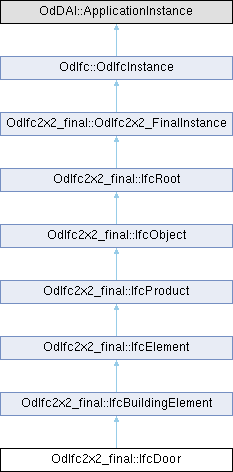
Public Member Functions | |
| double | getOverallHeight () const |
| void | setOverallHeight (double OverallHeight) |
| double | getOverallWidth () const |
| void | setOverallWidth (double OverallWidth) |
| IfcDoor () | |
| virtual OdResult | inFields (OdDAI::OdSpfFilerBase *rdFiler) override |
| virtual OdResult | outFields (OdDAI::OdSpfFilerBase *wrFiler) override |
| virtual OdDAI::Entity * | getInstanceType () const override |
| virtual OdRxValue | getAttr (const char *attrName) const override |
| virtual void | unsetAttr (const char *explicitAttrName) override |
| virtual bool | testAttr (const char *explicitAttrName) const override |
| virtual bool | putAttr (const char *explicitAttrName, const OdRxValue &val) override |
| virtual bool | isKindOf (OdIfc::OdIfcEntityType entityType) const override |
| virtual OdIfc::OdIfcEntityType | type () const override |
| virtual OdRxValue | getAttr (const OdIfc::OdIfcAttribute attrDef) const override |
| virtual void | unsetAttr (const OdIfc::OdIfcAttribute explicitAttrDef) override |
| virtual bool | testAttr (const OdIfc::OdIfcAttribute explicitAttrDef) const override |
| virtual bool | putAttr (const OdIfc::OdIfcAttribute explicitAttrDef, const OdRxValue &val) override |
 Public Member Functions inherited from OdIfc2x2_final::IfcElement Public Member Functions inherited from OdIfc2x2_final::IfcElement | |
| const OdAnsiString & | getTag () const |
| void | setTag (const OdAnsiString &Tag) |
| void | getInvFillsVoids (OdDAIObjectIds &FillsVoids) const |
| void | getInvConnectedTo (OdDAIObjectIds &ConnectedTo) const |
| void | getInvHasCoverings (OdDAIObjectIds &HasCoverings) const |
| void | getInvHasProjections (OdDAIObjectIds &HasProjections) const |
| void | getInvHasPorts (OdDAIObjectIds &HasPorts) const |
| void | getInvHasOpenings (OdDAIObjectIds &HasOpenings) const |
| void | getInvIsConnectionRealization (OdDAIObjectIds &IsConnectionRealization) const |
| void | getInvProvidesBoundaries (OdDAIObjectIds &ProvidesBoundaries) const |
| void | getInvConnectedFrom (OdDAIObjectIds &ConnectedFrom) const |
| void | getInvContainedInStructure (OdDAIObjectIds &ContainedInStructure) const |
| IfcElement () | |
| Public Member Functions inherited from OdIfc2x2_final::IfcProduct | |
| const OdDAIObjectId & | getObjectPlacement () const |
| void | setObjectPlacement (const OdDAIObjectId &ObjectPlacement) |
| const OdDAIObjectId & | getRepresentation () const |
| void | setRepresentation (const OdDAIObjectId &Representation) |
| void | getInvReferencedBy (OdDAIObjectIds &ReferencedBy) const |
| Public Member Functions inherited from OdIfc2x2_final::IfcObject | |
| const OdAnsiString & | getObjectType () const |
| void | setObjectType (const OdAnsiString &ObjectType) |
| void | getInvIsDefinedBy (OdDAIObjectIds &IsDefinedBy) const |
| void | getInvHasAssociations (OdDAIObjectIds &HasAssociations) const |
| void | getInvHasAssignments (OdDAIObjectIds &HasAssignments) const |
| void | getInvDecomposes (OdDAIObjectIds &Decomposes) const |
| void | getInvIsDecomposedBy (OdDAIObjectIds &IsDecomposedBy) const |
| IfcObject () | |
| Public Member Functions inherited from OdIfc2x2_final::IfcRoot | |
| OdDAI::CompressedGUID | getGlobalId () const |
| void | setGlobalId (OdDAI::CompressedGUID GlobalId) |
| const OdDAIObjectId & | getOwnerHistory () const |
| void | setOwnerHistory (const OdDAIObjectId &OwnerHistory) |
| const OdAnsiString & | getName () const |
| void | setName (const OdAnsiString &Name) |
| const OdAnsiString & | getDescription () const |
| void | setDescription (const OdAnsiString &Description) |
| IfcRoot () | |
| Public Member Functions inherited from OdIfc::OdIfcInstance | |
| ODRX_DECLARE_MEMBERS (OdIfcInstance) | |
| OdIfcInstance () | |
| ~OdIfcInstance () | |
| bool | isInstanceOf (OdIfcEntityType entityType) const |
| IfcOpResult | resolved () |
| void | resolve (IfcOpResult resolved, void *resPtr) |
| void | unresolve () |
| virtual void | setGsNode (OdGsCache *pGsNode) |
| virtual OdGsCache * | gsNode () const |
| virtual OdUInt32 | subSetAttributes (OdGiDrawableTraits *traits) const |
| virtual bool | subWorldDraw (OdGiWorldDraw *wd) const |
| virtual OdDbStub * | ownerId () const |
Protected Attributes | |
| IfcPositiveLengthMeasure | m_OverallHeight |
| IfcPositiveLengthMeasure | m_OverallWidth |
| Protected Attributes inherited from OdIfc2x2_final::IfcElement | |
| OdAnsiString | m_Tag |
| Protected Attributes inherited from OdIfc2x2_final::IfcProduct | |
| OdDAIObjectId | m_ObjectPlacement |
| OdDAIObjectId | m_Representation |
| Protected Attributes inherited from OdIfc2x2_final::IfcObject | |
| OdAnsiString | m_ObjectType |
| Protected Attributes inherited from OdIfc2x2_final::IfcRoot | |
| OdDAI::CompressedGUID | m_GlobalId |
| OdDAIObjectId | m_OwnerHistory |
| OdAnsiString | m_Name |
| OdAnsiString | m_Description |
| Protected Attributes inherited from OdIfc::OdIfcInstance | |
| void * | m_resPtr |
| IfcOpResult | m_resolved |
Additional Inherited Members | |
| Static Public Member Functions inherited from OdIfc::OdIfcInstance | |
| static const OdGePoint3d * | asPoint3d (const OdIfcInstance *inst) |
| static const OdGePoint2d * | asPoint2d (const OdIfcInstance *inst) |
| static const OdGeVector3d * | asVector3d (const OdIfcInstance *inst) |
| static const OdGeVector2d * | asVector2d (const OdIfcInstance *inst) |
| static const OdGeMatrix2d * | asMatrix2d (const OdIfcInstance *inst) |
| static const OdGeMatrix3d * | asMatrix3d (const OdIfcInstance *inst) |
| static OdIfcCompoundPtr | asCompound (OdSmartPtr< OdIfcInstance > inst) |
| static const OdCmEntityColor * | asRgbColor (const OdIfcInstance *inst) |
Detailed Description
The door is a built element that is predominately used to provide controlled access for people, goods, animals and vehicles. It includes constructions with hinged, pivoted, sliding, and additionally revolving and folding operations. A door can: be a "free standing" door, contained in an IfcSpatialElement such as an IfcBuildingStorey fill an opening, typically in a wall. The door will then have a FillsVoids attribute which uses the IfcRelFillsElement relationship to relate the IfcDoor with the IfcOpeningElement be part of an element assembly, typically an IfcCurtainWall. The door will then have a Decomposes attribute which uses the the IfcRelAggregates relationship to relate the door with the assembly of elements
There are two main representations for door occurrences: IfcDoor entities that have a 3D rectangle 'Profile' shape representation defined. This profile can then be used to parametrically generate the geometry of a door. If not provided, the profile of the IfcOpeningElement can be used if the door fills an opening. The parameters are specified on the relating IfcDoorType that references IfcDoorLiningProperties and IfcDoorPanelProperties for each panel in the door IfcDoor entities that are not parametrically generated and have only 'Brep', or 'SurfaceModel' geometry
The parameters of a door are defined by both the IfcDoor occurrence and its IfcDoorType. The IfcDoor specifies: the door width and height the door opening direction (by the positive y-axis of the ObjectPlacement)
The IfcDoorType specifies parameters which are common to all of its occurrences of IfcDoor: the operation type (single swing, double swing, revolving, etc.) the door hinge side (by using two different styles for right and left opening doors) the particular attributes for the lining by the IfcDoorLiningProperties the particular attributes for the panels by the IfcDoorPanelProperties
- Door Attributes - The opening direction is determined by the local placement of IfcDoor and the OperationType of the IfcDoorType. The IfcDoorTypeOperationEnum defines the general layout of the door type and its symbolic presentation. Depending on the enumerator, the appropriate instances of IfcDoorLiningProperties and IfcDoorPanelProperties are attached in the list of HasPropertySets. The IfcDoorTypeOperationEnum mainly determines the hinge side (left hung, or right hung), the operation (swinging, sliding, folding, etc.) and the number of panels.
There are different definitions in various countries on what a left opening or left hung or left swing door is (same for right). Therefore the IFC definition can derivate from the local standard and need to be mapped appropriately.
- Material Set - This concept can be applied to the following resources: Lining - Indicates that the material constituent applies to the door lining Framing - Indicates that the material constituent applies to the door panel(s); if not provided, the 'Lining' material information applies to panel(s) as well Glazing - Indicates that the material constituent applies to the glazing part
- Object Typing - This concept can be applied to the following resources: IfcDoorType
- Product Local Placement - The product placement is used to determine the opening direction of the door. Restrictions for this concept: The PlacementRelTo relationship of IfcLocalPlacement points to the local placement of the same element (if specified), in which the IfcDoor is used as a filling (normally an IfcOpeningElement), as provided by the IfcRelFillsElement relationship If the IfcDoor is part of an assembly, e.g. an IfcCurtainWall, then the PlacementRelTo relationship of IfcLocalPlacement points (if specified) to the local placement of that assembly If the IfcDoor is not inserted into an IfcOpeningElement, then the PlacementRelTo relationship of IfcLocalPlacement points (if specified) to the local placement of the same IfcSpatialStructureElement that is used in the ContainedInStructure inverse attribute or to a referenced spatial structure element at a higher level
- Profile 3D Geometry - The door profile is represented by a three-dimensional closed curve lying in the xz plane. The profile is used to apply the parameters of a parametric door representation. The following attribute values for the IfcShapeRepresentation holding this geometric representation is used: RepresentationIdentifier: 'Profile' RepresentationType: 'Curve3D' or 'GeometricCurveSet'. In case of 'GeometricCurveSet' only a single closed curve is contained in the set of IfcShapeRepresentation.Items
The image below illustrates applying the door lining parameters to the door profile shape representation. The profile defines the outer boundary to which the door lining parameters relate as: IfcDoorLiningProperties.LiningDepth starting at distance defined by LiningOffset going into the positive y direction IfcDoorLiningProperties.LiningThickness offset into the inner side of the rectangle IfcDoorLiningProperties.LiningOffset distance along the positive y direction to where the LiningDepth applies IfcDoorLiningProperties.ThresholdThickness starting at the bottom edge of the rectangle into the inner side of the rectangle IfcDoorLiningProperties.ThresholdDepth starting at distance defined by LiningOffset going into the positive y direction IfcDoorLiningProperties.TransomOffset starting at the bottom edge of the rectangle (along local x axis) into the inner side of the rectangle, distance provided as percentage of overall height. Distance to the center line of the transom
<IMAGE ifcdoorstandardcase-01>
- Property Sets for Objects - Pset_ProcessCapacity Pset_DoorCommon Pset_DoorWindowGlazingType Pset_TicketProcessing (only applies to BOOM_BARRIER) Pset_TicketProcessing (only applies to TURNSTILE) Pset_DoorTypeTurnstile (only applies to TURNSTILE)
- Quantity Sets - This concept can be applied to the following resources: Qto_DoorBaseQuantities
- Spatial Containment - The IfcDoor, as any subtype of IfcBuildingElement, can participate alternatively in one of the two different containment relationships: the Spatial Containment (defined here) the Element Composition
The IfcDoor can also be connected to the IfcOpeningElement in which it is placed as a filler. In this case, the spatial containment relationship is provided, see the image below.
<IMAGE ifcdoor_containment-01>
- Remarks
- It is recommended to use an IfcDoor with a 'Profile' representation instead of IfcDoorStandardCase, since IfcDoorStandardCase entity has been removed
Definition at line 139 of file Ifc2x2_Final/IfcDoorAutoImpl.h.
Constructor & Destructor Documentation
◆ IfcDoor()
| OdIfc2x2_final::IfcDoor::IfcDoor | ( | ) |
Default constructor for the IfcDoor class.
Member Function Documentation
◆ getAttr() [1/2]
|
overridevirtual |
Returns an attribute value for the specified attribute name.
- Parameters
-
attrName [in] Name of an attribute to query.
- Returns
- OdRxValue object that represents a generic variant type value.
Reimplemented from OdIfc2x2_final::IfcElement.
◆ getAttr() [2/2]
|
overridevirtual |
Returns an attribute value for the specified attribute definition.
- Parameters
-
attrDef [in] Attribute definition to query.
- Returns
- OdRxValue object that represents a generic variant type value.
Reimplemented from OdIfc2x2_final::IfcElement.
◆ getInstanceType()
|
overridevirtual |
Returns a type of a class instance.
- Returns
- Pointer to the <exref target=https://docs.opendesign.com/tkernel_api_cpp/OdDAI__Entity.html>>OdDAI::Entity</exref> type that determines an entity definition within a schema.
Reimplemented from OdIfc2x2_final::IfcBuildingElement.
◆ getOverallHeight()
| double OdIfc2x2_final::IfcDoor::getOverallHeight | ( | ) | const |
Returns the value of OverallHeight attribute. This attribute represents overall measure of the height, it reflects the Z Dimension of a bounding box, enclosing the body of the door opening. If omitted, the OverallHeight should be taken from the geometric representation of the IfcOpening in which the door is inserted.
- Returns
- Returns the value of OverallHeight attribute.
- Remarks
- The body of the door might be taller then the door opening (e.g. in cases where the door lining includes a casing). In these cases the OverallHeight is still specified as the door opening height, and not as the total height of the door lining.
◆ getOverallWidth()
| double OdIfc2x2_final::IfcDoor::getOverallWidth | ( | ) | const |
Returns the value of OverallWidth attribute. This attribute represents overall measure of the width, it reflects the X Dimension of a bounding box, enclosing the body of theE door opening. If omitted, the OverallWidth should be taken from the geometric representation of the IfcOpening in which the door is inserted.
- Returns
- Returns the value of OverallWidth attribute.
- Remarks
- The body of the door might be wider then the door opening (e.g. in cases where the door lining includes a casing). In these cases the OverallWidth is still specified as the door opening width, and not as the total width of the door lining.
◆ inFields()
|
overridevirtual |
Reads object's data from the specified filer.
- Parameters
-
rdFiler [in] Pointer to a filer from which to read the data.
- Returns
- A value of OdResult type that contains the result of the method execution.
Reimplemented from OdIfc2x2_final::IfcElement.
◆ isKindOf()
|
overridevirtual |
Checks whether the specified instance is the object derived from or belongs to this class.
- Parameters
-
entityType [in] Entity to check.
- Returns
- true if the specified instance is the object derived from or belongs to this class, false otherwise.
Reimplemented from OdIfc2x2_final::IfcBuildingElement.
◆ outFields()
|
overridevirtual |
Writes object's data the the specified filer.
- Parameters
-
wrFiler [in] Pointer to a filer to which to write the data.
- Returns
- A value of OdResult type that contains the result of the method execution.
Reimplemented from OdIfc2x2_final::IfcElement.
◆ putAttr() [1/2]
|
overridevirtual |
Sets the specified attribute with a given value.
- Parameters
-
explicitAttrName [in] Explicit name of the attribute to set. val [in] Value to set.
- Returns
- true if the value is successfully set for the specified attribute, false otherwise.
Reimplemented from OdIfc2x2_final::IfcElement.
◆ putAttr() [2/2]
|
overridevirtual |
Sets the specified attribute with a given value.
- Parameters
-
explicitAttrDef [in] Explicit attribute definition to set. val [in] Value to set.
- Returns
- true if the value is successfully set for the specified attribute, false otherwise.
Reimplemented from OdIfc2x2_final::IfcElement.
◆ setOverallHeight()
| void OdIfc2x2_final::IfcDoor::setOverallHeight | ( | double | OverallHeight | ) |
Sets the value of OverallHeight attribute. This attribute represents overall measure of the height, it reflects the Z Dimension of a bounding box, enclosing the body of the door opening. If omitted, the OverallHeight should be taken from the geometric representation of the IfcOpening in which the door is inserted.
- Parameters
-
OverallHeight [in] Overall height to set.
- Remarks
- The body of the door might be taller then the door opening (e.g. in cases where the door lining includes a casing). In these cases the OverallHeight is still specified as the door opening height, and not as the total height of the door lining.
◆ setOverallWidth()
| void OdIfc2x2_final::IfcDoor::setOverallWidth | ( | double | OverallWidth | ) |
Sets the value of OverallWidth attribute. This attribute represents overall measure of the width, it reflects the X Dimension of a bounding box, enclosing the body of theE door opening. If omitted, the OverallWidth should be taken from the geometric representation of the IfcOpening in which the door is inserted.
- Parameters
-
OverallWidth [in] Overall width to set.
- Remarks
- The body of the door might be wider then the door opening (e.g. in cases where the door lining includes a casing). In these cases the OverallWidth is still specified as the door opening width, and not as the total width of the door lining.
◆ testAttr() [1/2]
|
overridevirtual |
Checks whether the specified attribute is set.
- Parameters
-
explicitAttrName [in] Explicit name of the attribute to test.
- Returns
- true if the specified attribute is set, false otherwise.
Reimplemented from OdIfc2x2_final::IfcElement.
◆ testAttr() [2/2]
|
overridevirtual |
Checks whether the specified attribute is set.
- Parameters
-
explicitAttrDef [in] Attribute definition to test.
- Returns
- true if the specified attribute is set, false otherwise.
Reimplemented from OdIfc2x2_final::IfcElement.
◆ type()
|
overridevirtual |
Returns the type of this entity.
- Returns
- A value of the <exref target=https://docs.opendesign.com/tkernel_api_cpp/OdIfc__OdIfcEntityType.html>>OdIfc::OdIfcEntityType</exref> type that represents type of this entity.
Reimplemented from OdIfc2x2_final::IfcBuildingElement.
◆ unsetAttr() [1/2]
|
overridevirtual |
Resets a value for the specified attribute.
- Parameters
-
explicitAttrName [in] Explicit name of the attribute to reset.
Reimplemented from OdIfc2x2_final::IfcElement.
◆ unsetAttr() [2/2]
|
overridevirtual |
Resets a value for the specified attribute.
- Parameters
-
explicitAttrDef [in] Explicit definition that represents an attribute to reset.
Reimplemented from OdIfc2x2_final::IfcElement.
Member Data Documentation
◆ m_OverallHeight
|
protected |
Definition at line 309 of file Ifc2x2_Final/IfcDoorAutoImpl.h.
◆ m_OverallWidth
|
protected |
Definition at line 310 of file Ifc2x2_Final/IfcDoorAutoImpl.h.
The documentation for this class was generated from the following file:
Generated on Tue Apr 15 2025 11:31:07