#include <FxDatabase.h>
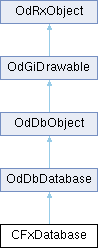
Static Public Member Functions | |
| static CFxDatabasePtr | LoadFile (const CFxString &strFilename, OdCodePageId *pCodepage=0, const OdPassword &password=OdPassword()) |
| static CFxDatabasePtr | RecoverFile (const CFxString &strFilename, OdCodePageId *pCodepage=0, const OdPassword &password=OdPassword()) |
 Static Public Member Functions inherited from OdDbDatabase Static Public Member Functions inherited from OdDbDatabase | |
| static bool | isValidLineWeight (int weight) |
| static OdDb::LineWeight | getNearestLineWeight (int weight) |
| Static Public Member Functions inherited from OdRxObject | |
| static OdRxObjectPtr | cast (const OdRxObject *pointer) |
| static OdRxClass * | desc () |
| static void | rxInit () |
| static void | rxUninit () |
Additional Inherited Members | |
| Protected Member Functions inherited from OdDbDatabase | |
| OdDbDatabase () | |
| Protected Member Functions inherited from OdDbObject | |
| OdDbObject () | |
| virtual OdDbObjectPtr | subDeepClone (OdDbIdMapping &ownerIdMap, OdDbObject *pOwner, bool bPrimary) const |
| Protected Member Functions inherited from OdGiDrawable | |
| OdGiDrawable () | |
| virtual OdUInt32 | subViewportDrawLogicalFlags (OdGiViewportDraw *vd) const |
| virtual OdUInt32 | subRegenSupportFlags () const |
| Protected Attributes inherited from OdDbObject | |
| OdDbObjectImpl * | m_pImpl |
Detailed Description
Description: Represents a drawing database in memory. Library: DDKERNEL
Definition at line 47 of file FxDatabase.h.
Member Enumeration Documentation
◆ UNDOCTL_Modes
| Enumerator | |
|---|---|
| Enabled | |
| One | |
| Auto | |
| Combine | |
| Layer | |
Definition at line 294 of file FxDatabase.h.
Constructor & Destructor Documentation
◆ CFxDatabase()
| CFxDatabase::CFxDatabase | ( | void | ) |
◆ ~CFxDatabase()
|
override |
Member Function Documentation
◆ BlockPurge()
|
pure virtual |
Block purge.
Arguments:
Description:
- Parameters
-
id The identifier. block true to block.
Return Value: .
◆ ClearError()
|
pure virtual |
Description: Reset the last error.
◆ GetActiveBlockId()
| OdDbObjectId CFxDatabase::GetActiveBlockId | ( | ) | const |
Description: Returns active block table record. Returns model space id inside paper space viewport.
◆ GetActiveViewportId()
| OdDbObjectId CFxDatabase::GetActiveViewportId | ( | OdDbObjectId | idLayout = OdDbObjectId::kNull | ) | const |
Description: Returns the active viewport id. If 'idLayout' is null then current layout from database is used.
◆ getBINDTYPE()
|
pure virtual |
◆ GetBlockedPurge()
|
pure virtual |
Description: Gets the blocked purge.
Return Value:
The blocked purge.
◆ GetDatabaseHistory()
|
pure virtual |
Gets the database history.
Return Value:
null if it fails, else the database history.
Description:
◆ getDWGCODEPAGE()
|
override |
◆ getElapsedTime()
|
pure virtual |
Description: Gets the elapsed time.
Return Value:
The elapsed time.
◆ GetFileData()
|
pure virtual |
Description: Returns file data included in database.
◆ GetFxGsModel() [1/2]
|
pure virtual |
Description: Returns the GsBaseModel associated.
◆ GetFxGsModel() [2/2]
|
pure virtual |
Description: Returns the GsBaseModel associated.
◆ GetGsView()
|
pure virtual |
Description: Looks for gs view inside display device associated to this database. Arguments:
- Parameters
-
id Input Id of the OdDbViewport or OdDbViewportTableRecord. Return value: Returns null in case database is not attached to any document or in case of inconsistent display device.
◆ GetLastError()
|
pure virtual |
Description: Returns the last error. Return Value:
Last error.
◆ getPLIMMAX()
|
overridepure virtual |
◆ getPLIMMIN()
|
overridepure virtual |
◆ GetRecentlyErased()
|
pure virtual |
Description: Returns the recently erased files.
◆ GetUnitsFormatter()
|
pure virtual |
Description: Returns units formatter.
◆ getUSERS1()
|
pure virtual |
◆ getUSERS2()
|
pure virtual |
◆ getUSERS3()
|
pure virtual |
◆ getUSERS4()
|
pure virtual |
◆ getUSERS5()
|
pure virtual |
◆ IsModelLayoutActive()
| bool CFxDatabase::IsModelLayoutActive | ( | ) | const |
Description: Returns true if model layout active. If 'idLayout' is null then current layout from database is used.
◆ LoadFile()
|
static |
Description: Load file. Return Value: Returns database if file was opened successfully and null otherwise.
◆ LockFile()
|
pure virtual |
Description: Lock file on disk.
◆ ODRX_DECLARE_MEMBERS()
| CFxDatabase::ODRX_DECLARE_MEMBERS | ( | CFxDatabase | ) |
◆ QVAR_DEF_2()
| CFxDatabase::QVAR_DEF_2 | ( | OdInt8 | , |
| DGNFRAME | , | ||
| ValidateRange(0, 2) | ) |
<title BACKZ> <toctitle BACKZ>
Type double Initial value 0.0 Read-Only Yes Saved In Database Versions R12+
BACKZ specifies the back clipping distance for the current viewport.
Access Methods OdDbDatabase::getSysVar()
- See also
- <link VIEWMODE, VIEWMODE> <group TD_SysVars_B> <title CTAB> <toctitle CTAB>
Type OdDbObjectId Initial value Model Layout Id Read-Only No Saved In Database Versions 2000+
CTAB specifies the current tab (model or layout) in the database.
Access Methods OdDbDatabase::getSysVar() OdDbDatabase::setSysVar()
<group TD_SysVars_C> <title CPLOTSTYLE> <toctitle CPLOTSTYLE>
Type OdString Initial value "ByColor" Read-Only No Saved In Database Versions 2000+
CPLOTSTYLE specifies the default plot style for new entities.
Access Methods OdDbDatabase::getSysVar() OdDbDatabase::setSysVar()
Type OdInt16 Initial value 2 Read-Only No Saved In Database Versions R12+
CVPORT specifies the ID of the current viewport. CVPORT == 1 specifies the current overall paper space viewport.
Access Methods OdDbDatabase::getSysVar() OdDbDatabase::setSysVar()
<group TD_SysVars_C> <title DWGNAME> <toctitle DWGNAME>
Type OdString Initial value "" Read-Only Yes Saved In Not saved Versions R12+
DWGNAME specifies the name of the file associated with this database. The path is not returned. The extension is returned.
Access Methods OdDbDatabase::getSysVar()
- See also
- <link DWGPREFIX, DWGPREFIX> <group TD_SysVars_D> <title DWGPREFIX> <toctitle DWGPREFIX>
Type OdString Initial value "" Read-Only Yes Saved In Not saved Versions R12+
DWGPREFIX specifies the folder of the file associated with this database. The returned string, if not empty, ends in a delimiter ('/' or '\').
Access Methods OdDbDatabase::getSysVar()
- See also
- <link DWGNAME, DWGNAME> <group TD_SysVars_D> <title DWGTITLED> <toctitle DWGTITLED>
Type bool Initial value false Read-Only Yes Saved In Not saved Versions R12+
DWGTITLED specifies whether a filename has been assigned to the database.
Value Description false Not assigned true Assigned
Access Methods OdDbDatabase::getSysVar()
<group TD_SysVars_D> <title FRONTZ> <toctitle FRONTZ>
Type double Initial value 0.0 Read-Only Yes Saved In Database Versions R12+
FRONTZ specifies the front clipping distance for the current viewport.
Access Methods OdDbDatabase::getSysVar()
- See also
- <link VIEWMODE, VIEWMODE> <group TD_SysVars_F> <title GRIDMODE> <toctitle GRIDMODE>
Type bool Initial value false Read-Only No Saved In Database Versions R12+
GRIDMODE controls the display of the grid in the current viewport.
Value Description false Not displayed true Displayed
Access Methods OdDbDatabase::getSysVar() OdDbDatabase::setSysVar()
<group TD_SysVars_G> <title GRIDUNIT> <toctitle GRIDUNIT>
Type OdGePoint2d Initial value (0.5, 0.5) | (10.0, 10.0) Read-Only No Saved In Database Versions R12+
GRIDUNIT specifies the XY grid spacing in the current viewport.
Access Methods OdDbDatabase::getSysVar() OdDbDatabase::setSysVar()
<group TD_SysVars_G> <title SNAPANG> <toctitle SNAPANG>
Type double Initial value 0.0 Read-Only No Saved In Database Versions R12+
SNAPANG controls the rotation in the current UCS of the snap and grid in the current viewport.
Access Methods OdDbDatabase::getSysVar() OdDbDatabase::setSysVar()
Note: All angles are expressed in radians. <group TD_SysVars_S> <title SNAPBASE> <toctitle SNAPBASE>
Type OdGePoint2d Initial value (0.0, 0.0) Read-Only No Saved In Database Versions R12+
SNAPBASE controls the origin in the current UCS of the snap and grid in the current viewport.
Access Methods OdDbDatabase::getSysVar() OdDbDatabase::setSysVar()
<group TD_SysVars_S> <title SNAPISOPAIR> <toctitle SNAPISOPAIR>
Type OdInt16 Initial value 0 Read-Only No Saved In Database Versions R12+
SNAPISOPAIR specifies the isometric plane for the current viewport.
Value Description 0 Left 1 Top 2 Bottom
Access Methods OdDbDatabase::getSysVar() OdDbDatabase::setSysVar()
- See also
- <link SNAPSTYL, SNAPSTYL> <group TD_SysVars_S> <title SNAPMODE> <toctitle SNAPMODE>
Type OdInt16 Initial value 0 Read-Only No Saved In Database Versions R12+
SNAPMODE controls the snap mode in the current viewport.
Value Description 0 Disabled 1 Enabled
Access Methods OdDbDatabase::getSysVar() OdDbDatabase::setSysVar()
<group TD_SysVars_S> <title SNAPSTYL> <toctitle SNAPSTYL>
Type OdInt16 Initial value 0 Read-Only No Saved In Database Versions R12+
SNAPSTYL controls the snap style in the current viewport.
Value Description 0 Rectangular snap 1 Isometric snap
Access Methods OdDbDatabase::getSysVar() OdDbDatabase::setSysVar()
- See also
- <link SNAPISOPAIR, SNAPISOPAIR> <group TD_SysVars_S> <title SNAPUNIT> <toctitle SNAPUNIT>
Type OdGePoint2d Initial value (0.5, 0.5) | (10.0, 10.0) Read-Only No Saved In Database Versions R12+
SNAPUNIT specifies the XY snap spacing in the current viewport.
Access Methods OdDbDatabase::getSysVar() OdDbDatabase::setSysVar()
<group TD_SysVars_S> <title SYSCODEPAGE> <toctitle SYSCODEPAGE>
Type OdCodePageId Initial value Varies Read-Only Yes Saved In Nondatabase, Quasi variable Versions R12+
The SYSCODEPAGE variable specifies the operating system's code page. The value can be:
Name Value Description CP_UNDEFINED 0 undefined CP_ASCII 1 ascii CP_8859_1 2 iso8859-1 CP_8859_2 3 iso8859-2 CP_8859_3 4 iso8859-3 CP_8859_4 5 iso8859-4 CP_8859_5 6 iso8859-5 CP_8859_6 7 iso8859-6 CP_8859_7 8 iso8859-7 CP_8859_8 9 iso8859-8 CP_8859_9 10 iso8859-9 CP_DOS437 11 dos437 CP_DOS850 12 dos850 CP_DOS852 13 dos852 CP_DOS855 14 dos855 CP_DOS857 15 dos857 CP_DOS860 16 dos860 CP_DOS861 17 dos861 CP_DOS863 18 dos863 CP_DOS864 19 dos864 CP_DOS865 20 dos865 CP_DOS869 21 dos869 CP_DOS932 22 dos932 CP_MACINTOSH 23 mac-roman CP_BIG5 24 big5 CP_KSC5601 25 ksc5601 CP_JOHAB 26 johab CP_DOS866 27 dos866 CP_ANSI_1250 28 ansi 1250 CP_ANSI_1251 29 ansi 1251 CP_ANSI_1252 30 ansi 1252 CP_GB2312 31 gb2312 CP_ANSI_1253 32 ansi 1253 CP_ANSI_1254 33 ansi 1254 CP_ANSI_1255 34 ansi 1255 CP_ANSI_1256 35 ansi 1256 CP_ANSI_1257 36 ansi 1257 CP_ANSI_874 37 ansi 874 CP_ANSI_932 38 ansi 932 CP_ANSI_936 39 ansi 936 CP_ANSI_949 40 ansi 949 CP_ANSI_950 41 ansi 950 CP_ANSI_1361 42 ansi 1361 CP_ANSI_1200 43 ansi 1200 CP_ANSI_1258 44 ansi 1258
Access Methods OdDbDatabase::getSysVar() OdDbHostAppServices::setSystemCodePage()
- See also
- <link OdCodePageId, OdCodePageId> Enumeration. <group TD_SysVars_S> <title TARGET> <toctitle TARGET>
Type OdGePoint3d Initial value (0.0, 0.0, 0.0) Read-Only Yes Saved In Database Versions R12+
TARGET specifies the target point for the current viewport.
Access Methods OdDbDatabase::getSysVar()
<group TD_SysVars_T> <title UCSFOLLOW> <toctitle UCSFOLLOW>
Type bool Initial value false Read-Only No Saved In Database Versions R12+
UCSFOLLOW controls the generation of plan views in the current viewport whenever the UCS changes.
Value Description false View unchanged true View changes to plan view in the new UCS
Access Methods OdDbDatabase::getSysVar() OdDbDatabase::setSysVar()
<group TD_SysVars_U> <title UCSICON> <toctitle UCSICON>
Type OdInt16 Initial value 3 Read-Only No Saved In Database Versions R12+
UCSICON controls the display of the UCS icon.
Value At Origin On 0 No No 1 No Yes 2 Yes No 3 Yes Yes
Access Methods OdDbDatabase::getSysVar() OdDbDatabase::setSysVar()
<group TD_SysVars_U> <title UCSVP> <toctitle UCSVP>
Type bool Initial value false Read-Only No Saved In Database Versions 2000+
UCSVP controls the saving of the current UCS with the current viewport.
Value Description false UCS associated with the current viewport is unchanged. true Saves the UCS with the current viewport.
Access Methods OdDbDatabase::getSysVar() OdDbDatabase::setSysVar()
<group TD_SysVars_U> <title VIEWCTR> <toctitle VIEWCTR>
Type OdGePoint3d Initial value Varies Read-Only Yes Saved In Database Versions R12+
VIEWCTR specifies the UCS center of the view for the current viewport.
Access Methods OdDbDatabase::getSysVar()
<group TD_SysVars_V> <title VIEWDIR> <toctitle VIEWDIR>
Type OdGePoint3d Initial value (0.0, 0.0, 1.0) Read-Only Yes Saved In Database Versions R12+
VIEWDIR specifies the vector from the target point for the current viewport to the camera point.
Access Methods OdDbDatabase::getSysVar()
<group TD_SysVars_V> <title VIEWMODE> <toctitle VIEWMODE>
Type OdInt16 Initial value 0 Read-Only Yes Saved In Database Versions R12+
VIEWMODE specifies the view mode for the current viewport. VIEWMODE will be the sum of zero or more of the following:
Value Description 0x00 Disabled 0x01 Perspective enabled 0x02 Front clip enabled 0x04 Back clip enabled 0x08 UCS follow enabled 0x10 Front clipping plane not at eye
Access Methods OdDbDatabase::getSysVar()
<group TD_SysVars_V> <title VIEWSIZE> <toctitle VIEWSIZE>
Type double Initial value Varies Read-Only Yes Saved In Database Versions R12+
VIEWSIZE specifies the UCS height of the view for the current viewport.
Access Methods OdDbDatabase::getSysVar()
<group TD_SysVars_V> <title VIEWTWIST> <toctitle VIEWTWIST>
Type double Initial value 0.0 Read-Only Yes Saved In Database Versions R12+
VIEWTWIST specifies the view twist for the current viewport.
Access Methods OdDbDatabase::getSysVar()
Note: All angles are expressed in radians. <group TD_SysVars_V> <title WORLDUCS> <toctitle WORLDUCS>
Type OdInt16 Initial value 1 Read-Only Yes Saved In Not saved Versions R12+
WORLDUCS indicates if the current UCS is the same as the WCS.
Value Description 0 Different 1 Same
Access Methods OdDbDatabase::getSysVar()
<group TD_SysVars_W> <title CANNOSCALEVALUE> <toctitle CANNOSCALEVALUE>
Type double Initial value 1.0 Read-Only Yes Saved In Drawing Versions 2008+
The CANNOSCALEVALUE variable stores a default value of the annotation scale to be used in the current drawing.
Access Methods OdDbDatabase::getSysVar()
<group TD_SysVars_C> <title DIMANNO> <toctitle DIMANNO>
Type bool Initial value false Read-Only Yes Saved In Database Versions 2008+
DIMANNO indicates whether or not the current dimension style is annotative.
Value Description false Current dimension style is not annotative. true Current dimension style is annotative.
Access Methods OdDbDatabase::getSysVar() OdDbDatabase::getDIMANNO()
<group TD_SysVars_D>
- VARDOCS: <properties>
"\n IMAGEFRAME Controls whether image frames are displayed and plotted" "\n" "\n @table" "\n Value Description" "\n 0 Invisible" "\n 1 Is displayed and plotted" "\n 2 Is displayed but not plotted"
</properties>
◆ RecoverFile()
|
static |
Description: Load file. Return Value: Returns database if file was recovered and opened successfully and null otherwise.
◆ ResetTime()
|
pure virtual |
Description: Resets database time record.
◆ SaveFile()
|
pure virtual |
Description: Saves file on disk. Return Value: Returns true if file was opened successfully and false otherwise.
◆ setBINDTYPE()
|
pure virtual |
◆ setDWGCODEPAGE()
|
pure virtual |
◆ SetFileData()
|
pure virtual |
Description: Sets file data.
◆ setPSTYLEMODE()
|
pure virtual |
◆ setPUCSAll()
|
pure virtual |
◆ setPUCSORG()
|
pure virtual |
◆ setPUCSXDIR()
|
pure virtual |
◆ setPUCSYDIR()
|
pure virtual |
◆ setTDINDWG()
|
pure virtual |
◆ setTDUCREATE()
|
pure virtual |
◆ setTDUSRTIMER()
|
pure virtual |
◆ setTDUUPDATE()
|
pure virtual |
◆ setUCSAll()
|
pure virtual |
◆ setUCSORG()
|
pure virtual |
◆ setUCSXDIR()
|
pure virtual |
◆ setUCSYDIR()
|
pure virtual |
◆ setUSERS1()
|
pure virtual |
◆ setUSERS2()
|
pure virtual |
◆ setUSERS3()
|
pure virtual |
◆ setUSERS4()
|
pure virtual |
◆ setUSERS5()
|
pure virtual |
◆ StartUndoRecord()
Description: Returns the last command after undo record.
◆ ValidateNone() [1/21]
|
inline |
<title BACKZ> <toctitle BACKZ>
Type double Initial value 0.0 Read-Only Yes Saved In Database Versions R12+
BACKZ specifies the back clipping distance for the current viewport.
Access Methods OdDbDatabase::getSysVar()
- See also
- <link VIEWMODE, VIEWMODE> <group TD_SysVars_B>
<title CTAB> <toctitle CTAB>
Type OdDbObjectId Initial value Model Layout Id Read-Only No Saved In Database Versions 2000+
CTAB specifies the current tab (model or layout) in the database.
Access Methods OdDbDatabase::getSysVar() OdDbDatabase::setSysVar()
<group TD_SysVars_C>
<title CPLOTSTYLE> <toctitle CPLOTSTYLE>
Type OdString Initial value "ByColor" Read-Only No Saved In Database Versions 2000+
CPLOTSTYLE specifies the default plot style for new entities.
Access Methods OdDbDatabase::getSysVar() OdDbDatabase::setSysVar()
<title CVPORT> <toctitle CVPORT>
Type OdInt16 Initial value 2 Read-Only No Saved In Database Versions R12+
CVPORT specifies the ID of the current viewport. CVPORT == 1 specifies the current overall paper space viewport.
Access Methods OdDbDatabase::getSysVar() OdDbDatabase::setSysVar()
<group TD_SysVars_C>
<title DWGNAME> <toctitle DWGNAME>
Type OdString Initial value "" Read-Only Yes Saved In Not saved Versions R12+
DWGNAME specifies the name of the file associated with this database. The path is not returned. The extension is returned.
Access Methods OdDbDatabase::getSysVar()
- See also
- <link DWGPREFIX, DWGPREFIX> <group TD_SysVars_D>
<title DWGPREFIX> <toctitle DWGPREFIX>
Type OdString Initial value "" Read-Only Yes Saved In Not saved Versions R12+
DWGPREFIX specifies the folder of the file associated with this database. The returned string, if not empty, ends in a delimiter ('/' or '\').
Access Methods OdDbDatabase::getSysVar()
- See also
- <link DWGNAME, DWGNAME> <group TD_SysVars_D>
<title DWGTITLED> <toctitle DWGTITLED>
Type bool Initial value false Read-Only Yes Saved In Not saved Versions R12+
DWGTITLED specifies whether a filename has been assigned to the database.
Value Description false Not assigned true Assigned
Access Methods OdDbDatabase::getSysVar()
<group TD_SysVars_D>
<title FRONTZ> <toctitle FRONTZ>
Type double Initial value 0.0 Read-Only Yes Saved In Database Versions R12+
FRONTZ specifies the front clipping distance for the current viewport.
Access Methods OdDbDatabase::getSysVar()
- See also
- <link VIEWMODE, VIEWMODE> <group TD_SysVars_F>
<title GRIDMODE> <toctitle GRIDMODE>
Type bool Initial value false Read-Only No Saved In Database Versions R12+
GRIDMODE controls the display of the grid in the current viewport.
Value Description false Not displayed true Displayed
Access Methods OdDbDatabase::getSysVar() OdDbDatabase::setSysVar()
<group TD_SysVars_G>
<title GRIDUNIT> <toctitle GRIDUNIT>
Type OdGePoint2d Initial value (0.5, 0.5) | (10.0, 10.0) Read-Only No Saved In Database Versions R12+
GRIDUNIT specifies the XY grid spacing in the current viewport.
Access Methods OdDbDatabase::getSysVar() OdDbDatabase::setSysVar()
<group TD_SysVars_G>
<title SNAPANG> <toctitle SNAPANG>
Type double Initial value 0.0 Read-Only No Saved In Database Versions R12+
SNAPANG controls the rotation in the current UCS of the snap and grid in the current viewport.
Access Methods OdDbDatabase::getSysVar() OdDbDatabase::setSysVar()
Note: All angles are expressed in radians. <group TD_SysVars_S>
<title SNAPBASE> <toctitle SNAPBASE>
Type OdGePoint2d Initial value (0.0, 0.0) Read-Only No Saved In Database Versions R12+
SNAPBASE controls the origin in the current UCS of the snap and grid in the current viewport.
Access Methods OdDbDatabase::getSysVar() OdDbDatabase::setSysVar()
<group TD_SysVars_S>
<title SNAPISOPAIR> <toctitle SNAPISOPAIR>
Type OdInt16 Initial value 0 Read-Only No Saved In Database Versions R12+
SNAPISOPAIR specifies the isometric plane for the current viewport.
Value Description 0 Left 1 Top 2 Bottom
Access Methods OdDbDatabase::getSysVar() OdDbDatabase::setSysVar()
- See also
- <link SNAPSTYL, SNAPSTYL> <group TD_SysVars_S>
<title SNAPMODE> <toctitle SNAPMODE>
Type OdInt16 Initial value 0 Read-Only No Saved In Database Versions R12+
SNAPMODE controls the snap mode in the current viewport.
Value Description 0 Disabled 1 Enabled
Access Methods OdDbDatabase::getSysVar() OdDbDatabase::setSysVar()
<group TD_SysVars_S>
<title SNAPSTYL> <toctitle SNAPSTYL>
Type OdInt16 Initial value 0 Read-Only No Saved In Database Versions R12+
SNAPSTYL controls the snap style in the current viewport.
Value Description 0 Rectangular snap 1 Isometric snap
Access Methods OdDbDatabase::getSysVar() OdDbDatabase::setSysVar()
- See also
- <link SNAPISOPAIR, SNAPISOPAIR> <group TD_SysVars_S>
<title SNAPUNIT> <toctitle SNAPUNIT>
Type OdGePoint2d Initial value (0.5, 0.5) | (10.0, 10.0) Read-Only No Saved In Database Versions R12+
SNAPUNIT specifies the XY snap spacing in the current viewport.
Access Methods OdDbDatabase::getSysVar() OdDbDatabase::setSysVar()
<group TD_SysVars_S>
<title SYSCODEPAGE> <toctitle SYSCODEPAGE>
Type OdCodePageId Initial value Varies Read-Only Yes Saved In Nondatabase, Quasi variable Versions R12+
The SYSCODEPAGE variable specifies the operating system's code page. The value can be:
Name Value Description CP_UNDEFINED 0 undefined CP_ASCII 1 ascii CP_8859_1 2 iso8859-1 CP_8859_2 3 iso8859-2 CP_8859_3 4 iso8859-3 CP_8859_4 5 iso8859-4 CP_8859_5 6 iso8859-5 CP_8859_6 7 iso8859-6 CP_8859_7 8 iso8859-7 CP_8859_8 9 iso8859-8 CP_8859_9 10 iso8859-9 CP_DOS437 11 dos437 CP_DOS850 12 dos850 CP_DOS852 13 dos852 CP_DOS855 14 dos855 CP_DOS857 15 dos857 CP_DOS860 16 dos860 CP_DOS861 17 dos861 CP_DOS863 18 dos863 CP_DOS864 19 dos864 CP_DOS865 20 dos865 CP_DOS869 21 dos869 CP_DOS932 22 dos932 CP_MACINTOSH 23 mac-roman CP_BIG5 24 big5 CP_KSC5601 25 ksc5601 CP_JOHAB 26 johab CP_DOS866 27 dos866 CP_ANSI_1250 28 ansi 1250 CP_ANSI_1251 29 ansi 1251 CP_ANSI_1252 30 ansi 1252 CP_GB2312 31 gb2312 CP_ANSI_1253 32 ansi 1253 CP_ANSI_1254 33 ansi 1254 CP_ANSI_1255 34 ansi 1255 CP_ANSI_1256 35 ansi 1256 CP_ANSI_1257 36 ansi 1257 CP_ANSI_874 37 ansi 874 CP_ANSI_932 38 ansi 932 CP_ANSI_936 39 ansi 936 CP_ANSI_949 40 ansi 949 CP_ANSI_950 41 ansi 950 CP_ANSI_1361 42 ansi 1361 CP_ANSI_1200 43 ansi 1200 CP_ANSI_1258 44 ansi 1258
Access Methods OdDbDatabase::getSysVar() OdDbHostAppServices::setSystemCodePage()
- See also
- <link OdCodePageId, OdCodePageId> Enumeration. <group TD_SysVars_S>
<title TARGET> <toctitle TARGET>
Type OdGePoint3d Initial value (0.0, 0.0, 0.0) Read-Only Yes Saved In Database Versions R12+
TARGET specifies the target point for the current viewport.
Access Methods OdDbDatabase::getSysVar()
<group TD_SysVars_T>
<title UCSFOLLOW> <toctitle UCSFOLLOW>
Type bool Initial value false Read-Only No Saved In Database Versions R12+
UCSFOLLOW controls the generation of plan views in the current viewport whenever the UCS changes.
Value Description false View unchanged true View changes to plan view in the new UCS
Access Methods OdDbDatabase::getSysVar() OdDbDatabase::setSysVar()
<group TD_SysVars_U>
<title UCSICON> <toctitle UCSICON>
Type OdInt16 Initial value 3 Read-Only No Saved In Database Versions R12+
UCSICON controls the display of the UCS icon.
Value At Origin On 0 No No 1 No Yes 2 Yes No 3 Yes Yes
Access Methods OdDbDatabase::getSysVar() OdDbDatabase::setSysVar()
<group TD_SysVars_U>
<title UCSVP> <toctitle UCSVP>
Type bool Initial value false Read-Only No Saved In Database Versions 2000+
UCSVP controls the saving of the current UCS with the current viewport.
Value Description false UCS associated with the current viewport is unchanged. true Saves the UCS with the current viewport.
Access Methods OdDbDatabase::getSysVar() OdDbDatabase::setSysVar()
<group TD_SysVars_U>
<title VIEWCTR> <toctitle VIEWCTR>
Type OdGePoint3d Initial value Varies Read-Only Yes Saved In Database Versions R12+
VIEWCTR specifies the UCS center of the view for the current viewport.
Access Methods OdDbDatabase::getSysVar()
<group TD_SysVars_V>
<title VIEWDIR> <toctitle VIEWDIR>
Type OdGePoint3d Initial value (0.0, 0.0, 1.0) Read-Only Yes Saved In Database Versions R12+
VIEWDIR specifies the vector from the target point for the current viewport to the camera point.
Access Methods OdDbDatabase::getSysVar()
<group TD_SysVars_V>
<title VIEWMODE> <toctitle VIEWMODE>
Type OdInt16 Initial value 0 Read-Only Yes Saved In Database Versions R12+
VIEWMODE specifies the view mode for the current viewport. VIEWMODE will be the sum of zero or more of the following:
Value Description 0x00 Disabled 0x01 Perspective enabled 0x02 Front clip enabled 0x04 Back clip enabled 0x08 UCS follow enabled 0x10 Front clipping plane not at eye
Access Methods OdDbDatabase::getSysVar()
<group TD_SysVars_V>
<title VIEWSIZE> <toctitle VIEWSIZE>
Type double Initial value Varies Read-Only Yes Saved In Database Versions R12+
VIEWSIZE specifies the UCS height of the view for the current viewport.
Access Methods OdDbDatabase::getSysVar()
<group TD_SysVars_V>
<title VIEWTWIST> <toctitle VIEWTWIST>
Type double Initial value 0.0 Read-Only Yes Saved In Database Versions R12+
VIEWTWIST specifies the view twist for the current viewport.
Access Methods OdDbDatabase::getSysVar()
Note: All angles are expressed in radians. <group TD_SysVars_V>
<title WORLDUCS> <toctitle WORLDUCS>
Type OdInt16 Initial value 1 Read-Only Yes Saved In Not saved Versions R12+
WORLDUCS indicates if the current UCS is the same as the WCS.
Value Description 0 Different 1 Same
Access Methods OdDbDatabase::getSysVar()
<group TD_SysVars_W>
<title CANNOSCALEVALUE> <toctitle CANNOSCALEVALUE>
Type double Initial value 1.0 Read-Only Yes Saved In Drawing Versions 2008+
The CANNOSCALEVALUE variable stores a default value of the annotation scale to be used in the current drawing.
Access Methods OdDbDatabase::getSysVar()
<group TD_SysVars_C>
<title DIMANNO> <toctitle DIMANNO>
Type bool Initial value false Read-Only Yes Saved In Database Versions 2008+
DIMANNO indicates whether or not the current dimension style is annotative.
Value Description false Current dimension style is not annotative. true Current dimension style is annotative.
Access Methods OdDbDatabase::getSysVar() OdDbDatabase::getDIMANNO()
<group TD_SysVars_D>
- VARDOCS: <properties>
"\n IMAGEFRAME Controls whether image frames are displayed and plotted" "\n" "\n @table" "\n Value Description" "\n 0 Invisible" "\n 1 Is displayed and plotted" "\n 2 Is displayed but not plotted"
</properties>
<title GRIDDISPLAY> <toctitle GRIDDISPLAY>
Type OdInt16 Initial value 2 Range 0 ... 15 Read-Only No Saved In Nondatabase, Quasi variable Versions 2007+
The GRIDDISPLAY variable controls the display behavior and display limits of the grid. The setting is stored as a bitcode using the sum of the following values:
Value Description 0 Restricts the grid to the area specified by the LIMITS command. 1 Does not restrict the grid to the area specified by the LIMITS command. 2 Turns on adaptive grid display, which limits the density of the grid when zoomed out. 4 If the grid is set to adaptive display and when zoomed in, generates additional, more closely spaced grid lines in the same proportion as the intervals of the major grid lines. 8 Changes the grid plane to follow the XY plane of the dynamic UCS (if value is 2, this setting is ignored).
Access Methods OdDbDatabase::getSysVar() OdDbDatabase::setSysVar()
<group TD_SysVars_G>
<title GRIDMAJOR> <toctitle GRIDMAJOR>
Type OdInt16 Initial value 5 Read-Only No Saved In Nondatabase, Quasi variable Versions 2007+
The GRIDMAJOR variable specifies the frequency of major grid lines compared to minor grid lines in the range 1 to 100.
Access Methods OdDbDatabase::getSysVar() OdDbDatabase::setSysVar()
For example, to get the value:
For example, to set the value:
<group TD_SysVars_G>
<title VSEDGECOLOR> <toctitle VSEDGECOLOR>
Type OdString Initial value "ByEntity" Read-Only No Saved In Database Versions 2007+
The VSEDGECOLOR variable stores the tint of edges in the visual style for the current viewport. TrueColor value is set as follows: "RGB:XXX,XXX,XXX", where XXX is the color component value in the range 0 to 255. Value 0 defines a color ByBlock, value 256 defines a color ByLayer, value 257 defines a color ByEntity, values 1 to 255 define the ACI color.
Note: An existing visual style is not changed when the system variable gets a new value. Temporary visual style will be created as a clone of visual style assigned for current viewport.
Access Methods OdDbDatabase::getSysVar() OdDbDatabase::setSysVar()
For example, to get the value:
For example, to set the value:
<group TD_SysVars_G>
<title VSEDGEJITTER> <toctitle VSEDGEJITTER>
Type OdInt16 Initial value (–2) Read-Only No Saved In Database Versions 2010+
The VSEDGEJITTER variable switches the display of edges to be viewed with several linear streaks, as if the edges were sketched using a pencil. The value defines the number of jitters which can be:
Value Description 1 Low jitters 2 Medium jitters 3 High jitters
A negative value turns off the sketch effect, but the variable continues to store the number of jitters.
Note: An existing visual style is not changed when the system variable gets a new value. Temporary visual style will be created as a clone of visual style assigned for current viewport.
Access Methods OdDbDatabase::getSysVar() OdDbDatabase::setSysVar()
For example, to get the value:
For example, to set the value:
<group TD_SysVars_V>
<title VSEDGELEX> <toctitle VSEDGELEX>
Type OdInt16 Initial value (–6) Read-Only No Saved In Nondatabase, Quasi variable Versions 2011+
The VSEDGELEX variable allows edges to extend beyond their intersection for 3D entities. The admissible range is 1 to 100 pixels. A negative value turns off the line extensions effect, but the variable continues to store the previous setting.
Note: An existing visual style is not changed when the system variable gets a new value. Temporary visual style will be created as a clone of visual style assigned for current viewport.
Access Methods OdDbDatabase::getSysVar() OdDbDatabase::setSysVar()
For example, to get the value:
For example, to set the value:
<group TD_SysVars_V>
<title VSEDGEOVERHANG> <toctitle VSEDGEOVERHANG>
Type OdInt16 Initial value (–6) Read-Only No Saved In Nondatabase, Quasi variable Versions 2007+
The VSEDGEOVERHANG variable overhangs edges that extend beyond their intersections for 3D entities. The value can be in the range 1 to 100 pixels. A negative value turns off the overhang effect, but the variable continues to store the setting.
Note: An existing visual style is not changed when the system variable gets a new value. Temporary visual style will be created as a clone of visual style assigned for current viewport.
Access Methods OdDbDatabase::getSysVar() OdDbDatabase::setSysVar()
For example, to get the value:
For example, to set the value:
<group TD_SysVars_V>
<title VSEDGES> <toctitle VSEDGES>
Type OdInt16 Initial value 1 Read-Only No Saved In Nondatabase, Quasi variable Versions 2007+
The VSEDGES variable stores the type of edges which are used for displaying in the current viewport. The value can be:
Value Description 0 Edges are not displayed 1 Isolines of edges are displayed 2 Facet edges are displayed
Note: An existing visual style is not changed when the system variable gets a new value. Temporary visual style will be created as a clone of visual style assigned for current viewport.
Access Methods OdDbDatabase::getSysVar() OdDbDatabase::setSysVar()
For example, to get the value:
For example, to set the value:
<group TD_SysVars_V>
<title VSEDGESMOOTH> <toctitle VSEDGESMOOTH>
Type OdInt16 Initial value 1 Read-Only No Saved In Nondatabase, Quasi variable Versions 2007+
The VSEDGESMOOTH variable stores the angle at which edges are displayed in the current viewport. The value can be in the range 0 to 180 degrees.
Note: An existing visual style is not changed when the system variable gets a new value. Temporary visual style will be created as a clone of visual style assigned for current viewport.
Access Methods OdDbDatabase::getSysVar() OdDbDatabase::setSysVar()
For example, to get the value:
For example, to set the value:
<group TD_SysVars_V>
<title VSFACECOLORMODE> <toctitle VSFACECOLORMODE>
Type OdInt16 Initial value 0 Read-Only No Saved In Nondatabase, Quasi variable Versions 2007+
The VSFACECOLORMODE variable stores the mode that defines how to calculate the face color. The value can be:
Value Description 0 Normal mode – face color is not used. 1 Monochrome mode – uses the color from VSMONOCOLOR system variable to display all faces. 2 Tint mode – uses the color from VSMONOCOLOR system variable to shade all faces by changing the tint and saturation of colors. 3 Desaturate mode – softens the color of all faces by reducing its saturation (30 percent).
Note: An existing visual style is not changed when the system variable gets a new value. Temporary visual style will be created as a clone of visual style assigned for current viewport.
Access Methods OdDbDatabase::getSysVar() OdDbDatabase::setSysVar()
For example, to get the value:
For example, to set the value:
<group TD_SysVars_V>
<title VSFACEHIGHLIGHT> <toctitle VSFACEHIGHLIGHT>
Type OdInt16 Initial value (–30) Read-Only No Saved In Nondatabase, Quasi variable Versions 2007+
The VSFACEHIGHLIGHT variable stores the reflex highlights of faces without materials to be displayed in the current viewport. The value can be in the range –100 to 100. The higher the value, the larger the highlight. The smaller the value, the smaller the highlight. If the VSMATERIALMODE system variable is on, attached materials ignore the highlight.
Note: An existing visual style is not changed when the system variable gets a new value. Temporary visual style will be created as a clone of visual style assigned for current viewport.
Access Methods OdDbDatabase::getSysVar() OdDbDatabase::setSysVar()
For example, to get the value:
For example, to set the value:
<group TD_SysVars_V>
<title VSFACEOPACITY> <toctitle VSFACEOPACITY>
Type OdInt16 Initial value (–60) Read-Only No Saved In Nondatabase, Quasi variable Versions 2007+
The VSFACEOPACITY variable switches the preset level of transparency for 3D entities. The value can be in the range 0 to 100 percent. The value 100 is limpid, the value 0 is opaque. A negative value stores the transparency but turns off the effect.
Note: An existing visual style is not changed when the system variable gets a new value. Temporary visual style will be created as a clone of visual style assigned for current viewport.
Access Methods OdDbDatabase::getSysVar() OdDbDatabase::setSysVar()
For example, to get the value:
For example, to set the value:
<group TD_SysVars_V>
<title VSFACESTYLE> <toctitle VSFACESTYLE>
Type OdInt16 Initial value 0 Read-Only No Saved In Nondatabase, Quasi variable Versions 2007+
The VSFACESTYLE variable stores the face mode that defines how faces display in the current viewport. The value can be:
Value Description 0 Off – style is not applied. 1 Real – defines how the face would appear in the real world mode. 2 Gooch – uses cool and warm colors instead of dark and light to display the faces which might be shadowed and difficult to review in the realistic mode.
Note: An existing visual style is not changed when the system variable gets a new value. Temporary visual style will be created as a clone of visual style assigned for current viewport.
Access Methods OdDbDatabase::getSysVar() OdDbDatabase::setSysVar()
For example, to get the value:
For example, to set the value:
<group TD_SysVars_V>
<title VSHALOGAP> <toctitle VSHALOGAP>
Type OdInt16 Initial value 0 Read-Only No Saved In Nondatabase, Quasi variable Versions 2007+
The VSHALOGAP variable stores the aureole gap in the visual style for the current viewport. The value can be in the range 0 to 100.
Note: An existing visual style is not changed when the system variable gets a new value. Temporary visual style will be created as a clone of visual style assigned for current viewport.
Access Methods OdDbDatabase::getSysVar() OdDbDatabase::setSysVar()
For example, to get the value:
For example, to set the value:
<group TD_SysVars_V>
<title VSINTERSECTIONCOLOR> <toctitle VSINTERSECTIONCOLOR>
Type OdString Initial value "7" Read-Only No Saved In Nondatabase, Quasi variable Versions 2007+
The VSINTERSECTIONCOLOR variable stores the tint of intersection polylines in the visual style for the current viewport when it is set to 2D Wireframe. Value 0 defines a color ByBlock, value 256 defines a color ByLayer, value 257 defines a color ByEntity, values 1 to 255 define the ACI color.
Note: An existing visual style is not changed when the system variable gets a new value. Temporary visual style will be created as a clone of visual style assigned for current viewport.
Access Methods OdDbDatabase::getSysVar() OdDbDatabase::setSysVar()
For example, to get the value:
For example, to set the value:
<group TD_SysVars_V>
<title VSINTERSECTIONEDGES> <toctitle VSINTERSECTIONEDGES>
Type OdInt16 Initial value 0 Read-Only No Saved In Nondatabase, Quasi variable Versions 2007+
The VSINTERSECTIONEDGES variable determines whether intersection edges are displayed in the visual style for the current viewport. The value can be:
Value Description 0 Display off 1 Display on
Note: An existing visual style is not changed when the system variable gets a new value. Temporary visual style will be created as a clone of visual style assigned for current viewport.
Access Methods OdDbDatabase::getSysVar() OdDbDatabase::setSysVar()
For example, to get the value:
For example, to set the value:
<group TD_SysVars_V>
<title VSINTERSECTIONLTYPE> <toctitle VSINTERSECTIONLTYPE>
Type OdInt16 Initial value 1 Read-Only No Saved In Nondatabase, Quasi variable Versions 2007+
The VSINTERSECTIONLTYPE variable stores the linetype number defining the shape of intersection lines in the visual style for the current viewport. The value can be:
Value Description 1 Solid line 2 Dashed line 3 Dotted line 4 Short dashed line 5 Medium dashed line 6 Long dashed line 7 Double short dashed line 8 Double medium dashed line 9 Double long dashed line 10 Medium long dashed line 11 Sparse dotted line
Note: An existing visual style is not changed when the system variable gets a new value. Temporary visual style will be created as a clone of visual style assigned for current viewport.
Access Methods OdDbDatabase::getSysVar() OdDbDatabase::setSysVar()
For example, to get the value:
For example, to set the value:
<group TD_SysVars_V>
<title VSISOONTOP> <toctitle VSISOONTOP>
Type OdInt16 Initial value 0 Read-Only No Saved In Nondatabase, Quasi variable Versions 2007+
The VSISOONTOP variable determines whether isolines are on top of shaded entities in the visual style for the current viewport. The value can be:
Value Description 0 Isolines off 1 Isolines on
Note: An existing visual style is not changed when the system variable gets a new value. Temporary visual style will be created as a clone of visual style assigned for current viewport.
Access Methods OdDbDatabase::getSysVar() OdDbDatabase::setSysVar()
For example, to get the value:
For example, to set the value:
<group TD_SysVars_V>
<title VSLIGHTINGQUALITY> <toctitle VSLIGHTINGQUALITY>
Type OdInt16 Initial value 1 Read-Only No Saved In Nondatabase, Quasi variable Versions 2007+
The VSLIGHTINGQUALITY variable stores the light quality mode in the visual style for the current viewport. The value can be:
Value Description 0 Faceted – uses a single color for each face. 1 Smooth – computes colors of faces as a gradient between the vertices. 2 Smoothest – computes colors of faces for individual pixels using the per-pixel lighting setting.
Note: An existing visual style is not changed when the system variable gets a new value. Temporary visual style will be created as a clone of visual style assigned for current viewport.
Access Methods OdDbDatabase::getSysVar() OdDbDatabase::setSysVar()
For example, to get the value:
For example, to set the value:
<group TD_SysVars_V>
<title VSMATERIALMODE> <toctitle VSMATERIALMODE>
Type OdInt16 Initial value 0 Read-Only No Saved In Nondatabase, Quasi variable Versions 2007+
The VSMATERIALMODE variable stores the material mode that defines how materials are to be displayed in the current viewport. The value can be:
Value Description 0 Materials are not displayed. 1 Textures are not displayed and materials are displayed. 2 Textures and materials are displayed.
Note: An existing visual style is not changed when the system variable gets a new value. Temporary visual style will be created as a clone of visual style assigned for current viewport.
Access Methods OdDbDatabase::getSysVar() OdDbDatabase::setSysVar()
For example, to get the value:
For example, to set the value:
<group TD_SysVars_V>
<title VSMONOCOLOR> <toctitle VSMONOCOLOR>
Type OdString Initial value "RGB:255,255,255" Read-Only No Saved In Nondatabase, Quasi variable Versions 2007+
The VSMONOCOLOR variable stores the monochrome tint of faces in the visual style for the current viewport. TrueColor value is set as follows: "RGB:XXX,XXX,XXX", where XXX is the color component value in the range 0 to 255.
Note: An existing visual style is not changed when the system variable gets a new value. Temporary visual style will be created as a clone of visual style assigned for current viewport.
Access Methods OdDbDatabase::getSysVar() OdDbDatabase::setSysVar()
For example, to get the value:
For example, to set the value:
<group TD_SysVars_V>
<title VSOBSCUREDCOLOR> <toctitle VSOBSCUREDCOLOR>
Type OdString Initial value "ByEntity" Read-Only No Saved In Nondatabase, Quasi variable Versions 2007+
The VSOBSCUREDCOLOR variable stores the tint of obscured (hidden) lines in the visual style for the current viewport. TrueColor value is set as follows: "RGB:XXX,XXX,XXX", where XXX is the color component value in the range 0 to 255. Value 0 defines a color ByBlock, value 256 defines a color ByLayer, value 257 defines a color ByEntity, values 1 to 255 define the ACI color.
Note: An existing visual style is not changed when the system variable gets a new value. Temporary visual style will be created as a clone of visual style assigned for current viewport.
Access Methods OdDbDatabase::getSysVar() OdDbDatabase::setSysVar()
For example, to get the value:
For example, to set the value:
<group TD_SysVars_V>
<title VSOBSCUREDEDGES> <toctitle VSOBSCUREDEDGES>
Type OdInt16 Initial value 1 Read-Only No Saved In Nondatabase, Quasi variable Versions 2007+
The VSOBSCUREDEDGES variable determines whether obscured (hidden) edges are displayed in the visual style for the current viewport. The value can be:
Value Description 0 Display off 1 Display on
Note: An existing visual style is not changed when the system variable gets a new value. Temporary visual style will be created as a clone of visual style assigned for current viewport.
Access Methods OdDbDatabase::getSysVar() OdDbDatabase::setSysVar()
For example, to get the value:
For example, to set the value:
<group TD_SysVars_V>
<title VSOBSCUREDLTYPE> <toctitle VSOBSCUREDLTYPE>
Type OdInt16 Initial value Depends on the visual style Read-Only No Saved In Nondatabase, Quasi variable Versions 2007+
The VSOBSCUREDLTYPE variable stores the linetype number defining the shape of obscured (hidden) lines in the visual style for the current viewport. The value can be:
Value Description 1 Solid line 2 Dashed line 3 Dotted line 4 \Short dashed line 5 Medium dashed line 6 \Long dashed line 7 Double short dashed line 8 Double medium dashed line 9 Double long dashed line 10 Medium long dashed line 11 Sparse dotted line
The current visual style defines the initial value:
Value Description 1 2D Wireframe 1 Conceptual 2 Hidden 1 Shaded 2 Shaded with Edges 1 Shades of Gray 1 Sketchy 1 Wireframe 1 X-ray 1 Realistic
Note: An existing visual style is not changed when the system variable gets a new value. Temporary visual style will be created as a clone of visual style assigned for current viewport.
Access Methods OdDbDatabase::getSysVar() OdDbDatabase::setSysVar()
For example, to get the value:
For example, to set the value:
<group TD_SysVars_V>
<title VSOCCLUDEDCOLOR> <toctitle VSOCCLUDEDCOLOR>
Type OdString Initial value "ByEntity" Read-Only No Saved In Nondatabase, Quasi variable Versions 2011+
The VSOCCLUDEDCOLOR variable stores the tint of occluded (hidden) lines in the visual style for the current viewport. TrueColor value is set as follows: "RGB:XXX,XXX,XXX", where XXX is the color component value in the range 0 to 255. Value 0 defines a color ByBlock, value 256 defines a color ByLayer, value 257 defines a color ByEntity, values 1 to 255 define the ACI color.
Note: An existing visual style is not changed when the system variable gets a new value. Temporary visual style will be created as a clone of visual style assigned for current viewport.
Access Methods OdDbDatabase::getSysVar() OdDbDatabase::setSysVar()
For example, to get the value:
For example, to set the value:
<group TD_SysVars_V>
<title VSOCCLUDEDEDGES> <toctitle VSOCCLUDEDEDGES>
Type OdInt16 Initial value 1 Read-Only No Saved In Nondatabase, Quasi variable Versions 2011+
The VSOCCLUDEDEDGES variable determines whether occluded (hidden) edges are displayed in the visual style for the current viewport. The value can be:
Value Description 0 Display off 1 Display on
Note: An existing visual style is not changed when the system variable gets a new value. Temporary visual style will be created as a clone of visual style assigned for current viewport.
Access Methods OdDbDatabase::getSysVar() OdDbDatabase::setSysVar()
For example, to get the value:
For example, to set the value:
<group TD_SysVars_V>
<title VSOCCLUDEDLTYPE> <toctitle VSOCCLUDEDLTYPE>
Type OdInt16 Initial value Depends on the visual style Read-Only No Saved In Nondatabase, Quasi variable Versions 2011+
The VSOCCLUDEDLTYPE variable stores the linetype number defining the shape of occluded (hidden) lines in the visual style for the current viewport. The value can be:
Value Description 1 Solid line 2 Dashed line 3 Dotted line 4 Short dashed line 5 Medium dashed line 6 Long dashed line 7 Double short dashed line 8 Double medium dashed line 9 Double long dashed line 10 Medium long dashed line 11 Sparse dotted line
The current visual style defines the initial value:
Value Description 1 2D Wireframe 1 Conceptual 2 Hidden 1 Shaded 2 Shaded with Edges 1 Shades of Gray 1 Sketchy 1 Wireframe 1 X-ray 1 Realistic
Note: An existing visual style is not changed when the system variable gets a new value. Temporary visual style will be created as a clone of visual style assigned for current viewport.
Access Methods OdDbDatabase::getSysVar() OdDbDatabase::setSysVar()
For example, to get the value:
For example, to set the value:
<group TD_SysVars_V>
<title VSSHADOWS> <toctitle VSSHADOWS>
Type OdInt16 Initial value 0 Read-Only No Saved In Nondatabase, Quasi variable Versions 2007+
The VSSHADOWS variable stores the shadow mode that defines whether a visual style displays shadows in the current viewport. The value can be:
Value Description 0 Shadows are not displayed 1 Ground shadows are only displayed 2 Full shadows are displayed
Note: An existing visual style is not changed when the system variable gets a new value. Temporary visual style will be created as a clone of visual style assigned for current viewport.
Access Methods OdDbDatabase::getSysVar() OdDbDatabase::setSysVar()
For example, to get the value:
For example, to set the value:
<group TD_SysVars_V>
<title VSSILHEDGES> <toctitle VSSILHEDGES>
Type OdInt16 Initial value Depends on the visual style Read-Only No Saved In Nondatabase, Quasi variable Versions 2007+
The VSSILHEDGES variable determines whether silhouette edges of 3D entities are displayed in the visual style for the current viewport. The value can be:
Value Description 0 Display off 1 Display on
The current visual style defines the initial value:
Value Description 0 2D Wireframe 1 Conceptual 1 Hidden 0 Shaded 1 Shaded with Edges 1 Shades of Gray 1 Sketchy 0 Wireframe 0 X-ray 0 Realistic
Note: An existing visual style is not changed when the system variable gets a new value. Temporary visual style will be created as a clone of visual style assigned for current viewport.
Access Methods OdDbDatabase::getSysVar() OdDbDatabase::setSysVar()
For example, to get the value:
For example, to set the value:
<group TD_SysVars_V>
<title VSSILHWIDTH> <toctitle VSSILHWIDTH>
Type OdInt16 Initial value 5 Read-Only No Saved In Nondatabase, Quasi variable Versions 2007+
The VSSILHWIDTH variable stores the width in pixels of silhouette edges in the visual style for the current viewport. The value can be in the range 0 to 25.
Note: An existing visual style is not changed when the system variable gets a new value. Temporary visual style will be created as a clone of visual style assigned for current viewport.
Access Methods OdDbDatabase::getSysVar() OdDbDatabase::setSysVar()
For example, to get the value:
For example, to set the value:
<group TD_SysVars_V>
<title NAVVCUBEDISPLAY> <toctitle NAVVCUBEDISPLAY>
Type OdInt16 Initial value 3 Read-Only No Saved In Nondatabase, Quasi variable Versions 2010+
The NAVVCUBEDISPLAY variable specifies whether the viewcube tool should be displayed in the current paper or display viewport (OdDbViewport or OdDbViewportTableRecord) depending on the current visual style. The TILEMODE variable defines whether the current viewport is paper or display. The viewcube is a navigation tool which is displayed in 2D and 3D visual styles and also allows switching between standard and isometric views. The value can be:
Value Description 0 2D and 3D visual styles do not display the viewcube 1 3D visual styles display the viewcube, 2D visual styles do not 2 2D visual styles display the viewcube, 3D visual styles do not 3 2D and 3D visual styles display the viewcube
Access Methods OdDbDatabase::getSysVar() OdDbDatabase::setSysVar()
Access methods provide access to the value for the current viewport (OdDbViewport if a paper layout is active or OdViewportTableRecord if model space is active). See also OdDbAbstractViewportData::navvcubeddisplay() and OdDbAbstractViewportData::setNavvcubeddisplay() methods.
For example, to get the value:
For example, to set the value:
<group TD_SysVars_N>
<title DEFAULTLIGHTING> <toctitle DEFAULTLIGHTING>
Type OdInt16 Initial value 1 Read-Only No Saved In Nondatabase, Quasi variable Versions 2007+
The DEFAULTLIGHTING variable is used for turning on and off default lighting instead of other lighting types. The value can be:
Value Description 0 Default lighting is turned off automatically when the other lights such as distant lights, point lights, spotlights, or the sun are turned on. 1 Only default lighting is turned on.
Access Methods OdDbDatabase::getSysVar() OdDbDatabase::setSysVar()
Access methods provide access to the value for the current viewport. Alternatively users can invoke direct access methods in their code depending on the type of database object:
OdAbstractViewPE::setDefaultLightingOn() OdDbAbstractViewTableRecord::isDefaultLightingOn() OdDbAbstractViewTableRecord::setDefaultLightingOn() OdDbViewport::isDefaultLightingOn() OdDbViewport::setDefaultLightingOn()
<group TD_SysVars_D>
<title DEFAULTLIGHTINGTYPE> <toctitle DEFAULTLIGHTINGTYPE>
Type OdInt16 Initial value 1 Read-Only No Saved In Nondatabase, Quasi variable Versions 2007+
The DEFAULTLIGHTINGTYPE variable is used for specifying the old or new default lighting type in a viewport. When the default lighting type is old, only one distant light is used. The new default lighting type allows for two distant lights and ambient light adjustments. The value can be:
Value Description 0 Old type of default lighting 1 New type of default lighting
Access Methods OdDbDatabase::getSysVar() OdDbDatabase::setSysVar()
Access methods provide access to the value for the current viewport. Alternatively users can invoke direct access methods in their code depending on the type of database object:
OdAbstractViewPE::setDefaultLightingType() OdDbAbstractViewTableRecord::defaultLightingType() OdDbAbstractViewTableRecord::setDefaultLightingType() OdDbViewport::defaultLightingType() OdDbViewport::setDefaultLightingType()
<group TD_SysVars_D>
<title CGEOCS> <toctitle CGEOCS>
Type OdString Initial value OdString::kEmpty Read-Only Yes Saved In Database Versions 2007+
The CGEOCS variable represents the name of the GIS coordinate system assigned to the drawing file.
Access Methods OdDbDatabase::getSysVar() OdDbDatabase::getCGEOCS()
<group TD_SysVars_S>
<title STUDENTDRAWING> <toctitle STUDENTDRAWING>
Type bool Initial value Depends on the drawing Read-Only Yes Saved In Database Versions 2019+
The STUDENTDRAWING variable specifies whether the drawing was created using an educational version of the software.
Value Description false Drawing was created using non-educational version true Drawing was created using educational version
Access Methods OdDbDatabase::getSysVar() OdDbDatabase::isEMR()
<group TD_SysVars_S>
<title ANGBASE> <toctitle ANGBASE>
Type double Initial value 0.0 Read-Only No Saved In Database Versions R12+
ANGBASE specifies the direction of angle 0 with respect to the UCS.
Access Methods OdDbDatabase::getSysVar() OdDbDatabase::setSysVar() OdDbDatabase::getANGBASE() OdDbDatabase::setANGBASE()
Note: All angles are expressed in radians.
<group TD_SysVars_A>
<title ANGDIR> <toctitle ANGDIR>
Type bool Initial value false Read-Only No Saved In Database Versions R12+
ANGDIR controls the direction of positive angles with respect to the UCS.
Value Positive Angles false Counterclockwise true Clockwise
Access Methods OdDbDatabase::getSysVar() OdDbDatabase::setSysVar() OdDbDatabase::getANGDIR() OdDbDatabase::setANGDIR()
<group TD_SysVars_A>
<title INSBASE> <toctitle INSBASE>
Type OdGePoint3d Initial value (0.0, 0.0, 0.0) Read-Only No Saved In Database Versions R12+
INSBASE specifies the WCS insertion base point of the current space or model space.
Access Methods OdDbDatabase::getSysVar() OdDbDatabase::setSysVar() OdDbDatabase::getINSBASE() OdDbDatabase::setINSBASE()
<group TD_SysVars_I>
<title EXTMIN> <toctitle EXTMIN>
Type OdGePoint3d Initial value (1.E+20, 1.E+20, 1.E+20) Read-Only Yes (for getSysVar() and setSysVar() methods) Saved In Database Versions R12+
EXTMIN specifies the lower-left corner of the extents of the Model Space.
Access Methods OdDbDatabase::getSysVar() – returns the lower-left corner of the extents of the current space (Model or Paper). OdDbDatabase::getEXTMIN() – returns the lower-left corner of the extents of the Model Space. OdDbDatabase::setEXTMIN() – sets the lower-left corner of the extents of the Model Space.
Note: get(L"EXTMIN") works with values for current Layout and accesses database EXTMIN or PEXTMIN.
- See also
- <link OdDbLayout::getEXTMIN(), OdDbLayout::getEXTMIN()> <link OdDbLayout::setEXTMIN(), OdDbLayout::setEXTMIN()> <group TD_SysVars_E>
<title EXTMAX> <toctitle EXTMAX>
Type OdGePoint3d Initial value (-1.0E+20, -1.0E+20, -1.0E+20) Read-Only Yes (for getSysVar() and setSysVar() methods) Saved In Database Versions R12+
EXTMAX specifies the upper-right corner of the extents of the Model Space.
Access Methods OdDbDatabase::getSysVar() – returns the upper-right corner of the extents of the current space (Model or Paper). OdDbDatabase::getEXTMAX() – returns the upper-right corner of the extents of the Model Space. OdDbDatabase::setEXTMAX() – sets the upper-right corner of the extents of the Model Space.
- See also
- <link OdDbLayout::getEXTMAX(), OdDbLayout::getEXTMAX()> <link OdDbLayout::setEXTMAX(), OdDbLayout::setEXTMAX()> <group TD_SysVars_E>
<title LIMMIN> <toctitle LIMMIN>
Type OdGePoint2d Initial value (0.0, 0.0) Read-Only No Saved In Database Versions R12+
The LIMMIN system variable stores the lower-left corner of the grid limits for model space or current space (current layout).
Access Methods
OdDbDatabase::getSysVar() OdDbDatabase::setSysVar()
OdDbDatabase::getLIMMIN() OdDbDatabase::setLIMMIN()
For example, to get the value:
For example, to set the value:
<group TD_SysVars_L>
<title LIMMAX> <toctitle LIMMAX>
Type OdGePoint2d Initial value (12.0, 9.0) | (420.0, 297.0) Read-Only No Saved In Database Versions R12+
The LIMMAX system variable stores the upper-right corner of the grid limits for model space or current space (current layout).
Access Methods
OdDbDatabase::getSysVar() OdDbDatabase::setSysVar()
OdDbDatabase::getLIMMAX() OdDbDatabase::setLIMMAX()
For example, to get the value:
For example, to set the value:
<group TD_SysVars_L>
<title ORTHOMODE> <toctitle ORTHOMODE>
Type bool Initial value false Read-Only No Saved In Database Versions R12+
ORTHOMODE controls the constraint of cursor movement to the perpendicular.
Value Description false Not constrained true Constrained
Access Methods OdDbDatabase::getSysVar() OdDbDatabase::setSysVar() OdDbDatabase::getORTHOMODE() OdDbDatabase::setORTHOMODE()
<group TD_SysVars_O>
<title REGENMODE> <toctitle REGENMODE>
Type bool Initial value true Read-Only No Saved In Database Versions R12+
REGENMODE controls automatic regeneration.
Value Description false Disabled true Enabled
Access Methods OdDbDatabase::getSysVar() OdDbDatabase::setSysVar() OdDbDatabase::getREGENMODE() OdDbDatabase::setREGENMODE()
<group TD_SysVars_R>
<title FILLMODE> <toctitle FILLMODE>
Type bool Initial value true Read-Only No Saved In Database Versions R12+
FILLMODE controls the rendering of Hatches, 2D Solids, and wide Polylines.
Value Description false Disabled true Enabled
Access Methods OdDbDatabase::getSysVar() OdDbDatabase::setSysVar() OdDbDatabase::getFILLMODE() OdDbDatabase::setFILLMODE()
<group TD_SysVars_F>
<title QTEXTMODE> <toctitle QTEXTMODE>
Type bool Initial value false Read-Only No Saved In Database Versions R12+
QTEXTMODE controls the display of text.
Value Description false Text is displayed true Bounding box is displayed
Access Methods OdDbDatabase::getSysVar() OdDbDatabase::setSysVar() OdDbDatabase::getQTEXTMODE() OdDbDatabase::setQTEXTMODE()
<group TD_SysVars_Q>
<title MIRRTEXT> <toctitle MIRRTEXT>
Type bool Initial value true Read-Only No Saved In Database Versions R12+
MIRRTEXT controls the mirroring of Text with the MIRROR command.
Value Description false Not mirrored true Mirrored
Access Methods OdDbDatabase::getSysVar() OdDbDatabase::setSysVar() OdDbDatabase::getMIRRTEXT() OdDbDatabase::setMIRRTEXT()
<group TD_SysVars_M>
<title LTSCALE> <toctitle LTSCALE>
Type double Initial value 1.0 Read-Only No Saved In Database Versions R12+
LTSCALE specifies the global linetype scale factor.
Access Methods OdDbDatabase::getSysVar() OdDbDatabase::setSysVar() OdDbDatabase::getLTSCALE() OdDbDatabase::setLTSCALE()
<group TD_SysVars_L>
<title ATTMODE> <toctitle ATTMODE>
Type OdInt16 Initial value 1 Read-Only No Saved In Database Versions R12+
ATTMODE controls the display of attributes.
Value Description 0 All attributes are invisible 1 Visible attributes are visible, and invisible attributes are invisible. 2 All attributes are visible.
Access Methods OdDbDatabase::getSysVar() OdDbDatabase::setSysVar() OdDbDatabase::getATTMODE() OdDbDatabase::setATTMODE()
<group TD_SysVars_A>
<title TEXTSIZE> <toctitle TEXTSIZE>
Type double Initial value 0.2 | 2.5 Read-Only No Saved In Database Versions R12+
TEXTSIZE specifies the default size for new text entities in the current text style.
Access Methods OdDbDatabase::getSysVar() OdDbDatabase::setSysVar() OdDbDatabase::getTEXTSIZE() OdDbDatabase::setTEXTSIZE()
<group TD_SysVars_T>
<title TRACEWID> <toctitle TRACEWID>
Type double Initial value 0.05 | 1.0 Read-Only No Saved In Database Versions R12+
TRACEWID is default width for new trace entities.
Access Methods OdDbDatabase::getSysVar() OdDbDatabase::setSysVar() OdDbDatabase::getTRACEWID() OdDbDatabase::setTRACEWID()
<group TD_SysVars_T>
<title TEXTSTYLE> <toctitle TEXTSTYLE>
Type OdDbObjectId Initial value "Standard" text style object ID Read-Only No Saved In Database Versions R12+
TEXTSTYLE specifies the default style for new text entities.
Access Methods OdDbDatabase::getSysVar() OdDbDatabase::setSysVar() OdDbDatabase::getTEXTSTYLE() OdDbDatabase::setTEXTSTYLE()
<group TD_SysVars_T>
<title CLAYER> <toctitle CLAYER>
Type OdDbObjectId Initial value ID of the predefined layer "0" (Zero Layer) Read-Only No Saved In Database Versions R12+
CLAYER specifies the default layer for new entities.
Access Methods OdDbDatabase::getSysVar() OdDbDatabase::setSysVar() OdDbDatabase::getCLAYER() OdDbDatabase::setCLAYER()
<group TD_SysVars_C>
<title CELTYPE> <toctitle CELTYPE>
Type OdDbObjectId Initial value "Continuous" linetype record object ID Read-Only No Saved In Database Versions R12+
CELTYPE specifies the default linetype for new entities.
Access Methods OdDbDatabase::getSysVar() OdDbDatabase::setSysVar() OdDbDatabase::getCELTYPE() OdDbDatabase::setCELTYPE()
<group TD_SysVars_C>
<title CECOLOR> <toctitle CECOLOR>
Type OdCmColor Initial value OdCmEntityColor::kByLayer Read-Only No Saved In Database Versions R12+
CECOLOR specifies the default color for new entities.
Access Methods OdDbDatabase::getSysVar() OdDbDatabase::setSysVar() OdDbDatabase::getCECOLOR() OdDbDatabase::setCECOLOR()
<group TD_SysVars_C>
<title CELTSCALE> <toctitle CELTSCALE>
Type double Initial value 1.0 Read-Only No Saved In Database Versions 13+
CELTSCALE specifies the default linetype scale for new entities.
Access Methods OdDbDatabase::getSysVar() OdDbDatabase::setSysVar() OdDbDatabase::getCELTSCALE() OdDbDatabase::setCELTSCALE()
<group TD_SysVars_C>
<title CHAMFERA> <toctitle CHAMFERA>
Type double Initial value 0.0 Read-Only No Saved In Database Versions 9+
The CHAMFERA variable specifies a default value of the first chamfer distance in drawing units.
Access Methods OdDbDatabase::getSysVar() OdDbDatabase::setSysVar() OdDbDatabase::getCHAMFERA() OdDbDatabase::setCHAMFERA()
For example, to get the value:
For example, to set the value:
Note: Use together with the CHAMFERB variable.
<group TD_SysVars_C>
<title CHAMFERB> <toctitle CHAMFERB>
Type double Initial value 0.0 Read-Only No Saved In Database Versions 9+
The CHAMFERB variable specifies a default value of the second chamfer distance in drawing units.
Access Methods OdDbDatabase::getSysVar() OdDbDatabase::setSysVar() OdDbDatabase::getCHAMFERB() OdDbDatabase::setCHAMFERB()
For example, to get the value:
For example, to set the value:
Note: Use together with the CHAMFERA variable.
<group TD_SysVars_C>
<title CHAMFERC> <toctitle CHAMFERC>
Type double Initial value 0.0 Read-Only No Saved In Database Versions 13+
The CHAMFERC variable specifies a default value of the chamfer length in drawing units.
Access Methods OdDbDatabase::getSysVar() OdDbDatabase::setSysVar() OdDbDatabase::getCHAMFERC() OdDbDatabase::setCHAMFERC()
For example, to get the value:
For example, to set the value:
Note: Use together with the CHAMFERD variable.
<group TD_SysVars_C>
<title CHAMFERD> <toctitle CHAMFERD>
Type double Initial value 0.0 Read-Only No Saved In Database Versions 13+
The CHAMFERD variable specifies a default value of the chamfer angle in radians.
Access Methods OdDbDatabase::getSysVar() OdDbDatabase::setSysVar() OdDbDatabase::getCHAMFERD() OdDbDatabase::setCHAMFERD()
For example, to get a value:
For example, to set a value:
Note: Use together with the CHAMFERC variable.
<group TD_SysVars_C>
<title DISPSILH> <toctitle DISPSILH>
Type bool Initial value false Read-Only No Saved In Database Versions R13+
DISPSILH controls the display of silhouette curve edges and meshes.
Value Curve Edges Meshes false Not displayed Displayed true Displayed Not displayed
Access Methods OdDbDatabase::getSysVar() OdDbDatabase::setSysVar() OdDbDatabase::getDISPSILH() OdDbDatabase::setDISPSILH()
<group TD_SysVars_D>
<title DIMSTYLE> <toctitle DIMSTYLE>
Type OdDbObjectId Initial value "Standard" dimension style object ID for Imperial drawings or "ISO-25" dimension style object ID for Metric drawings. Read-Only No Saved In Database Versions R12+
DIMSTYLE specifies the default dimension style for new entities.
Access Methods OdDbDatabase::getSysVar() OdDbDatabase::getDIMSTYLE() OdDbDatabase::setDIMSTYLE()
<group TD_SysVars_D>
<title DIMASO> <toctitle DIMASO>
Type bool Initial value true Read-Only No Saved In Database Versions R12+
DIMASO controls the creation of Associative dimension objects.
Value Description false Creates exploded dimensions. true Creates associative dimension entities.
Access Methods OdDbDatabase::getSysVar() OdDbDatabase::setSysVar() OdDbDatabase::getDIMASO() OdDbDatabase::setDIMASO()
Note: DIMASO is obsolete, but is included for compatibility purposes.
<group TD_SysVars_D>
<title DIMSHO> <toctitle DIMSHO>
Type bool Initial value true Read-Only No Saved In Database Versions R12+
DIMSHO controls the updating of associative dimension object while dragging.
Value Description false Disabled true Enabled
Access Methods OdDbDatabase::getSysVar() OdDbDatabase::setSysVar() OdDbDatabase::getDIMSHO() OdDbDatabase::setDIMSHO()
Note: DIMSHO is obsolete, but is included for compatibility purposes.
<group TD_SysVars_D>
<title LUNITS> <toctitle LUNITS>
Type OdInt16 Initial value 2 Read-Only No Saved In Database Versions R12+
LUNITS controls the display of linear units.
Value Description 1 Scientific 2 Decimal 3 Engineering 4 Architectural 5 Fractional
Access Methods OdDbDatabase::getSysVar() OdDbDatabase::setSysVar() OdDbDatabase::getLUNITS() OdDbDatabase::setLUNITS()
Note: LUNITS does not control the formatting of dimension text.
<group TD_SysVars_L>
<title LUPREC> <toctitle LUPREC>
Type OdInt16 Initial value 4 Range 0 ... 8 Read-Only No Saved In Database Versions R12+
LUPREC specifies the number of decimal places in the display of linear units.
Access Methods OdDbDatabase::getSysVar() OdDbDatabase::setSysVar() OdDbDatabase::getLUPREC() OdDbDatabase::setLUPREC()
Note: LUPREC does not control the formatting of dimension text.
<group TD_SysVars_L>
<title SKETCHINC> <toctitle SKETCHINC>
Type double Initial value 0.1 Read-Only No Saved In Database Versions R12+
SKETCHINC specifies the recording increment for the SKETCH command.
Access Methods OdDbDatabase::getSysVar() OdDbDatabase::setSysVar() OdDbDatabase::getSKETCHINC() OdDbDatabase::setSKETCHINC()
<group TD_SysVars_S>
<title FILLETRAD> <toctitle FILLETRAD>
Type double Initial value 0.0 | 0.0 Read-Only No Saved In Database Versions R12+
FILLETRAD specifies the default fillet radius.
Access Methods OdDbDatabase::getSysVar() OdDbDatabase::setSysVar() OdDbDatabase::getFILLETRAD() OdDbDatabase::setFILLETRAD()
<group TD_SysVars_F>
<title AUNITS> <toctitle AUNITS>
Type OdInt16 Initial value 0 Range 0 ... 4 Read-Only No Saved In Database Versions R12+
AUNITS controls the display of angular units.
Value Description 0 Degrees 1 Degrees-Minutes-Seconds 2 Gradians 3 Radians 4 Surveyor Units
Access Methods OdDbDatabase::getSysVar() OdDbDatabase::setSysVar() OdDbDatabase::getAUNITS() OdDbDatabase::setAUNITS()
<group TD_SysVars_A>
<title AUPREC> <toctitle AUPREC>
Type OdInt16 Initial value 0 Range 0 ... 8 Read-Only No Saved In Database Versions R12+
AUPREC specifies the number of decimal places in the display of angular units.
Access Methods OdDbDatabase::getSysVar() OdDbDatabase::setSysVar() OdDbDatabase::getAUPREC() OdDbDatabase::setAUPREC()
Note: AUPREC does not control the formatting of dimension text.
<group TD_SysVars_A>
<title MENUNAME> <toctitle MENUNAME>
Type OdString Initial value "." Read-Only No Saved In Database Versions R12+
MENUNAME returns the path and file name of the customization file.
Access Methods OdDbDatabase::getMENUNAME() OdDbDatabase::setMENUNAME()
<group TD_SysVars_M>
<title ELEVATION> <toctitle ELEVATION>
Type double Initial value 0.0 Read-Only No Saved In Database Versions R12+
ELEVATION specifies the default elevation for new entities in the current space or model space.
Access Methods OdDbDatabase::getSysVar() OdDbDatabase::setSysVar() OdDbDatabase::getELEVATION() OdDbDatabase::setELEVATION()
<group TD_SysVars_E>
<title PELEVATION> <toctitle PELEVATION>
Type double Initial value 0.0 Read-Only No Saved In Database Versions N/A
PELEVATION specifies the default elevation for new entities in the current paper space.
OdDbDatabase::setPELEVATION()
<group TD_SysVars_P>
<title THICKNESS> <toctitle THICKNESS>
Type double Initial value 0.0 Read-Only No Saved In Database Versions R12+
THICKNESS specifies the default 3D thickness for new entities.
Access Methods OdDbDatabase::getSysVar() OdDbDatabase::setSysVar() OdDbDatabase::getTHICKNESS() OdDbDatabase::setTHICKNESS()
<group TD_SysVars_T>
<title LIMCHECK> <toctitle LIMCHECK>
Type bool Initial value false Read-Only No Saved In Database Versions R12+
The LIMCHECK system variable determines whether objects are allowed outside the grid limits for model space or current space (current layout).
Value Description false Objects outside limits are allowed true Objects outside limits are disallowed
Access Methods OdDbDatabase::getSysVar() – gets the outside limits status as an instance of tagged data (boolean type) OdDbDatabase::setSysVar() – sets the outside limits status as an instance of tagged data (boolean type) OdDbDatabase::getLIMCHECK() – gets the outside limits status as a boolean value OdDbDatabase::setLIMCHECK() – sets the outside limits status as a boolean value
For example, to get the value:
For example, to set the value:
<group TD_SysVars_L>
<title SKPOLY> <toctitle SKPOLY>
Type bool Initial value false Read-Only No Saved In Database Versions R12+
SKPOLY controls the generation of polylines during the SKETCH command.
Value Description false Generates Lines true Generates Polylines
Access Methods OdDbDatabase::getSysVar() OdDbDatabase::setSysVar() OdDbDatabase::getSKPOLY() OdDbDatabase::setSKPOLY()
<group TD_SysVars_S>
<title TDUCREATE> <toctitle TDUCREATE>
Type OdDbDate Initial value OdDbDate::kInitZero Read-Only Yes Saved In Database Versions 2002+
TDUCREATE represents the time and date, in Universal Time, the database was created.
Access Methods OdDbDatabase::getSysVar() OdDbDatabase::getTDUCREATE()
- See also
- <link odDbSetTDUCREATE(), odDbSetTDUCREATE()>
<group TD_SysVars_T>
<title TDUUPDATE> <toctitle TDUUPDATE>
Type OdDbDate Initial value OdDbDate::kInitZero Read-Only Yes Saved In Database Versions 2002+
TDUUPDATE represents the time and date, in Universal Time, the database was last saved.
Access Methods OdDbDatabase::getSysVar() OdDbDatabase::getTDUUPDATE()
- See also
- <link odDbSetTDUUPDATE(), odDbSetTDUUPDATE()>
<group TD_SysVars_T>
<title TDINDWG> <toctitle TDINDWG>
Type OdDbDate Initial value OdDbDate::kInitZero Read-Only Yes Saved In Database Versions R12+
TDINDWG represents the total editing time of the database.
Access Methods OdDbDatabase::getSysVar() OdDbDatabase::getTDINDWG()
- See also
- <link odDbSetTDINDWG(), odDbSetTDINDWG()>
<group TD_SysVars_T>
<title TDUSRTIMER> <toctitle TDUSRTIMER>
Type OdDbDate Initial value OdDbDate::kInitZero Read-Only Yes Saved In Database Versions R12+
TDUSRTIMER represents the user-elapsed timer.
Access Methods OdDbDatabase::getSysVar() OdDbDatabase::getTDUSRTIMER()
- See also
- <link odDbSetTDUSRTIMER(), odDbSetTDUSRTIMER()>
<group TD_SysVars_T>
<title USRTIMER> <toctitle USRTIMER>
Type bool Initial value true Read-Only No Saved In Database Versions N/A
USRTIMER controls the user elapsed timer.
Value Description false Disabled true Enabled
Access Methods OdDbDatabase::getUSRTIMER() OdDbDatabase::setUSRTIMER()
<group TD_SysVars_U>
<title PDMODE> <toctitle PDMODE>
Type OdInt16 Initial value 0 Read-Only No Saved In Database Versions R12+
PDMODE specifies the display of Point entities.
<image PDMODE.gif>
Access Methods OdDbDatabase::getSysVar() OdDbDatabase::setSysVar() OdDbDatabase::getPDMODE() OdDbDatabase::setPDMODE()
<group TD_SysVars_P>
<title PDSIZE> <toctitle PDSIZE>
Type double Initial value 0.0 Read-Only No Saved In Database Versions R12+
PDSIZE specifies the display size of point entities.
Value Description <0 Fraction of viewport size in drawing units. 0 5% of viewport size in drawing units. >0 Size in drawing units.
Access Methods OdDbDatabase::getSysVar() OdDbDatabase::setSysVar() OdDbDatabase::getPDSIZE() OdDbDatabase::setPDSIZE()
<group TD_SysVars_P>
<title PLINEWID> <toctitle PLINEWID>
Type double Initial value 0.0 Read-Only No Saved In Database Versions R13+
PLINEWID specifies the default width for new Polyline entities. Value should be greater than or equal to 0.
Access Methods OdDbDatabase::getSysVar() OdDbDatabase::setSysVar() OdDbDatabase::getPLINEWID() OdDbDatabase::setPLINEWID()
<group TD_SysVars_P>
<title SPLFRAME> <toctitle SPLFRAME>
Type bool Initial value false Read-Only No Saved In Database Versions R12+
SPLFRAME controls the display of control polygons for Splines and spline-fit Polylines.
Value Description false Disabled true Enabled
Access Methods OdDbDatabase::getSysVar() OdDbDatabase::setSysVar() OdDbDatabase::getSPLFRAME() OdDbDatabase::setSPLFRAME()
<group TD_SysVars_P>
<title SPLINETYPE> <toctitle SPLINETYPE>
Type OdInt16 Initial value 6 Read-Only No Saved In Database Versions R12+
SPLINETYPE specifies the type of spline generated by the PEDIT/Spline command.
Value Description 5 Quadratic B-spline 6 Cubic B-spline
Access Methods OdDbDatabase::getSysVar() OdDbDatabase::setSysVar() OdDbDatabase::getSPLINETYPE() OdDbDatabase::setSPLINETYPE()
<group TD_SysVars_S>
<title SPLINESEGS> <toctitle SPLINESEGS>
Type OdInt16 Initial value 8 Read-Only No Saved In Database Versions R12+
The SPLINESEGS variable stores the number of segments for spline-fit polylines generated by the PEDIT/Spline command. The value is a non-zero integer number from -32768 to 32767. A negative value generates circular segments. A positive value generates linear segments. A zero value is not applicable. Fit-type polylines use arcs as approximating segments.
Access Methods OdDbDatabase::getSysVar() OdDbDatabase::setSysVar() OdDbDatabase::getSPLINESEGS() OdDbDatabase::setSPLINESEGS()
For example, to get the value:
For example, to set the value:
<group TD_SysVars_S>
<title SURFTAB1> <toctitle SURFTAB1>
Type OdInt16 Initial value 6 Read-Only No Saved In Database Versions R12+
SURFTAB1 specifies the number of tabulations generated in the M direction by the EDGESURF, REVSURF, RULESURF, and TABSURF commands.
Access Methods OdDbDatabase::getSysVar() OdDbDatabase::setSysVar() OdDbDatabase::getSURFTAB1() OdDbDatabase::setSURFTAB1()
<group TD_SysVars_S>
<title SURFTAB2> <toctitle SURFTAB2>
Type OdInt16 Initial value 6 Read-Only No Saved In Database Versions R12+
SURFTAB2 specifies the number of tabulations generated in the N direction by the EDGESURF and REVSURF commands.
Access Methods OdDbDatabase::getSysVar() OdDbDatabase::setSysVar() OdDbDatabase::getSURFTAB2() OdDbDatabase::setSURFTAB2()
<group TD_SysVars_S>
<title SURFTYPE> <toctitle SURFTYPE>
Type OdInt16 Initial value 6 Read-Only No Saved In Database Versions R12+
SURFTYPE specifies the type of surface fitting for the PEDIT/Smooth command.
Value Description 5 Quadratic B-spline surface 6 Cubic B-spline surface 8 Bezier surface
Access Methods OdDbDatabase::getSysVar() OdDbDatabase::setSysVar() OdDbDatabase::getSURFTYPE() OdDbDatabase::setSURFTYPE()
<group TD_SysVars_S>
<title SURFU> <toctitle SURFU>
Type OdInt16 Initial value 6 Range 0 ... 200 Read-Only No Saved In Database Versions R12+
SURFU specifies the surface density in the M direction for the PEDIT/Smooth command.
Access Methods OdDbDatabase::getSysVar() OdDbDatabase::setSysVar() OdDbDatabase::getSURFU() OdDbDatabase::setSURFU()
<group TD_SysVars_S>
<title SURFV> <toctitle SURFV>
Type OdInt16 Initial value 6 Range 0 ... 200 Read-Only No Saved In Database Versions R12+
SURFV specifies the surface density in the N direction for the PEDIT/Smooth command.
Access Methods OdDbDatabase::getSysVar() OdDbDatabase::setSysVar() OdDbDatabase::getSURFV() OdDbDatabase::setSURFV()
<group TD_SysVars_S>
<title USERI1> <toctitle USERI1>
Type OdInt16 Initial value 0 Read-Only No Saved In Database Versions R12+
USERI1 is 'reserved for user applications'.
Access Methods OdDbDatabase::getSysVar() OdDbDatabase::setSysVar() OdDbDatabase::getUSERI1() OdDbDatabase::setUSERI1()
<group TD_SysVars_U>
<title USERI2> <toctitle USERI2>
Type OdInt16 Initial value 0 Read-Only No Saved In Database Versions R12+
USERI2 is 'reserved for user applications'.
Access Methods OdDbDatabase::getSysVar() OdDbDatabase::setSysVar() OdDbDatabase::getUSERI2() OdDbDatabase::setUSERI2()
<group TD_SysVars_U>
<title USERI3> <toctitle USERI3>
Type OdInt16 Initial value 0 Read-Only No Saved In Database Versions R12+
USERI3 is 'reserved for user applications'.
Access Methods OdDbDatabase::getSysVar() OdDbDatabase::setSysVar() OdDbDatabase::getUSERI3() OdDbDatabase::setUSERI3()
<group TD_SysVars_U>
<title USERI4> <toctitle USERI4>
Type OdInt16 Initial value 0 Read-Only No Saved In Database Versions R12+
USERI4 is 'reserved for user applications'.
Access Methods OdDbDatabase::getSysVar() OdDbDatabase::setSysVar() OdDbDatabase::getUSERI4() OdDbDatabase::setUSERI4()
<group TD_SysVars_U>
<title USERI5> <toctitle USERI5>
Type OdInt16 Initial value 0 Read-Only No Saved In Database Versions R12+
USERI5 is 'reserved for user applications'.
Access Methods OdDbDatabase::getSysVar() OdDbDatabase::setSysVar() OdDbDatabase::getUSERI5() OdDbDatabase::setUSERI5()
<group TD_SysVars_U>
<title USERR1> <toctitle USERR1>
Type double Initial value 0.0 Read-Only No Saved In Database Versions R12+
USERR1 is 'reserved for user applications'.
Access Methods OdDbDatabase::getSysVar() OdDbDatabase::setSysVar() OdDbDatabase::getUSERR1() OdDbDatabase::setUSERR1()
<group TD_SysVars_U>
<title USERR2> <toctitle USERR2>
Type double Initial value 0.0 Read-Only No Saved In Database Versions R12+
USERR2 is 'reserved for user applications'.
Access Methods OdDbDatabase::getSysVar() OdDbDatabase::setSysVar() OdDbDatabase::getUSERR2() OdDbDatabase::setUSERR2()
<group TD_SysVars_U>
<title USERR3> <toctitle USERR3>
Type double Initial value 0.0 Read-Only No Saved In Database Versions R12+
USERR3 is 'reserved for user applications'.
Access Methods OdDbDatabase::getSysVar() OdDbDatabase::setSysVar() OdDbDatabase::getUSERR3() OdDbDatabase::setUSERR3()
<group TD_SysVars_U>
<title USERR4> <toctitle USERR4>
Type double Initial value 0.0 Read-Only No Saved In Database Versions R12+
USERR4 is 'reserved for user applications'.
Access Methods OdDbDatabase::getSysVar() OdDbDatabase::setSysVar() OdDbDatabase::getUSERR4() OdDbDatabase::setUSERR4()
<group TD_SysVars_U>
<title PDFUNDERLAYSHADEDMODE> <toctitle PDFUNDERLAYSHADEDMODE>
Type bool Initial value False Read-Only No Saved In Database Versions N/A
The PDFUNDERLAYSHADEDMODE variable specifies whether the Pdf underlays rendered in shaded mode or wireframe only.
Value Description false Pdf underlays rendered in wireframe mode only true Pdf underlays rendered in every mode
Access Methods OdDbDatabase::getSysVar() OdDbDatabase::setSysVar()
<group TD_SysVars_S>
<title USERR5> <toctitle USERR5>
Type double Initial value 0.0 Read-Only No Saved In Database Versions R12+
USERR5 is 'reserved for user applications'.
Access Methods OdDbDatabase::getSysVar() OdDbDatabase::setSysVar() OdDbDatabase::getUSERR5() OdDbDatabase::setUSERR5()
<group TD_SysVars_U>
<title WORLDVIEW> <toctitle WORLDVIEW>
Type bool Initial value true Read-Only No Saved In Database Versions R12+
WORLDVIEW controls the switching of the UCS to the WCS for the duration of the 3DORBIT, DVIEW and VPOINT commands.
Value Description false UCS is unchanged. true UCS switches to WCS.
Access Methods OdDbDatabase::getSysVar() OdDbDatabase::setSysVar() OdDbDatabase::getWORLDVIEW() OdDbDatabase::setWORLDVIEW()
<group TD_SysVars_W>
<title SHADEDGE> <toctitle SHADEDGE>
Type OdInt16 Initial value 3 Read-Only No Saved In Database Versions R12+
SHADEDGE specifies the rendering of faces and edges with the SHADE command.
Value Faces Edges 0 Shaded Not highlighted 1 Shaded Background color 2 Not filled Object color 3 Object color Background color
Access Methods OdDbDatabase::getSysVar() OdDbDatabase::setSysVar() OdDbDatabase::getSHADEDGE() OdDbDatabase::setSHADEDGE()
<group TD_SysVars_S>
<title SHADEDIF> <toctitle SHADEDIF>
Type OdInt16 Initial value 70 Range 0 ... 100 Read-Only No Saved In Database Versions R12+
SHADEDIF specifies the percentage of diffuse reflective light (vs. ambient light) when (SHADEDGE == 0) || (SHADEDGE == 1).
Access Methods OdDbDatabase::getSysVar() OdDbDatabase::setSysVar() OdDbDatabase::getSHADEDIF() OdDbDatabase::setSHADEDIF()
<group TD_SysVars_S>
<title TILEMODE> <toctitle TILEMODE>
Type bool Initial value true Read-Only No Saved In Database Versions R12+
The TILEMODE system variable determines whether model or paper layout tab is active for database.
Value Description false Current paper layout tab is active. true Model layout tab is active.
Note: The last active layout tab will be activated when TILEMODE is changed from true to false. The database stores last layout tab status.
Access Methods OdDbDatabase::getSysVar() OdDbDatabase::setSysVar() OdDbDatabase::getTILEMODE() OdDbDatabase::setTILEMODE()
For example, to get the value:
For example, to set the value:
<group TD_SysVars_T>
<title MAXACTVP> <toctitle MAXACTVP>
Type OdInt16 Initial value 64 Range 2 ... 64 Read-Only No Saved In Database Versions R12+
MAXACTVP specifies the maximum of active viewports in a layout.
Access Methods OdDbDatabase::getSysVar() OdDbDatabase::setSysVar() OdDbDatabase::getMAXACTVP() OdDbDatabase::setMAXACTVP()
<group TD_SysVars_M>
<title PINSBASE> <toctitle PINSBASE>
Type OdGePoint3d Initial value (0.0, 0.0, 0.0) Read-Only No Saved In Database Versions N/A
PINSBASE specifies the WCS insertion base point of the current paper space.
Access Methods OdDbDatabase::getPINSBASE() OdDbDatabase::setPINSBASE()
<group TD_SysVars_P>
<title PLIMCHECK> <toctitle PLIMCHECK>
Type bool Initial value false Read-Only No Saved In Database Versions 11+
The PLIMCHECK system variable determines whether objects are allowed outside the grid limits for paper space (current paper layout).
Value Description false Objects outside paper limits are allowed. true Objects outside paper limits are disallowed.
Access Methods OdDbDatabase::getSysVar() OdDbDatabase::setSysVar() OdDbDatabase::getPLIMCHECK() OdDbDatabase::setPLIMCHECK()
For example, to get the value:
For example, to set the value:
<group TD_SysVars_P>
<title PEXTMIN> <toctitle PEXTMIN>
Type OdGePoint3d Initial value (1.0E+20, 1.0E+20, 1.0E+20) Read-Only No Saved In Database Versions N/A
PEXTMIN specifies the lower-left corner of the extents of the current Paper Space.
Access Methods OdDbDatabase::getPEXTMIN() OdDbDatabase::setPEXTMIN()
Note: get/setSysVar() does not work for this variable. See <link EXTMIN, EXTMIN> description.
<group TD_SysVars_P>
<title PEXTMAX> <toctitle PEXTMAX>
Type OdGePoint3d Initial value (-1.E+20, -1.E+20, -1.E+20) Read-Only No Saved In Database Versions N/A
PEXTMAX specifies the upper-right corner of the extents of the current Paper Space.
Access Methods OdDbDatabase::getPEXTMAX() OdDbDatabase::setPEXTMAX()
<group TD_SysVars_P>
<title PLIMMIN> <toctitle PLIMMIN>
Type OdGePoint2d Initial value (0.0, 0.0) Read-Only No Saved In Database Versions N/A
The PLIMMIN system variable stores the lower-left corner of the grid limits for Paper Space (current paper layout).
Access Methods OdDbDatabase::getPLIMMIN() OdDbDatabase::setPLIMMIN()
<group TD_SysVars_P>
<title PLIMMAX> <toctitle PLIMMAX>
Type OdGePoint2d Initial value (12.0, 9.0)|(420.0, 297.0) Read-Only No Saved In Database Versions N/A
The PLIMMAX system variable stores the upper-right corner of the grid limits for paper space (current paper layout).
Access Methods OdDbDatabase::getPLIMMAX() OdDbDatabase::setPLIMMAX()
<group TD_SysVars_P>
<title UCSNAME> <toctitle UCSNAME>
Type OdDbObjectId Initial value OdDbObjectId::kNull Read-Only Yes Saved In Database Versions R12+
UCSNAME specifies the current UCS for the current viewport of the current space or model space.
Access Methods OdDbDatabase::getSysVar() OdDbDatabase::getUCSNAME() OdDbDatabase::setUCSNAME()
<group TD_SysVars_U>
<title PUCSNAME> <toctitle PUCSNAME>
Type OdDbObjectId Initial value OdDbObjectId::kNull Read-Only No Saved In Database Versions N/A
PUCSNAME specifies the current UCS for the current paper space.
Access Methods OdDbDatabase::getPUCSNAME() OdDbDatabase::setPUCSNAME()
<group TD_SysVars_P>
<title UNITMODE> <toctitle UNITMODE>
Type OdInt16 Initial value 0 Read-Only No Saved In Database Versions R12+
UNITMODE specifies the unit display format for Architectural Units and Surveyor's Units.
Value Architectural Units Surveyor's Units 0 12'-5 1/4" N 48d0'0" E 1 12'5-1/4" N 48d0'0" E
When UNITMODE = 1, the displayed units are in a format suitable for input.
Access Methods OdDbDatabase::getSysVar() OdDbDatabase::setSysVar() OdDbDatabase::getUNITMODE() OdDbDatabase::setUNITMODE()
<group TD_SysVars_U>
<title VISRETAIN> <toctitle VISRETAIN>
Type bool Initial value true Read-Only No Saved In Database Versions R12+
VISRETAIN specifies the precedence of layer settings for externally referenced databases.
Value Description false Settings are saved in the external reference. true Settings are saved in the current database.
Access Methods OdDbDatabase::getSysVar() OdDbDatabase::setSysVar() OdDbDatabase::getVISRETAIN() OdDbDatabase::setVISRETAIN()
<group TD_SysVars_V>
<title PLINEGEN> <toctitle PLINEGEN>
Type bool Initial value false Read-Only No Saved In Database Versions R12+
PLINEGEN controls the generation of linetypes for Polylines.
Value Description false Each segment starts and ends in a dash. true Linetype generation is continuous, ignoring the vertices.
Access Methods OdDbDatabase::getSysVar() OdDbDatabase::setSysVar() OdDbDatabase::getPLINEGEN() OdDbDatabase::setPLINEGEN()
<group TD_SysVars_P>
<title PSLTSCALE> <toctitle PSLTSCALE>
Type bool Initial value true Read-Only No Saved In Database Versions R12+
PSLTSCALE controls the generation of linetypes for Polylines in paper space.
Value Description false Dash lengths in model space are based on model space drawing units. true Dash lengths in model space are based on paper space drawing units. When PSLTSCALE is true, linetypes in viewports will appear the same size as those in paper space.
Access Methods OdDbDatabase::getSysVar() OdDbDatabase::setSysVar() OdDbDatabase::getPSLTSCALE() OdDbDatabase::setPSLTSCALE()
<group TD_SysVars_P>
<title TREEDEPTH> <toctitle TREEDEPTH>
Type OdInt16 Initial value 3020 Read-Only No Saved In Database Versions R13+
TREEDEPTH specifies depth of the spatial index. Spatial indexing, along with layer indexing, is used to maximize performance of demand loading and entity selection.
Value Description <0 2D indexing. An integer in the form -MMMPP specifies the depths for model space (MMM) and paper space (PP). 0 Disables spatial indexing. >0 3D indexing. An integer in the form MMMPP specifies the depths for model space (MMM) and paper space (PP).
Access Methods OdDbDatabase::getSysVar() OdDbDatabase::setSysVar() OdDbDatabase::getTREEDEPTH() OdDbDatabase::setTREEDEPTH()
<group TD_SysVars_T>
<title CMLSTYLE> <toctitle CMLSTYLE>
Type OdDbObjectId Initial value "Standard" multi-line style object ID Read-Only No Saved In Database Versions 13+
CMLSTYLE specifies the default style for new multi-line entities.
Access Methods OdDbDatabase::getSysVar() OdDbDatabase::setSysVar() OdDbDatabase::getCMLSTYLE() OdDbDatabase::setCMLSTYLE()
<group TD_SysVars_C>
<title CMLJUST> <toctitle CMLJUST>
Type OdInt16 Initial value 0 Read-Only No Saved In Database Versions 13+
CMLJUST specifies the default justification for new multiline entities.
Value Description 0 Top 1 Middle 2 Bottom
Access Methods OdDbDatabase::getSysVar() OdDbDatabase::setSysVar() OdDbDatabase::getCMLJUST() OdDbDatabase::setCMLJUST()
<group TD_SysVars_C>
<title CMLSCALE> <toctitle CMLSCALE>
Type double Initial value 1.0 | 20.0 Read-Only No Saved In Database Versions 13+
CMLSCALE specifies the default width scale for new multiline entities.
Access Methods OdDbDatabase::getSysVar() OdDbDatabase::setSysVar() OdDbDatabase::getCMLSCALE() OdDbDatabase::setCMLSCALE()
<group TD_SysVars_C>
<title PROXYGRAPHICS> <toctitle PROXYGRAPHICS>
Type OdInt16 Initial value 1 Read-Only No Saved In Database Versions R14+
PROXYGRAPHICS controls the saving of proxy images with the database.
Value Description 0 No proxy images. 1 Proxy image saved with database.
Access Methods OdDbDatabase::getSysVar() OdDbDatabase::setSysVar() OdDbDatabase::getPROXYGRAPHICS() OdDbDatabase::setPROXYGRAPHICS()
Note: PROXYGRAPHICS is called SAVEIMAGES in R13.
<group TD_SysVars_P>
<title MEASUREMENT> <toctitle MEASUREMENT>
Type OdDb::MeasurementValue Initial value OdDb::kEnglish | OdDb::kMetric Read-Only No Saved In Database Versions R14+
MEASUREMENT controls the use of metric vs. imperial linetype and hatch pattern files.
Name Value Registry Settings Used Default Settings OdDb::kEnglish 0 ANSILinetype & ANSIHatch acad.lin & acad.pat OdDb::kMetric 1 ISOLinetype & ISOHatch acadiso.lin & acadiso.pat
Access Methods OdDbDatabase::getSysVar() OdDbDatabase::setSysVar() OdDbDatabase::getMEASUREMENT() OdDbDatabase::setMEASUREMENT()
<group TD_SysVars_M>
<title CELWEIGHT> <toctitle CELWEIGHT>
Type OdDb::LineWeight Initial value OdDb::kLnWtByLayer Read-Only No Saved In Database Versions 2000+
CELWEIGHT specifies the default lineweight for new entities.
Access Methods OdDbDatabase::getSysVar() OdDbDatabase::setSysVar() OdDbDatabase::getCELWEIGHT() OdDbDatabase::setCELWEIGHT()
<group TD_SysVars_C>
<title ENDCAPS> <toctitle ENDCAPS>
Type OdDb::EndCaps Initial value OdDb::kEndCapNone Read-Only No Saved In Database Versions N/A
ENDCAPS specifies the lineweight entcaps for new entities.
Name Value Description OdDb::kEndCapNone 0 None OdDb::kEndCapRound 1 Round OdDb::kEndCapAngle 2 Angle OdDb::kEndCapSquare 3 Square
Access Methods OdDbDatabase::getENDCAPS() OdDbDatabase::setENDCAPS()
<group TD_SysVars_E>
<title JOINSTYLE> <toctitle JOINSTYLE>
Type OdDb::JoinStyle Initial value OdDb::kJnStylNone Read-Only No Saved In Database Versions N/A
JOINSTYLE specifies the lineweight join style for new entities.
Name Value Description OdDb::kJnStylNone 0 None OdDb::kJnStylRound 1 Round OdDb::kJnStylAngle 2 Angle OdDb::kJnStylFlat 3 Flat
Access Methods OdDbDatabase::getJOINSTYLE() OdDbDatabase::setJOINSTYLE()
<group TD_SysVars_J>
<title LWDISPLAY> <toctitle LWDISPLAY>
Type bool Initial value false Read-Only No Saved In Database Versions 2000+
LWDISPLAY controls the display of lineweights.
Value Description false Not displayed true Displayed
Access Methods OdDbDatabase::getSysVar() OdDbDatabase::setSysVar() OdDbDatabase::getLWDISPLAY() OdDbDatabase::setLWDISPLAY()
<group TD_SysVars_L>
<title INSUNITS> <toctitle INSUNITS>
Type OdDb::UnitsValue Initial value OdDb::kUnitsInches | OdDb::kUnitsMillimeters Read-Only No Saved In Database Versions 2000+
INSUNITS specifies the drawing units used in the automatic scaling of blocks, Xrefs, and images inserted into or attached to this database.
Name Value Description OdDb::kUnitsUndefined 0 Undefined OdDb::kUnitsInches 1 Inches OdDb::kUnitsFeet 2 Feet OdDb::kUnitsMiles 3 Miles OdDb::kUnitsMillimeters 4 Millimeters OdDb::kUnitsCentimeters 5 Centimeters OdDb::kUnitsMeters 6 Meters OdDb::kUnitsKilometers 7 Kilometers OdDb::kUnitsMicroinches 8 Microinches OdDb::kUnitsMils 9 Mils OdDb::kUnitsYards 10 Yards OdDb::kUnitsAngstroms 11 Angstroms OdDb::kUnitsNanometers 12 Nanometers OdDb::kUnitsMicrons 13 Microns OdDb::kUnitsDecimeters 14 Decimeters OdDb::kUnitsDekameters 15 Dekameters OdDb::kUnitsHectometers 16 Hectometers OdDb::kUnitsGigameters 17 Gigameters OdDb::kUnitsAstronomical 18 Astronomical OdDb::kUnitsLightYears 19 LightYears OdDb::kUnitsParsecs 20 Parsecs OdDb::kUnitsUSSurveyFeet 21 US Survey Feet OdDb::kUnitsUSSurveyInch 22 US Survey Inch OdDb::kUnitsUSSurveyYard 23 US Survey Yard OdDb::kUnitsUSSurveyMile 24 US Survey Mile
Access Methods OdDbDatabase::getSysVar() OdDbDatabase::setSysVar() OdDbDatabase::getINSUNITS() OdDbDatabase::setINSUNITS()
<group TD_SysVars_I>
<title TSTACKALIGN> <toctitle TSTACKALIGN>
Type OdUInt16 Initial value 1 Read-Only No Saved In Database Versions 2000+
TSTACKALIGN controls the alignment of stacked text.
Value Description 0 Bottom 1 Center 2 Top
Access Methods OdDbDatabase::getSysVar() OdDbDatabase::setSysVar() OdDbDatabase::getTSTACKALIGN() OdDbDatabase::setTSTACKALIGN()
<group TD_SysVars_T>
<title TSTACKSIZE> <toctitle TSTACKSIZE>
Type OdUInt16 Initial value 70 Range 25 ... 125 Read-Only No Saved In Database Versions 2000+
TSTACKSIZE specifies the size of stacked text as a percentage of the current text height.
Access Methods OdDbDatabase::getSysVar() OdDbDatabase::setSysVar() OdDbDatabase::getTSTACKSIZE() OdDbDatabase::setTSTACKSIZE()
<group TD_SysVars_T>
<title HYPERLINKBASE> <toctitle HYPERLINKBASE>
Type OdString Initial value "" Read-Only No Saved In Database Versions 2000+
HYPERLINKBASE specifies the base path for relative hyperlinks in this database. If HYPERLINKBASE is an empty string, the database path is used.
Access Methods OdDbDatabase::getSysVar() OdDbDatabase::setSysVar() OdDbDatabase::getHYPERLINKBASE() OdDbDatabase::setHYPERLINKBASE()
<group TD_SysVars_H>
<title STYLESHEET> <toctitle STYLESHEET>
Type OdString Initial value "" Read-Only No Saved In Database Versions N/A
STYLESHEET specifies the name of the style sheet for the active layout.
OdDbDatabase::setSTYLESHEET()
<group TD_SysVars_S>
<title XEDIT> <toctitle XEDIT>
Type bool Initial value true Read-Only No Saved In Database Versions 2000+
XEDIT controls if this database, when an Xref, can be edited in-place.
Value Description false Not edited in-place true Edited in-place
Access Methods OdDbDatabase::getSysVar() OdDbDatabase::setSysVar() OdDbDatabase::getXEDIT() OdDbDatabase::setXEDIT()
<group TD_SysVars_X>
<title CEPSNTYPE> <toctitle CEPSNTYPE>
Type OdDb::PlotStyleNameType Initial value OdDb::kPlotStyleNameByLayer Read-Only No Saved In Database Versions 2000+
CEPSNTYPE specifies the plot style name type for new entities.
Name Value Description OdDb::kPlotStyleNameByLayer 0 By Layer OdDb::kPlotStyleNameByBlock 1 By Block OdDb::kPlotStyleNameIsDictDefault 2 By Dictionary Default OdDb::kPlotStyleNameById 3 By Id
Access Methods OdDbDatabase::getCEPSNTYPE() OdDbDatabase::setCEPSNTYPE()
<group TD_SysVars_C>
<title CEPSNID> <toctitle CEPSNID>
Type OdDbHardPointerId Initial value OdDbObjectId::kNull Read-Only No Saved In Database Versions 2000+
CEPSNID specifies the plot style for new entities when CEPSNTYPE == OdDb::kPlotStyleNameById.
Access Methods OdDbDatabase::getCEPSNID() OdDbDatabase::setCEPSNID()
<group TD_SysVars_C>
<title PSTYLEMODE> <toctitle PSTYLEMODE>
Type bool Initial value true Read-Only Yes Saved In Database Versions 2000+
PSTYLEMODE specifies if this database is in a color-dependent or named plot style mode.
Value Description false Named plot style mode true Color-dependent plot style mode
Access Methods OdDbDatabase::getSysVar() OdDbDatabase::getPSTYLEMODE()
<group TD_SysVars_P>
<title FINGERPRINTGUID> <toctitle FINGERPRINTGUID>
Type OdString Initial value odInitFINGERPRINTGUID() Read-Only No Saved In Database Versions N/A
FINGERPRINTGUID uniquely identifies a database. FINGERPRINTGUID set when the database is created.
Access Methods OdDbDatabase::getSysVar() OdDbDatabase::setSysVar() OdDbDatabase::getFINGERPRINTGUID() OdDbDatabase::setFINGERPRINTGUID()
<group TD_SysVars_F>
<title VERSIONGUID> <toctitle VERSIONGUID>
Type OdString Initial value odInitVERSIONGUID() Read-Only No Saved In Database Versions N/A
VERSIONGUID uniquely identifies a specific version of a database. VERSIONGUID is updated each time the database is saved.
Access Methods OdDbDatabase::getSysVar() OdDbDatabase::setSysVar() OdDbDatabase::getVERSIONGUID() OdDbDatabase::setVERSIONGUID()
<group TD_SysVars_V>
<title EXTNAMES> <toctitle EXTNAMES>
Type bool Initial value true Read-Only No Saved In Database Versions 2000+
EXTNAMES specifies if symbol tables follow the R14- or R2000+ naming conventions.
Value Version Max Len Character Set false R14- 31 [A-Z] [0-9] $ _ - true R2000+ 255 All except \ / : * ? " < > |
Access Methods OdDbDatabase::getSysVar() OdDbDatabase::setSysVar() OdDbDatabase::getEXTNAMES() OdDbDatabase::setEXTNAMES()
<group TD_SysVars_E>
<title PSVPSCALE> <toctitle PSVPSCALE>
Type double Initial value 0.0 Read-Only No Saved In Database Versions 2000+
PSVPSCALE specifies the viewport scale (PS/MS) for new viewports. A scale of 0.0 specifies Scaled to Fit.
Access Methods OdDbDatabase::getSysVar() OdDbDatabase::setSysVar() OdDbDatabase::getPSVPSCALE() OdDbDatabase::setPSVPSCALE()
<group TD_SysVars_P>
<title OLESTARTUP> <toctitle OLESTARTUP>
Type bool Initial value false Read-Only No Saved In Database Versions 2000+
OLESTARTUP specifies if the OLE source applications load when plotting. This may improve the plot quality.
Value Description false Not loaded true Loaded
Access Methods OdDbDatabase::getSysVar() OdDbDatabase::setSysVar() OdDbDatabase::getOLESTARTUP() OdDbDatabase::setOLESTARTUP()
<group TD_SysVars_O>
<title PELLIPSE> <toctitle PELLIPSE>
Type bool Initial value false Read-Only No Saved In Database Versions R13+
PELLIPSE specifies if polylines or ellipses are to be generated by the ELLIPSE command.
Value Description false Ellipses true Polylines
Access Methods OdDbDatabase::getSysVar() OdDbDatabase::setSysVar() OdDbDatabase::getPELLIPSE() OdDbDatabase::setPELLIPSE()
<group TD_SysVars_P>
<title ISOLINES> <toctitle ISOLINES>
Type OdUInt16 Initial value 4 Range 0 ... 2047 Read-Only No Saved In Database Versions R13+
ISOLINES specifies the number of isolines displayed per surface on 3D solids.
Access Methods OdDbDatabase::getSysVar() OdDbDatabase::setSysVar() OdDbDatabase::getISOLINES() OdDbDatabase::setISOLINES()
<group TD_SysVars_I>
<title TEXTQLTY> <toctitle TEXTQLTY>
Type OdUInt16 Initial value 50 Range 0 ... 100 Read-Only No Saved In Database Versions R13+
TEXTQLTY specifies the rendering quality of TrueType fonts while plotting.
Access Methods OdDbDatabase::getSysVar() OdDbDatabase::setSysVar() OdDbDatabase::getTEXTQLTY() OdDbDatabase::setTEXTQLTY()
<group TD_SysVars_T>
<title FACETRES> <toctitle FACETRES>
Type double Initial value 0.5 Range 0.01 ... 10.0 Read-Only No Saved In Database Versions R13+
FACETRES specifies the quality of hidden, shaded, and rendered objects.
Access Methods OdDbDatabase::getSysVar() OdDbDatabase::setSysVar() OdDbDatabase::getFACETRES() OdDbDatabase::setFACETRES()
<group TD_SysVars_F>
<title UCSORG> <toctitle UCSORG>
Type OdGePoint3d Initial value (0.0, 0.0, 0.0) Read-Only Yes Saved In Database Versions R12+
UCSORG specifies the WCS origin of the current UCS for the current viewport in the current space or model space.
Access Methods OdDbDatabase::getSysVar() OdDbDatabase::getUCSORG()
- See also
- <link odDbSetUCSORG(), odDbSetUCSORG()>
<group TD_SysVars_U>
<title UCSXDIR> <toctitle UCSXDIR>
Type OdGeVector3d Initial value (1.0, 0.0, 0.0) Read-Only Yes Saved In Database Versions R12+
UCSXDIR specifies the WCS x-direction of the current UCS for the current viewport in the current space or model space.
Access Methods OdDbDatabase::getSysVar() OdDbDatabase::getUCSXDIR()
- See also
- <link odDbSetUCSXDIR(), odDbSetUCSXDIR()>
<group TD_SysVars_U>
<title UCSYDIR> <toctitle UCSYDIR>
Type OdGeVector3d Initial value (0.0, 1.0, 0.0) Read-Only Yes Saved In Database Versions R12+
UCSYDIR specifies the WCS y-direction of the current UCS for the current viewport in the current space or model space.
Access Methods OdDbDatabase::getSysVar() OdDbDatabase::getUCSYDIR()
- See also
- <link odDbSetUCSYDIR(), odDbSetUCSYDIR()>
<group TD_SysVars_U>
<title PUCSBASE> <toctitle PUCSBASE>
Type OdDbObjectId Initial value OdDbObjectId::kNull Read-Only No Saved In Database Versions 2000+
PUCSBASE specifies the UCS that defines the orthographic UCS orientation for the current paper space.
Access Methods OdDbDatabase::getSysVar() OdDbDatabase::setSysVar() OdDbDatabase::getPUCSBASE() OdDbDatabase::setPUCSBASE()
<group TD_SysVars_P>
<title PUCSORG> <toctitle PUCSORG>
Type OdGePoint3d Initial value (0.0, 0.0, 0.0) Read-Only Yes Saved In Database Versions N/A
PUCSORG specifies the WCS origin of the current UCS of the current paper space.
Access Methods OdDbDatabase::getPUCSORG()
- See also
- <link odDbSetPUCSORG(), odDbSetPUCSORG()>
<group TD_SysVars_P>
<title PUCSXDIR> <toctitle PUCSXDIR>
Type OdGeVector3d Initial value (1.0, 0.0, 0.0) Read-Only Yes Saved In Database Versions N/A
PUCSXDIR specifies the WCS x-direction of the current UCS of the current paper space.
Access Methods OdDbDatabase::getPUCSXDIR()
- See also
- <link odDbSetPUCSXDIR(), odDbSetPUCSXDIR()>
<group TD_SysVars_P>
<title PUCSYDIR> <toctitle PUCSYDIR>
Type OdGeVector3d Initial value (0.0, 1.0, 0.0) Read-Only Yes Saved In Database Versions N/A
PUCSYDIR specifies the WCS y-direction of the current UCS of the current paper space.
Access Methods OdDbDatabase::getPUCSYDIR()
- See also
- <link odDbSetPUCSYDIR(), odDbSetPUCSYDIR()>
<group TD_SysVars_P>
<title PUCSORTHOVIEW> <toctitle PUCSORTHOVIEW>
Type OdInt16 Initial value 0 Read-Only No Saved In Database Versions N/A
PUCSORTHOVIEW specifies the orthographic UCS with respect to the base UCS for the current paper space.
Value Description 0 Non-orthographc 1 Top 2 Bottom 3 Front 4 Back 5 Left 6 Right
Access Methods OdDbDatabase::getPUCSORTHOVIEW() OdDbDatabase::setPUCSORTHOVIEW()
<group TD_SysVars_P>
<title PUCSORGTOP> <toctitle PUCSORGTOP>
Type OdGePoint3d Initial value (0.0, 0.0, 0.0) Read-Only No Saved In Database Versions N/A
PUCSORGTOP specifies the WCS origin of the top-orthographic UCS with respect to the base UCS for the current paper space.
Access Methods OdDbDatabase::getPUCSORGTOP() OdDbDatabase::setPUCSORGTOP()
<group TD_SysVars_P>
<title PUCSORGBOTTOM> <toctitle PUCSORGBOTTOM>
Type OdGePoint3d Initial value (0.0, 0.0, 0.0) Read-Only No Saved In Database Versions N/A
PUCSORGBOTTOM specifies the WCS origin of the bottom-orthographic UCS with respect to the base UCS for the current paper space.
Access Methods OdDbDatabase::getPUCSORGBOTTOM() OdDbDatabase::setPUCSORGBOTTOM()
<group TD_SysVars_P>
<title PUCSORGLEFT> <toctitle PUCSORGLEFT>
Type OdGePoint3d Initial value (0.0, 0.0, 0.0) Read-Only No Saved In Database Versions N/A
PUCSORGLEFT specifies the WCS origin of the left-orthographic UCS with respect to the base UCS for the current paper space.
Access Methods OdDbDatabase::getPUCSORGLEFT() OdDbDatabase::setPUCSORGLEFT()
<group TD_SysVars_P>
<title PUCSORGRIGHT> <toctitle PUCSORGRIGHT>
Type OdGePoint3d Initial value (0.0, 0.0, 0.0) Read-Only No Saved In Database Versions N/A
PUCSORGRIGHT specifies the WCS origin of the right-orthographic UCS with respect to the base UCS for the current paper space.
Access Methods OdDbDatabase::getPUCSORGRIGHT() OdDbDatabase::setPUCSORGRIGHT()
<group TD_SysVars_P>
<title PUCSORGFRONT> <toctitle PUCSORGFRONT>
Type OdGePoint3d Initial value (0.0, 0.0, 0.0) Read-Only No Saved In Database Versions N/A
PUCSORGFRONT specifies the WCS origin of the front-orthographic UCS with respect to the base UCS for the current paper space.
Access Methods OdDbDatabase::getPUCSORGFRONT() OdDbDatabase::setPUCSORGFRONT()
<group TD_SysVars_P>
<title PUCSORGBACK> <toctitle PUCSORGBACK>
Type OdGePoint3d Initial value (0.0, 0.0, 0.0) Read-Only No Saved In Database Versions N/A
PUCSORGBACK specifies the WCS origin of the back-orthographic UCS with respect to the base UCS for the current paper space.
Access Methods OdDbDatabase::getPUCSORGBACK() OdDbDatabase::setPUCSORGBACK()
<group TD_SysVars_P>
<title UCSBASE> <toctitle UCSBASE>
Type OdDbHardPointerId Initial value OdDbObjectId::kNull Read-Only No Saved In Database Versions 2000+
UCSBASE specifies the UCS that defines the orthographic UCS orientation for model space.
Access Methods OdDbDatabase::getSysVar() OdDbDatabase::setSysVar()
OdDbDatabase::getUCSBASE() OdDbDatabase::setUCSBASE()
<group TD_SysVars_U>
<title UCSORTHOVIEW> <toctitle UCSORTHOVIEW>
Type OdInt16 Initial value 0 Read-Only No Saved In Database Versions N/A
UCSORTHOVIEW specifies the model space orthographic UCS with respect to the base UCS.
Value Description 0 Non-orthographc 1 Top 2 Bottom 3 Front 4 Back 5 Left 6 Right
Access Methods OdDbDatabase::getUCSORTHOVIEW() OdDbDatabase::setUCSORTHOVIEW()
<group TD_SysVars_U>
<title UCSORGTOP> <toctitle UCSORGTOP>
Type OdGePoint3d Initial value (0.0, 0.0, 0.0) Read-Only No Saved In Database Versions N/A
UCSORGTOP specifies the WCS origin of the model space top-orthographic UCS with respect to the base model space UCS.
Access Methods OdDbDatabase::getUCSORGTOP() OdDbDatabase::setUCSORGTOP()
<group TD_SysVars_U>
<title UCSORGBOTTOM> <toctitle UCSORGBOTTOM>
Type OdGePoint3d Initial value (0.0, 0.0, 0.0) Read-Only No Saved In Database Versions N/A
UCSORGBOTTOM specifies the WCS origin of the model space bottom-orthographic UCS with respect to the base model space UCS.
Access Methods OdDbDatabase::getUCSORGBOTTOM() OdDbDatabase::setUCSORGBOTTOM()
<group TD_SysVars_U>
<title UCSORGLEFT> <toctitle UCSORGLEFT>
Type OdGePoint3d Initial value (0.0, 0.0, 0.0) Read-Only No Saved In Database Versions N/A
UCSORGLEFT specifies the WCS origin of the model space left-orthographic UCS with respect to the base model space UCS.
Access Methods OdDbDatabase::getUCSORGLEFT() OdDbDatabase::setUCSORGLEFT()
<group TD_SysVars_U>
<title UCSORGRIGHT> <toctitle UCSORGRIGHT>
Type OdGePoint3d Initial value (0.0, 0.0, 0.0) Read-Only No Saved In Database Versions N/A
UCSORGRIGHT specifies the WCS origin of the model space right-orthographic UCS with respect to the base model space UCS.
Access Methods OdDbDatabase::getUCSORGRIGHT() OdDbDatabase::setUCSORGRIGHT()
<group TD_SysVars_U>
<title UCSORGFRONT> <toctitle UCSORGFRONT>
Type OdGePoint3d Initial value (0.0, 0.0, 0.0) Read-Only No Saved In Database Versions N/A
UCSORGFRONT specifies the WCS origin of the model space front-orthographic UCS with respect to the base model space UCS.
Access Methods OdDbDatabase::getUCSORGFRONT() OdDbDatabase::setUCSORGFRONT()
<group TD_SysVars_U>
<title UCSORGBACK> <toctitle UCSORGBACK>
Type OdGePoint3d Initial value (0.0, 0.0, 0.0) Read-Only No Saved In Database Versions N/A
UCSORGBACK specifies the WCS origin of the model space back-orthographic UCS with respect to the base model space UCS.
Access Methods OdDbDatabase::getUCSORGBACK() OdDbDatabase::setUCSORGBACK()
<group TD_SysVars_U>
<title DWGCODEPAGE> <toctitle DWGCODEPAGE>
Type OdCodePageId Initial value CP_ANSI_1252 Read-Only Yes Saved In Database Versions R12+
The DWGCODEPAGE variable specifies the database system's code page when the database was created. The value can be:
Name Value Description CP_UNDEFINED 0 undefined CP_ASCII 1 ascii CP_8859_1 2 iso8859-1 CP_8859_2 3 iso8859-2 CP_8859_3 4 iso8859-3 CP_8859_4 5 iso8859-4 CP_8859_5 6 iso8859-5 CP_8859_6 7 iso8859-6 CP_8859_7 8 iso8859-7 CP_8859_8 9 iso8859-8 CP_8859_9 10 iso8859-9 CP_DOS437 11 dos437 CP_DOS850 12 dos850 CP_DOS852 13 dos852 CP_DOS855 14 dos855 CP_DOS857 15 dos857 CP_DOS860 16 dos860 CP_DOS861 17 dos861 CP_DOS863 18 dos863 CP_DOS864 19 dos864 CP_DOS865 20 dos865 CP_DOS869 21 dos869 CP_DOS932 22 dos932 CP_MACINTOSH 23 mac-roman CP_BIG5 24 big5 CP_KSC5601 25 ksc5601 CP_JOHAB 26 johab CP_DOS866 27 dos866 CP_ANSI_1250 28 ansi 1250 CP_ANSI_1251 29 ansi 1251 CP_ANSI_1252 30 ansi 1252 CP_GB2312 31 gb2312 CP_ANSI_1253 32 ansi 1253 CP_ANSI_1254 33 ansi 1254 CP_ANSI_1255 34 ansi 1255 CP_ANSI_1256 35 ansi 1256 CP_ANSI_1257 36 ansi 1257 CP_ANSI_874 37 ansi 874 CP_ANSI_932 38 ansi 932 CP_ANSI_936 39 ansi 936 CP_ANSI_949 40 ansi 949 CP_ANSI_950 41 ansi 950 CP_ANSI_1361 42 ansi 1361 CP_ANSI_1200 43 ansi 1200 CP_ANSI_1258 44 ansi 1258
Access Methods OdDbDatabase::getSysVar() OdDbDatabase::getDWGCODEPAGE()
For example, to get the value:
- See also
- <link odDbSetDWGCODEPAGE(), The odDbSetDWGCODEPAGE() global function.>
<group TD_SysVars_D>
<title CTABLESTYLE> <toctitle CTABLESTYLE>
Type OdDbObjectId Initial value "Standard" table style object ID Read-Only No Saved In Database Versions 2005+
CTABLESTYLE specifies the default style for new table entities.
Access Methods OdDbDatabase::getSysVar() OdDbDatabase::setSysVar() OdDbDatabase::tablestyle() OdDbDatabase::setTablestyle()
<group TD_SysVars_C>
<title CMLEADERSTYLE> <toctitle CMLEADERSTYLE>
Type OdDbObjectId Initial value "Standard" multileader style object ID Read-Only No Saved In Drawing Versions 2008+
CMLEADERSTYLE specifies the current multileader style used by the drawing.
Access Methods OdDbDatabase::getSysVar() OdDbDatabase::setSysVar() OdDbDatabase::getCMLEADERSTYLE() OdDbDatabase::setCMLEADERSTYLE()
<group TD_SysVars_C>
<title CANNOSCALE> <toctitle CANNOSCALE>
Type OdDbAnnotationScalePtr Initial value ID of the 1:1 annotation scale Read-Only No Saved In Drawing Versions 2008+
CANNOSCALE specifies the current annotation scale used by the current viewport.
Access Methods OdDbDatabase::getSysVar() OdDbDatabase::setSysVar() OdDbDatabase::getCANNOSCALE() OdDbDatabase::setCANNOSCALE()
<group TD_SysVars_C>
<title ANNOALLVISIBLE> <toctitle ANNOALLVISIBLE>
Type bool Initial value true Read-Only No Saved In Database Versions 2008+
The ANNOALLVISIBLE variable is used to hide or display annotative objects that do not support the current annotation scale. The value of ANNOALLVISIBLE variable is stored separately for model space and paper space viewports.
Value Description false Displays only the annotative objects that support the current annotation scale. true Displays all annotative objects.
Access Methods OdDbDatabase::getSysVar() OdDbDatabase::setSysVar() OdDbDatabase::getANNOALLVISIBLE() OdDbDatabase::setANNOALLVISIBLE()
Note: If the value of ANNOALLVISIBLE is set to true, annotative objects that support several scales display only one scale view.
<group TD_SysVars_A>
<title ANNOTATIVEDWG> <toctitle ANNOTATIVEDWG>
Type OdInt8 Initial value 0 Read-Only No Saved In Database Versions 2008+
ANNOTATIVEDWG determines whether the current drawing will act like an annotative block if the drawing is inserted into another drawing.
Value Description 0 Non-annotative behavior. 1 Annotative behavior.
Access Methods OdDbDatabase::getSysVar() OdDbDatabase::setSysVar() OdDbDatabase::getANNOTATIVEDWG() OdDbDatabase::setANNOTATIVEDWG()
Note: This variable becomes read only if the drawing contains annotative objects.
<group TD_SysVars_A>
<title LAYEREVAL> <toctitle LAYEREVAL>
Type OdInt16 Initial value 1 Range 0 ... 2 Read-Only No Saved In Database Versions 2008+
LAYEREVAL controls when the list of unresolved layers is checked for analysis.
Value Description 0 No checking. 1 Checks when new external reference layers are added. 2 Checks when any new layers are added.
Access Methods OdDbDatabase::getSysVar() OdDbDatabase::setSysVar() OdDbDatabase::getLAYEREVAL() OdDbDatabase::setLAYEREVAL()
<group TD_SysVars_L>
<title LAYERNOTIFY> <toctitle LAYERNOTIFY>
Type OdInt16 Initial value 15 Range –63 ... 63 Read-Only No Saved In Database Versions 2008+
LAYERNOTIFY controls when an alert is displayed for unresolved layers.
Value Description 0 Do not display alerts. 1 Display any alerts when printing. 2 Display any alerts when opening drawings. 4 Display any alerts when working with external references (attaching, loading, reloading). 8 Display any alerts when restoring layer states. 16 Display any alerts when saving drawings. 32 Display any alerts when inserting blocks.
Access Methods OdDbDatabase::getSysVar() OdDbDatabase::setSysVar() OdDbDatabase::getLAYERNOTIFY() OdDbDatabase::setLAYERNOTIFY()
<group TD_SysVars_L>
<title LIGHTINGUNITS> <toctitle LIGHTINGUNITS>
Type OdInt16 Initial value 2 Range 0 ... 2 Read-Only No Saved In Database Versions 2008+
The LIGHTINGUNITS controls the type of lighting that is used and its unit of measurement.
Value Description 0 Standard lighting with no lighting units. 1 Photometric lighting with US units. 2 Photometric lighting with international units.
Access Methods OdDbDatabase::getSysVar() OdDbDatabase::setSysVar() OdDbDatabase::getLIGHTINGUNITS() OdDbDatabase::setLIGHTINGUNITS()
For example, to get the value:
For example, to set the value:
<group TD_SysVars_L>
<title LIGHTSINBLOCKS> <toctitle LIGHTSINBLOCKS>
Type OdInt16 Initial value 1 Range 0 ... 1 Read-Only No Saved In Database Versions 2008+
LIGHTSINBLOCKS controls whether lights that are saved in blocks are used when rendering.
Value Description 0 Lights in blocks are not used during rendering. 1 Lights in blocks are used during rendering.
Access Methods OdDbDatabase::getSysVar() OdDbDatabase::setSysVar() OdDbDatabase::getLIGHTSINBLOCKS() OdDbDatabase::setLIGHTSINBLOCKS()
<group TD_SysVars_L>
<title DBCSTATE> <toctitle DBCSTATE>
Type OdInt16 Initial value 0 Read-Only No Saved In Database Versions 2000+
DBCSTATE controls the display of the dbConnect Manager, whether or not the dbConnect Manager is active.
Value Description 0 Not displayed. 1 Displayed.
Access Methods OdDbDatabase::getSysVar() OdDbDatabase::setSysVar() OdDbDatabase::getDBCSTATE() OdDbDatabase::setDBCSTATE()
<group TD_SysVars_D>
<title INTERSECTIONCOLOR> <toctitle INTERSECTIONCOLOR>
Type OdInt16 Initial value 257 Read-Only No Saved In Database Versions 2004+
Currently not supported.
INTERSECTIONCOLOR specifies the ACI color index of intersection polylines. Intersection polylines are displayed at the intersections of 3D surfaces if and only if INTERSECTIONDISPLAY == true.
Name Value Description kACIbyBlock 0 ByBlock kACIRed 1 Red kACIYellow 2 Yellow kACIGreen 3 Green kACICyan 4 Cyan kACIBlue 5 Blue kACIMagenta 6 Magenta kACIforeground 7 Foreground color .. 8-255 Defined by display device kACIbyLayer 256 ByLayer kACInone 257 No color
Access Methods OdDbDatabase::getSysVar() OdDbDatabase::setSysVar() OdDbDatabase::getINTERSECTIONCOLOR() OdDbDatabase::setINTERSECTIONCOLOR()
<group TD_SysVars_I>
<title INTERSECTIONDISPLAY> <toctitle INTERSECTIONDISPLAY>
Type bool Initial value false Read-Only No Saved In Database Versions 2004+
Currently not supported.
INTERSECTIONDISPLAY controls the display of intersection polylines. Intersection polylines are displayed at the intersections of 3D surfaces.
Value Description false Not displayed true Displayed
Access Methods OdDbDatabase::getSysVar() OdDbDatabase::setSysVar() OdDbDatabase::getINTERSECTIONDISPLAY() OdDbDatabase::setINTERSECTIONDISPLAY()
<group TD_SysVars_I>
<title HALOGAP> <toctitle HALOGAP>
Type OdInt16 Initial value 0 Read-Only No Saved In Database Versions 2002+
Currently not supported.
HALOGAP specifies the gap to be displayed where one 3D object hides another. HALOGAP is zoom independent, and is specified as a percentage of one drawing unit.
Access Methods OdDbDatabase::getSysVar() OdDbDatabase::setSysVar() OdDbDatabase::getHALOGAP() OdDbDatabase::setHALOGAP()
<group TD_SysVars_H>
<title OBSCUREDCOLOR> <toctitle OBSCUREDCOLOR>
Type OdInt16 Initial value 257 Read-Only No Saved In Database Versions 2002+
OBSCUREDCOLOR specifies the ACI color index of intersection polylines. Obscured lines are visible if and only if (OBSCUREDCOLOR != kACInone) && (OBSCUREDLTYPE != 0)
Name Value Description kACIbyBlock 0 ByBlock kACIRed 1 Red kACIYellow 2 Yellow kACIGreen 3 Green kACICyan 4 Cyan kACIBlue 5 Blue kACIMagenta 6 Magenta kACIforeground 7 Foregroundcolor .. 8-255 Defined by display device kACIbyLayer 256 ByLayer kACInone 257 No color
Access Methods OdDbDatabase::getSysVar() OdDbDatabase::setSysVar() OdDbDatabase::getOBSCUREDCOLOR() OdDbDatabase::setOBSCUREDCOLOR()
<group TD_SysVars_O>
<title OBSCUREDLTYPE> <toctitle OBSCUREDLTYPE>
Type OdInt16 Initial value 0 Read-Only No Saved In Database Versions 2002+
OBSCUREDLTYPE specifies the display and linetype of obscured lines.
Value Description 0 Off 1 Solid 2 Dashed 3 Dotted 4 Short Dash 5 Medium Dash 6 Long Dash 7 Double Short Dash 8 Double Medium Dash 9 Double Long Dash 10 Medium Long Dash 11 Sparse Dot
Access Methods OdDbDatabase::getSysVar() OdDbDatabase::setSysVar() OdDbDatabase::getOBSCUREDLTYPE() OdDbDatabase::setOBSCUREDLTYPE()
<group TD_SysVars_O>
<title INDEXCTL> <toctitle INDEXCTL>
Type OdInt16 Initial value 0 Range 0 ... 3 Read-Only No Saved In Database Versions R14+
INDEXCTL specifies the creation of layer and spatial indices in the database.
Value Description 0 None created 1 Layer index created 2 Spatial index created 3 Both created
Access Methods OdDbDatabase::getSysVar() OdDbDatabase::setSysVar() OdDbDatabase::getINDEXCTL() OdDbDatabase::setINDEXCTL()
<group TD_SysVars_I>
<title PROJECTNAME> <toctitle PROJECTNAME>
Type OdString Initial value "" Read-Only No Saved In Database Versions 2000+
PROJECTNAME specifies the project name associated with the database.
Access Methods OdDbDatabase::getSysVar() OdDbDatabase::setSysVar() OdDbDatabase::getPROJECTNAME() OdDbDatabase::setPROJECTNAME()
<group TD_SysVars_P>
<title SORTENTS> <toctitle SORTENTS>
Type OdInt16 Initial value 127 Read-Only No Saved In Database Versions R12+
SORTENTS controls the object sort order. SORTENTS will be a combination of the following:
Value Description 0 No sorting 1 Object selection sorting 2 Object snap sorting 4 Clears all checkboxes 8 MSLIDE command sorting 16 REGEN command sorting 32 Plotting sorting 64 Clears all checkboxes
Access Methods OdDbDatabase::getSysVar() OdDbDatabase::setSysVar() OdDbDatabase::getSORTENTS() OdDbDatabase::setSORTENTS()
Note: The SORTENTS system variable has been depreciated.
- See also
- <link DRAWORDERCTL, DRAWORDERCTL>
<group TD_SysVars_S>
<title DIMASSOC> <toctitle DIMASSOC>
Type OdInt16 Initial value 2 Range 0 ... 2 Read-Only No Saved In Database Versions 2002+
DIMASSOC controls the associativity of new dimension entities.
Value Description 0 Creates unexploded dimensions. 1 Creates un-associative dimension entities. 2 Creates associative dimension entities.
Access Methods OdDbDatabase::getSysVar() OdDbDatabase::setSysVar() OdDbDatabase::getDIMASSOC() OdDbDatabase::setDIMASSOC()
<group TD_SysVars_D>
<title HIDETEXT> <toctitle HIDETEXT>
Type bool Initial value true Read-Only No Saved In Database Versions 2002+
HIDETEXT controls the participation of Text and MText entities in HIDE commands.
Value Description false Don't hide and are not hidden. true Hide and are hidden.
Access Methods OdDbDatabase::getSysVar() OdDbDatabase::setSysVar() OdDbDatabase::getHIDETEXT() OdDbDatabase::setHIDETEXT()
<group TD_SysVars_H>
<title DRAWORDERCTL> <toctitle DRAWORDERCTL>
Type OdInt8 Initial value 3 Range 0 ... 3 Read-Only No Saved In Database Versions 2005+
DRAWORDERCTL controls the display update and inheritance of draworder when using certain editing commands. The following commands are affected by DRAWORDERCTL: BREAK, EXPLODE, FILLET, HATCH, HATCHEDIT, JOIN, OFFSET, PEDIT, and TRIM. With Draworder Inheritance on, entities created with these commands assume the draw order of the original objects. With Draworder Inheritance off, they assume the default draworder (top). With Display Update on, entities created with the aforementioned editing commands are displayed correctly according to their Draworder. With Display Update off, they are displayed on top, until the next regeneration.
Value Draworder Inheritance Display Update 0 Off Off 1 Off On 2 On Off 3 On On
Access Methods OdDbDatabase::getSysVar() OdDbDatabase::setSysVar() OdDbDatabase::getDRAWORDERCTL() OdDbDatabase::setDRAWORDERCTL()
<group TD_SysVars_D>
<title HPINHERIT> <toctitle HPINHERIT>
Type bool Initial value false Read-Only No Saved In Database Versions 2006+
HPINHERIT specifies the hatch origin when hatch properties are inherited with the HATCH and HATCHEDIT commands.
Value Description false From HPORIGIN true From Source
Access Methods OdDbDatabase::getSysVar() OdDbDatabase::setSysVar() OdDbDatabase::getHPINHERIT() OdDbDatabase::setHPINHERIT()
<group TD_SysVars_H>
<title HPORIGIN> <toctitle HPORIGIN>
Type OdGePoint2d Initial value (0.0, 0.0) Read-Only No Saved In Database Versions 2006+
HPORIGIN specifies the hatch origin for new hatch entities relative to the current UCS.
Access Methods OdDbDatabase::getSysVar() OdDbDatabase::setSysVar() OdDbDatabase::getHPORIGIN() OdDbDatabase::setHPORIGIN()
<group TD_SysVars_H>
<title FIELDEVAL> <toctitle FIELDEVAL>
Type OdInt16 Initial value 0x1F Read-Only No Saved In Database Versions 2005+
FIELDEVAL specifies when fields are updated. FIELDEVAL will be a combination of one or more of the following values:
Name Value Description OdDbField::kDisable 0 Disable evaluation of field. OdDbField::kOnOpen 0x01 Evaluate on database open. OdDbField::kOnSave 0x02 Evaluate on database save. OdDbField::kOnPlot 0x04 Evaluate on database plot. OdDbField::kOnEtransmit 0x08 Evaluate on database Etransmit. OdDbField::kOnRegen 0x10 Evaluate on database regen. OdDbField::kOnDemand 0x20 Evaluate on demand. OdDbField::kAutomatic 0x3F Evaluate automatically.
Access Methods OdDbDatabase::getSysVar() OdDbDatabase::setSysVar() OdDbDatabase::getFIELDEVAL() OdDbDatabase::setFIELDEVAL()
<group TD_SysVars_F>
<title UPDATETHUMBNAIL> <toctitle UPDATETHUMBNAIL>
Type OdInt16 Initial value 0x0F Read-Only No Saved In Database Versions 2005+
UPDATETHUMBNAIL controls the updating of preview images in the Sheet Set Manager. UPDATETHUMBNAIL will be a combination of one or more of the following:
Value Description 0 Do not update previews. 0x01 Update model view previews. 0x02 Update sheet view previews. 0x04 Update sheet previews. 0x08 Update previews when sheets and views are modified, restored, or created. 0x16 Update previews when database is saved.
Access Methods OdDbDatabase::getSysVar() OdDbDatabase::setSysVar() OdDbDatabase::getUPDATETHUMBNAIL() OdDbDatabase::setUPDATETHUMBNAIL()
<group TD_SysVars_U>
<title SOLIDHIST> <toctitle SOLIDHIST>
Type OdInt8 Initial value 0 Read-Only No Saved In Database Versions 2007+
SOLIDHIST controls the default history retention setting for all solids. When enabled, a history of the solids comprising a composite solid is retained.
- Remarks
- Currently supported only in SpaModeler.
Value Description 0 Disabled 1 Enabled
Access Methods OdDbDatabase::getSysVar() OdDbDatabase::setSysVar() OdDbDatabase::getSOLIDHIST() OdDbDatabase::setSOLIDHIST()
<group TD_SysVars_S>
<title SHOWHIST> <toctitle SHOWHIST>
Type OdInt8 Initial value 1 Read-Only No Saved In Database Versions 2007+
Currently not supported.
SHOWHIST controls the History display for solids in a drawing.
Value Description 0 Hides all history. 1 Uses the individual solid Show History properties. 2 Displays all history.
Access Methods OdDbDatabase::getSysVar() OdDbDatabase::setSysVar() OdDbDatabase::getSHOWHIST() OdDbDatabase::setSHOWHIST()
<group TD_SysVars_S>
<title PSOLWIDTH> <toctitle PSOLWIDTH>
Type double Initial value 0.25 | 5.0 Read-Only No Saved In Database Versions 2007+
PSOLWIDTH specifies the default width for swept solids. PSOLWIDTH value should be greater than 0.
Access Methods OdDbDatabase::getSysVar() OdDbDatabase::setSysVar() OdDbDatabase::getPSOLWIDTH() OdDbDatabase::setPSOLWIDTH()
<group TD_SysVars_P>
<title LOFTPARAM> <toctitle LOFTPARAM>
Type OdDb::LoftParamType Initial value OdDb::kLoftDefault Read-Only No Saved In Database Versions 2007+
Currently not supported.
LOFTPARAM controls the shape of lofted solids and surfaces. LOFTPARAM will be a combination of one or more of the following:
Name Value Description kLoftNoParam 0x00 No parameters. kLoftNoTwist 0x01 No twist between cross sections. kLoftAlignDirection 0x02 Align directions of cross sections. kLoftSimplify 0x04 Create simple solids and surfaces. kLoftClose 0x08 Close between the starting and ending cross sections. kLoftDefault 0x07 kLoftNoTwist | kLoftAlignDirection | kLoftSimplify
Access Methods OdDbDatabase::getSysVar() OdDbDatabase::setSysVar() OdDbDatabase::getLOFTPARAM() OdDbDatabase::setLOFTPARAM()
<group TD_SysVars_L>
<title LOFTNORMALS> <toctitle LOFTNORMALS>
Type OdDb::LoftNormalsType Initial value OdDb::kLoftSmooth Read-Only No Saved In Database Versions 2007+
Currently not supported.
LOFTNORMALS controls the normals of lofted objects as they pass through cross sections. It is ignored when a path or guide curve is specified.
Name Value Description kLoftRuled 0 Ruled surface. kLoftSmooth 1 Smooth surface. kLoftFirstNormal 2 Surface is normal to the first cross section. kLoftLastNormal 3 Surface is normal to the last cross section. kLoftEndsNormal 4 Surface is normal to the first and last cross sections. kLoftAllNormal 5 Surface is normal to all cross sections. kLoftUseDraftAngles 6 Surface uses draft angle and magnitude.
Access Methods OdDbDatabase::getSysVar() OdDbDatabase::setSysVar() OdDbDatabase::getLOFTNORMALS() OdDbDatabase::setLOFTNORMALS()
<group TD_SysVars_L>
<title LOFTANG1> <toctitle LOFTANG1>
Type double Initial value pi/2 Range 0 ... 2pi Read-Only No Saved In Database Versions 2007+
Currently not supported.
LOFTANG1 specifies the draft angle through the first cross section in a loft operation. 0 is measured in the plane of the curve, outward from the curve. Positive angles are measured toward the next cross section.
Access Methods OdDbDatabase::getSysVar() OdDbDatabase::setSysVar() OdDbDatabase::getLOFTANG1() OdDbDatabase::setLOFTANG1()
Note: All angles are expressed in radians.
<group TD_SysVars_L>
<title LOFTANG2> <toctitle LOFTANG2>
Type double Initial value pi/2 Range 0 ... 2pi Read-Only No Saved In Database Versions 2007+
Currently not supported.
LOFTANG2 specifies the draft angle through the last cross section in a loft operation. 0 is measured in the plane of the curve, outward from the curve. Positive angles are measured toward the previous cross section.
Access Methods OdDbDatabase::getSysVar() OdDbDatabase::setSysVar() OdDbDatabase::getLOFTANG2() OdDbDatabase::setLOFTANG2()
Note: All angles are expressed in radians.
<group TD_SysVars_L>
<title LOFTMAG1> <toctitle LOFTMAG1>
Type double Initial value 0.0 Range 0.0 ... 1e100 Read-Only No Saved In Database Versions 2007+
Currently not supported.
LOFTMAG1 specifies the draft angle mangitude through the first cross section of a lofted solid.
Access Methods OdDbDatabase::getSysVar() OdDbDatabase::setSysVar() OdDbDatabase::getLOFTMAG1() OdDbDatabase::setLOFTMAG1()
<group TD_SysVars_L>
<title LOFTMAG2> <toctitle LOFTMAG2>
Type double Initial value 0.0 Range 0.0 ... 1e100 Read-Only No Saved In Database Versions 2007+
Currently not supported.
LOFTMAG2 specifies the draft angle mangitude through the last cross section of a lofted solid.
Access Methods OdDbDatabase::getSysVar() OdDbDatabase::setSysVar() OdDbDatabase::getLOFTMAG2() OdDbDatabase::setLOFTMAG2()
<group TD_SysVars_L>
<title LATITUDE> <toctitle LATITUDE>
Type double Initial value 37.7950 Range 90 Read-Only No Saved In Database Versions 2007+
LATITUDE specifies the latitude of the drawing model in decimal degrees. The default is determined by the country code in the operating system.
Access Methods OdDbDatabase::getSysVar() OdDbDatabase::setSysVar() OdDbDatabase::getLATITUDE() OdDbDatabase::setLATITUDE()
Note: All angles are expressed in decimal degrees. North latitudes are positive.
<group TD_SysVars_L>
<title LONGITUDE> <toctitle LONGITUDE>
Type double Initial value -122.3940 Range 180° Read-Only No Saved In Database Versions 2007+
LONGITUDE specifies the longitude of the drawing model in decimal degrees. The default is determined by the country code in the operating system.
Access Methods OdDbDatabase::getSysVar() OdDbDatabase::setSysVar() OdDbDatabase::getLONGITUDE() OdDbDatabase::setLONGITUDE()
Note: All angles are expressed in decimal degrees. West longitudes are positive.
<group TD_SysVars_L>
<title NORTHDIRECTION> <toctitle NORTHDIRECTION>
Type double Initial value 0.0 Read-Only No Saved In Database Versions 2007+
NORTHDIRECTION specifies the angle of the Sun from North. This angle is in the context of the WCS.
Access Methods OdDbDatabase::getSysVar() OdDbDatabase::setSysVar() OdDbDatabase::getNORTHDIRECTION() OdDbDatabase::setNORTHDIRECTION()
Note: All angles are expressed in radians.
<group TD_SysVars_N>
<title TIMEZONE> <toctitle TIMEZONE>
Type OdDb::TimeZone Initial value OdDb::kPacific Read-Only No Saved In Database Versions 2007+
TIMEZONE sets the time zone for sun studies in the drawing. TIMEZONE represents hours and minutes away from Greenwich Mean Time. Setting a geographic location sets TIMEZONE.
Access Methods OdDbDatabase::getSysVar() OdDbDatabase::setSysVar() OdDbDatabase::getTIMEZONE() OdDbDatabase::setTIMEZONE()
<group TD_SysVars_T>
<title LIGHTGLYPHDISPLAY> <toctitle LIGHTGLYPHDISPLAY>
Type OdInt8 Initial value 1 Read-Only No Saved In Database Versions 2007+
LIGHTGLYPHDISPLAY controls the display of light glyphs.
Value Description 0 Not displayed 1 Displayed
Access Methods OdDbDatabase::getSysVar() OdDbDatabase::setSysVar() OdDbDatabase::getLIGHTGLYPHDISPLAY() OdDbDatabase::setLIGHTGLYPHDISPLAY()
<group TD_SysVars_L>
<title TILEMODELIGHTSYNCH> <toctitle TILEMODELIGHTSYNCH>
Type OdInt8 Initial value 1 Read-Only No Saved In Database Versions N/A
TILEMODELIGHTSYNCH controls the sychronization of lighting in all model space viewports.
Value Description 0 Not synchronized 1 Synchronized
Access Methods OdDbDatabase::getSysVar() OdDbDatabase::setSysVar() OdDbDatabase::getTILEMODELIGHTSYNCH() OdDbDatabase::setTILEMODELIGHTSYNCH()
<group TD_SysVars_T>
<title INTERFERECOLOR> <toctitle INTERFERECOLOR>
Type OdCmColor Initial value OdCmEntityColor::kByLayer Read-Only No Saved In Database Versions 2007+
INTERFERECOLOR specifies the color of interference objects.
Access Methods OdDbDatabase::getSysVar() OdDbDatabase::setSysVar() OdDbDatabase::getINTERFERECOLOR() OdDbDatabase::setINTERFERECOLOR()
<group TD_SysVars_I>
<title INTERFEREOBJVS> <toctitle INTERFEREOBJVS>
Type OdDbObjectId Initial value OdDbObjectId::kNull Read-Only No Saved In Database Versions 2007+
INTERFEREOBJVS specifies the interference object visual style.
Access Methods OdDbDatabase::getSysVar() OdDbDatabase::setSysVar() OdDbDatabase::getINTERFEREOBJVS() OdDbDatabase::setINTERFEREOBJVS()
<group TD_SysVars_I>
<title INTERFEREVPVS> <toctitle INTERFEREVPVS>
Type OdDbObjectId Initial value OdDbObjectId::kNull Read-Only No Saved In Database Versions 2007+
INTERFEREVPVS specifies the interference checking visual style for the viewport.
Access Methods OdDbDatabase::getSysVar() OdDbDatabase::setSysVar() OdDbDatabase::getINTERFEREVPVS() OdDbDatabase::setINTERFEREVPVS()
<group TD_SysVars_I>
<title DRAGVS> <toctitle DRAGVS>
Type OdDbObjectId Initial value OdDbObjectId::kNull Read-Only No Saved In Database Versions 2007+
DRAGVS specifies the drag visual style.
Access Methods OdDbDatabase::getSysVar() OdDbDatabase::setSysVar() OdDbDatabase::getDRAGVS() OdDbDatabase::setDRAGVS()
<group TD_SysVars_D>
<title CSHADOW> <toctitle CSHADOW>
Type OdGiSubEntityTraits::ShadowFlags Initial value OdGiSubEntityTraits::ShadowFlags::kShadowsCastAndReceive Read-Only No Saved In Database Versions 2007+
CSHADOW controls shadows for 3D objects.
Name Value Description kShadowsCastAndReceive 0x00 Shadows cast and received. kShadowsDoesNotReceive 0x01 Shadows cast, but not received. kShadowsDoesNotCast 0x02 Shadows received but not cast. kShadowsIgnore 0x03 Shadows neither cast nor received.
Access Methods OdDbDatabase::getSysVar() OdDbDatabase::setSysVar() OdDbDatabase::getCSHADOW() OdDbDatabase::setCSHADOW()
Note: Shadows must be turned on in the visual style that is applied to the viewport.
<group TD_SysVars_C>
<title SHADOWPLANELOCATION> <toctitle SHADOWPLANELOCATION>
Type double Initial value 0.0 Read-Only No Saved In Database Versions 2007+
SHADOWPLANELOCATION specifies the location on the current Z-axis of an invisible ground plane used to display shadows. The shadow plane casts and receives shadows.
Access Methods OdDbDatabase::getSysVar() OdDbDatabase::setSysVar() OdDbDatabase::getSHADOWPLANELOCATION() OdDbDatabase::setSHADOWPLANELOCATION()
<group TD_SysVars_S>
<title CAMERADISPLAY> <toctitle CAMERADISPLAY>
Type bool Initial value false Read-Only No Saved In Database Versions 2007+
CAMERADISPLAY controls the display of camera glyphs.
Value Description false Not displayed true Displayed
Access Methods OdDbDatabase::getSysVar() OdDbDatabase::setSysVar() OdDbDatabase::getCAMERADISPLAY() OdDbDatabase::setCAMERADISPLAY()
<group TD_SysVars_C>
<title LENSLENGTH> <toctitle LENSLENGTH>
Type double Initial value 50.0 Read-Only No Saved In Database Versions 2007+
LENSLENGTH specifies the length, in millimeters, of the lens used in perspective viewing.
Access Methods OdDbDatabase::getSysVar() OdDbDatabase::setSysVar() OdDbDatabase::getLENSLENGTH() OdDbDatabase::setLENSLENGTH()
<group TD_SysVars_L>
<title CAMERAHEIGHT> <toctitle CAMERAHEIGHT>
Type double Initial value 0.0 Read-Only No Saved In Database Versions 2007+
CAMERAHEIGHT specifies the default height, in drawing units, for new camera objects.
Access Methods OdDbDatabase::getSysVar() OdDbDatabase::setSysVar() OdDbDatabase::getCAMERAHEIGHT() OdDbDatabase::setCAMERAHEIGHT()
<group TD_SysVars_C>
<title STEPSPERSEC> <toctitle STEPSPERSEC>
Type double Initial value 2.0 Range 1.0 ... 30.0 Read-Only No Saved In Database Versions 2007+
STEPSPERSEC specifies the number of steps taken per second in walk or fly mode.
Access Methods OdDbDatabase::getSysVar() OdDbDatabase::setSysVar() OdDbDatabase::getSTEPSPERSEC() OdDbDatabase::setSTEPSPERSEC()
<group TD_SysVars_S>
<title STEPSIZE> <toctitle STEPSIZE>
Type double Initial value 6.0 Range 1e-6 ... 1e6 Read-Only No Saved In Database Versions 2007+
STEPSIZE specifies the size of each step in drawing units, in walk or fly mode.
Access Methods OdDbDatabase::getSysVar() OdDbDatabase::setSysVar() OdDbDatabase::getSTEPSIZE() OdDbDatabase::setSTEPSIZE()
<group TD_SysVars_S>
Type double Initial value 2.0 Range 1 ... 6
Read-Only No Saved In Database Versions 2007+
3DDWFPREC specifies the 3D DWF publishing precision.
Access Methods OdDbDatabase::getSysVar() OdDbDatabase::setSysVar() OdDbDatabase::get3DDWFPREC() OdDbDatabase::set3DDWFPREC()
<group System_Variables_3>
<title PSOLHEIGHT> <toctitle PSOLHEIGHT>
Type double Initial value 4.0 | 80.0 Read-Only No Saved In Database Versions 2007+
PSOLHEIGHT specifies the default height, in drawing units, used by the POLYSOLID command, for swept solid objects.
Access Methods OdDbDatabase::getSysVar() OdDbDatabase::setSysVar() OdDbDatabase::getPSOLHEIGHT() OdDbDatabase::setPSOLHEIGHT()
<group TD_SysVars_P>
<title CMATERIAL> <toctitle CMATERIAL>
Type OdDbObjectId Initial value "ByLayer" material object ID Read-Only No Saved In Database Versions 2007+
CMATERIAL specifies the material of new objects.
Access Methods OdDbDatabase::getSysVar() OdDbDatabase::setSysVar() OdDbDatabase::getCMATERIAL() OdDbDatabase::setCMATERIAL()
<group TD_SysVars_C>
<title DWFFRAME> <toctitle DWFFRAME>
Type OdInt8 Initial value 2 Range 0 ... 2 Read-Only No Saved In Database Versions 2007+
DWFFRAME controls the visibility and plotting of the DWF underlay frame.
Value Description 0 Not visible and not plotted. 1 Visible and plotted. 2 Visible but not plotted.
Access Methods OdDbDatabase::getSysVar() OdDbDatabase::setSysVar() OdDbDatabase::getDWFFRAME() OdDbDatabase::setDWFFRAME()
<group TD_SysVars_D>
<title DGNFRAME> <toctitle DGNFRAME>
Type OdInt8 Initial value 2 Range 0 ... 2 Read-Only No Saved In Database Versions 2008+
DGNFRAME controls the visibility and plotting of the DGN frame.
Value Description 0 Not visible and not plotted. 1 Visible and plotted. 2 Visible but not plotted.
Access Methods OdDbDatabase::getSysVar() OdDbDatabase::setSysVar() OdDbDatabase::getDGNFRAME() OdDbDatabase::setDGNFRAME()
<group TD_SysVars_D>
<title REALWORLDSCALE> <toctitle REALWORLDSCALE>
Type bool Initial value true Read-Only No Saved In Database Versions 2007+
REALWORLDSCALE controls the rendering of materials with units set to real-world scale.
Value Description false Not rendered true Rendered
Access Methods OdDbDatabase::getSysVar() OdDbDatabase::setSysVar() OdDbDatabase::getREALWORLDSCALE() OdDbDatabase::setREALWORLDSCALE()
<group TD_SysVars_R>
<title GEOMARKERVISIBILITY> <toctitle GEOMARKERVISIBILITY>
Type OdInt16 Initial value 1 Range 0 ... 1 Read-Only No Saved In Database Versions 2009+
GEOMARKERVISIBILITY controls the visibility of the geolocation marker.
Value Description 0 Geolocation marker is invisible. 1 Geolocation marker is visible.
Access Methods OdDbDatabase::getSysVar() OdDbDatabase::setSysVar() OdDbDatabase::getGEOMARKERVISIBILITY() OdDbDatabase::setGEOMARKERVISIBILITY()
<group TD_SysVars_G>
<title EXPORTMODELSPACE> <toctitle EXPORTMODELSPACE>
Type OdInt16 Initial value 0 Range 0 ... 2 Read-Only No Saved In Database Versions N/A
The EXPORTMODELSPACE variable specifies what part of the drawing to export to a DWF, DWFx, or PDF file from model space.
Value Description 0 Display 1 Extents 2 Window
Access Methods OdDbDatabase::getSysVar() OdDbDatabase::setSysVar() OdDbDatabase::getEXPORTMODELSPACE() OdDbDatabase::setEXPORTMODELSPACE()
<group TD_SysVars_E>
<title EXPORTPAPERSPACE> <toctitle EXPORTPAPERSPACE>
Type OdInt16 Initial value 0 Range 0 ... 1 Read-Only No Saved In Database Versions N/A
The EXPORTPAPERSPACE variable specifies what part of the drawing to export to a DWF, DWFx, or PDF file from paper space.
Value Description 0 Current Layout 1 All Layouts
Access Methods OdDbDatabase::getSysVar() OdDbDatabase::setSysVar() OdDbDatabase::getEXPORTPAPERSPACE() OdDbDatabase::setEXPORTPAPERSPACE()
<group TD_SysVars_E>
<title EXPORTPAGESETUP> <toctitle EXPORTPAGESETUP>
Type OdInt16 Initial value 0 Range 0 ... 1 Read-Only No Saved In Database Versions N/A
The EXPORTPAGESETUP variable specifies whether to export to a DWF, DWFx, or PDF file with the current page setup.
Value Description 0 Default 1 Override
Access Methods OdDbDatabase::getSysVar() OdDbDatabase::setSysVar() OdDbDatabase::getEXPORTPAGESETUP() OdDbDatabase::setEXPORTPAGESETUP()
<group TD_SysVars_E>
<title FRAME> <toctitle FRAME>
Type OdInt16 Initial value 3 Range 0 ... 3 Read-Only No Saved In Database Versions N/A
The FRAME variable controls the visibility of frames for external references, images and underlays. It overrides the individual IMAGEFRAME, DWFFRAME, PDFFRAME, DGNFRAME, and XCLIPFRAME variable settings.
Value Description 0 Invisible 1 Displayed and plotted 2 Displayed but not plotted 3 The individual setting varies for different underlays, external references and images
Access Methods OdDbDatabase::getSysVar() OdDbDatabase::setSysVar() OdDbDatabase::getFRAME() OdDbDatabase::setFRAME()
<group TD_SysVars_F>
<title PDFFRAME> <toctitle PDFFRAME>
Type OdInt16 Initial value 1 Range 0 ... 2 Read-Only No Saved In Database Versions N/A
The PDFFRAME variable controls the visibility of PDF underlay frames.
Value Description 0 Invisible 1 Displayed and plotted 2 Displayed but not plotted
Access Methods OdDbDatabase::getSysVar() OdDbDatabase::setSysVar() OdDbDatabase::getPDFFRAME() OdDbDatabase::setPDFFRAME()
<group TD_SysVars_P>
<title XCLIPFRAME> <toctitle XCLIPFRAME>
Type OdInt16 Initial value 2 Read-Only No Saved In Database Versions R14+
XCLIPFRAME controls the visibility of Xref clip boundaries.
Value Description 0 Xref clip boundaries are invisible and not plotted. 1 Xref clip boundaries are visible and plotted. 2 Xref clip boundaries are visible and not plotted.
Access Methods OdDbDatabase::getSysVar() OdDbDatabase::setSysVar() OdDbDatabase::getXCLIPFRAME() OdDbDatabase::setXCLIPFRAME()
<group TD_SysVars_X>
<title MESHTYPE> <toctitle MESHTYPE>
Type OdInt16 Initial value 1 Range 0 ... 1 Read-Only No Saved In Database Versions N/A
The MESHTYPE variable controls the type of mesh that is created by REVSURF, TABSURF, RULESURF and EDGESURF.
Value Description 0 Creates legacy polygons or polyface meshes when you use REVSURF, TABSURF, RULESURF, or EDGESURF 1 Creates full-featured mesh objects when you use REVSURF, TABSURF, RULESURF, or EDGESURF (recommended)
Access Methods OdDbDatabase::getSysVar() OdDbDatabase::setSysVar() OdDbDatabase::getMESHTYPE() OdDbDatabase::setMESHTYPE()
<group TD_SysVars_M>
<title SKYSTATUS> <toctitle SKYSTATUS>
Type OdInt16 Initial value 0 Range 0 ... 2 Read-Only No Saved In Database Versions N/A
The SKYSTATUS variable determines if the sky illumination is computed at render time.
Value Description 0 No sky 1 Sky background 2 Sky background and illumination
Access Methods OdDbDatabase::getSysVar() OdDbDatabase::setSysVar() OdDbDatabase::getSKYSTATUS() OdDbDatabase::setSKYSTATUS()
<group TD_SysVars_S>
<title HPLAYER> <toctitle HPLAYER>
Type OdString Initial value "." Read-Only No Saved In Database Versions 2011+
HPLAYER stores the default layer of new hatches and fills.
Note: If is equal to "." then CLAYER is used for new hatch entities.
Access Methods OdDbDatabase::getSysVar() OdDbDatabase::setSysVar() OdDbDatabase::getHPLAYER() OdDbDatabase::setHPLAYER()
<group TD_SysVars_H>
<title HPTRANSPARENCY> <toctitle HPTRANSPARENCY>
Type OdCmTransparency Initial value OdCmTransparency::kErrorValue (Use CETRANSPARENCY for new Hatch entities) Read-Only No Saved In Database Versions R13+
HPTRANSPARENCY stores information about the transparency of new hatches and fills.
Access Methods OdDbDatabase::getSysVar() OdDbDatabase::setSysVar() OdDbDatabase::getHPTRANSPARENCY() OdDbDatabase::setHPTRANSPARENCY()
<group TD_SysVars_H>
<title HPCOLOR> <toctitle HPCOLOR>
Type OdCmColor Initial value OdCmEntityColor::kNone Read-Only No Saved In Database Versions 2011+
HPTRANSPARENCY stores the default color of hatches.
Access Methods OdDbDatabase::getSysVar() OdDbDatabase::setSysVar() OdDbDatabase::getHPCOLOR() OdDbDatabase::setHPCOLOR()
<group TD_SysVars_H>
<title HPBACKGROUNDCOLOR> <toctitle HPBACKGROUNDCOLOR>
Type OdCmColor Initial value OdCmEntityColor::kNone Read-Only No Saved In Database Versions 2011+
HPTRANSPARENCY stores the default background color of hatch patterns.
Access Methods OdDbDatabase::getSysVar() OdDbDatabase::setSysVar() OdDbDatabase::getHPBACKGROUNDCOLOR() OdDbDatabase::setHPBACKGROUNDCOLOR()
<group TD_SysVars_H>
<title CETRANSPARENCY> <toctitle CETRANSPARENCY>
Type OdString | OdCmTransparency Initial value "byLayer" | OdCmTransparency::kByLayer Read-Only No Saved In Database Versions 2011+
The CETRANSPARENCY variable specifies a default transparency for new entities (excluding hatches, see HPTRANSPARENCY variable).
Access Methods OdDbDatabase::getSysVar() OdDbDatabase::setSysVar() OdDbDatabase::getCETRANSPARENCY() OdDbDatabase::setCETRANSPARENCY()
For example, to get the value:
For example, to set the value:
<group TD_SysVars_C>
<title CVIEWDETAILSTYLE> <toctitle CVIEWDETAILSTYLE>
Type OdDbObjectId Initial value OdDbObjectId::kNull Read-Only No Saved In Database Versions 2013+
The CVIEWDETAILSTYLE variable controls the current detail view style.
Access Methods OdDbDatabase::getSysVar() OdDbDatabase::setSysVar() OdDbDatabase::getCVIEWDETAILSTYLE() OdDbDatabase::setCVIEWDETAILSTYLE()
<group TD_SysVars_C>
<title CVIEWSECTIONSTYLE> <toctitle CVIEWSECTIONSTYLE>
Type OdDbObjectId Initial value OdDbObjectId::kNull Read-Only No Saved In Database Versions 2013+
The CVIEWSECTIONSTYLE variable controls the current section view style.
Access Methods OdDbDatabase::getSysVar() OdDbDatabase::setSysVar() OdDbDatabase::getCVIEWSECTIONSTYLE() OdDbDatabase::setCVIEWSECTIONSTYLE()
<group TD_SysVars_C>
<title WIPEOUTFRAME> <toctitle WIPEOUTFRAME>
Type OdInt16 Initial value 1 Read-Only No Saved In Database Versions 2013+
WIPEOUTFRAME controls the visibility of wipeout object frames.
Value Description 0 Invisible 1 Is displayed and plotted 2 Is displayed but not plotted
Access Methods OdDbDatabase::getSysVar() OdDbDatabase::setSysVar() OdDbDatabase::getWIPEOUTFRAME() OdDbDatabase::setWIPEOUTFRAME()
<group TD_SysVars_W>
<title POINTCLOUDCLIPFRAME> <toctitle POINTCLOUDCLIPFRAME>
Type OdInt16 Initial value 2 Read-Only No Saved In Database Versions 2013+
POINTCLOUDCLIPFRAME controls the visibility of point cloud object clipping boundary.
Value Description 0 Invisible 1 Is displayed and plotted 2 Is displayed but not plotted
Access Methods OdDbDatabase::getSysVar() OdDbDatabase::setSysVar() OdDbDatabase::getPOINTCLOUDCLIPFRAME() OdDbDatabase::setPOINTCLOUDCLIPFRAME()
<group TD_SysVars_P>
<title MLEADERSCALE> <toctitle MLEADERSCALE>
Type double Initial value 1.0 Read-Only No Saved In Database Versions 2009+
The MLEADERSCALE variable specifies the scale factor applied to multileaders. The scale factor affects the size of text, arrowheads, and other items that can be scaled, but does not affect measurements of lengths, angles, and coordinates.
Access Methods OdDbDatabase::getSysVar() OdDbDatabase::setSysVar() OdDbDatabase::getMLEADERSCALE() OdDbDatabase::setMLEADERSCALE()
For example, to get the value:
For example, to set the value:
<group TD_SysVars_M>
<title DYNCONSTRAINTDISPLAY> <toctitle DYNCONSTRAINTDISPLAY>
Type bool Initial value false Read-Only No Saved In Database Versions 2010+
The DYNCONSTRAINTDISPLAY variable specifies the visibility of dynamic constraints.
Value Description false Hides dynamic constraints. true Shows dynamic constraints.
Access Methods OdDbDatabase::getSysVar() OdDbDatabase::setSysVar() OdDbDatabase::getDYNCONSTRAINTDISPLAY() OdDbDatabase::setDYNCONSTRAINTDISPLAY()
For example, to get the value:
For example, to set the value:
<group TD_SysVars_D>
<title VIEWUPDATEAUTO> <toctitle VIEWUPDATEAUTO>
Type OdInt16 Initial value 1 Read-Only No Saved In Database Versions 2013+
The VIEWUPDATEAUTO variable specifies whether model views are automatically updated when the model is changed. The value can be:
Value Description 0 Views are not updated. 1 Views are automatically updated.
Access Methods OdDbDatabase::getSysVar() OdDbDatabase::setSysVar() OdDbDatabase::getVIEWUPDATEAUTO() OdDbDatabase::setVIEWUPDATEAUTO()
For example, to get the value:
For example, to set the value:
<group TD_SysVars_V>
<title VSACURVATUREHIGH> <toctitle VSACURVATUREHIGH>
Type double Initial value 1.0 Read-Only No Saved In Database Versions 2013+
The VSACURVATUREHIGH variable stores a high value at which a surface displays as green tint when curvature analysis is performed.
Access Methods OdDbDatabase::getSysVar() OdDbDatabase::setSysVar() OdDbDatabase::getVSACURVATUREHIGH() OdDbDatabase::setVSACURVATUREHIGH()
For example, to get the value:
For example, to set the value:
<group TD_SysVars_V>
<title VSACURVATURELOW> <toctitle VSACURVATURELOW>
Type double Initial value (1.0) Read-Only No Saved In Database Versions 2013+
The VSACURVATURELOW variable stores a low value at which a surface displays as blue tint when curvature analysis is performed.
Access Methods OdDbDatabase::getSysVar() OdDbDatabase::setSysVar() OdDbDatabase::getVSACURVATURELOW() OdDbDatabase::setVSACURVATURELOW()
For example, to get the value:
For example, to set the value:
<group TD_SysVars_V>
<title VSACURVATURETYPE> <toctitle VSACURVATURETYPE>
Type OdInt16 Initial value 0 Read-Only No Saved In Database Versions 2013+
The VSACURVATURETYPE variable stores the type of curvature analysis which is applied to surfaces. The value can be:
Value Description 0 Gaussian curvature type calculates the area of high and low curvature values. 1 Mean curvature calculates the mean of the U and V surface curvature values. 2 Maximum curvature calculates the maximum of the U and V surface curvature values. 3 Minimum curvature calculates the minimum of the U and V surface curvature values.
Access Methods OdDbDatabase::getSysVar() OdDbDatabase::setSysVar() OdDbDatabase::getVSACURVATURETYPE() OdDbDatabase::setVSACURVATURETYPE()
For example, to get the value:
For example, to set the value:
<group TD_SysVars_V>
<title VSADRAFTANGLEHIGH> <toctitle VSADRAFTANGLEHIGH>
Type double Initial value 3.0 Read-Only No Saved In Database Versions 2013+
The VSADRAFTANGLEHIGH variable stores a high angle value at which a surface displays as green tint when draft analysis is performed. The draft angle defines an angle between the surface normal and UCS plane and is measured in the range 90 to 90 degrees.
Value Description 90 Opposite to the construction plane. 0.0 Perpendicular to the construction plane. 90.0 Parallel to the construction plane.
Access Methods OdDbDatabase::getSysVar() OdDbDatabase::setSysVar() OdDbDatabase::getVSADRAFTANGLEHIGH() OdDbDatabase::setVSADRAFTANGLEHIGH()
For example, to get the value:
For example, to set the value:
<group TD_SysVars_V>
<title VSADRAFTANGLELOW> <toctitle VSADRAFTANGLELOW>
Type double Initial value (3.0) Read-Only No Saved In Database Versions 2013+
The VSADRAFTANGLELOW variable stores a low angle value at which a surface displays as blue tint when draft analysis is performed. The draft angle defines an angle between the surface normal and UCS plane and is measured in the range 90 to 90 degrees.
Value Description 90 Opposite to the construction plane. 0.0 Perpendicular to the construction plane. 90.0 Parallel to the construction plane.
Access Methods OdDbDatabase::getSysVar() OdDbDatabase::setSysVar() OdDbDatabase::getVSADRAFTANGLELOW() OdDbDatabase::setVSADRAFTANGLELOW()
For example, to get the value:
For example, to set the value:
<group TD_SysVars_V>
<title VSAZEBRACOLOR1> <toctitle VSAZEBRACOLOR1>
Type OdString Initial value "RGB:255,255,255" Read-Only No Saved In Database Versions 2013+
The VSAZEBRACOLOR1 variable stores the first tint of zebra streaks which are displayed when zebra analysis is performed. TrueColor value is set as follows: "RGB:XXX,XXX,XXX", where XXX is the color component value in the range 0 to 255. Value 0 defines a color ByBlock, value 256 defines a color ByLayer, values 1 to 255 define the ACI color.
Access Methods OdDbDatabase::getSysVar() OdDbDatabase::setSysVar() OdDbDatabase::getVSAZEBRACOLOR1() OdDbDatabase::setVSAZEBRACOLOR1()
For example, to get the value:
For example, to set the value:
<group TD_SysVars_V>
<title VSAZEBRACOLOR2> <toctitle VSAZEBRACOLOR2>
Type OdString Initial value "RGB:0,0,0" Read-Only No Saved In Database Versions 2013+
The VSAZEBRACOLOR2 variable stores the second tint of zebra streaks which are displayed when zebra analysis is performed. TrueColor value is set as follows: "RGB:XXX,XXX,XXX", where XXX is the color component value in the range 0 to 255. Value 0 defines a color ByBlock, value 256 defines a color ByLayer, values 1 to 255 define the ACI color.
Access Methods OdDbDatabase::getSysVar() OdDbDatabase::setSysVar() OdDbDatabase::getVSAZEBRACOLOR2() OdDbDatabase::setVSAZEBRACOLOR2()
For example, to get the value:
For example, to set the value:
<group TD_SysVars_V>
<title VSAZEBRADIRECTION> <toctitle VSAZEBRADIRECTION>
Type OdInt16 Initial value 90 Read-Only No Saved In Database Versions 2013+
The VSAZEBRADIRECTION variable stores the direction angle of zebra streaks which are displayed when zebra analysis is performed. The value can be in the range 0 to 90 degrees. The value 0 defines horizontal streaks. The value 90 defines vertical streaks.
Access Methods OdDbDatabase::getSysVar() OdDbDatabase::setSysVar() OdDbDatabase::getVSAZEBRADIRECTION() OdDbDatabase::setVSAZEBRADIRECTION()
For example, to get the value:
For example, to set the value:
<group TD_SysVars_V>
<title VSAZEBRASIZE> <toctitle VSAZEBRASIZE>
Type OdInt16 Initial value 45 Range 32768 ... 32767 Read-Only No Saved In Database Versions 2013+
The VSAZEBRASIZE variable stores the width of the zebra streaks which are displayed when zebra analysis is performed. The value can be in the range 1 to 100.
Access Methods OdDbDatabase::getSysVar() OdDbDatabase::setSysVar() OdDbDatabase::getVSAZEBRASIZE() OdDbDatabase::setVSAZEBRASIZE()
For example, to get the value:
For example, to set the value:
<group TD_SysVars_V>
<title VSAZEBRATYPE> <toctitle VSAZEBRATYPE>
Type OdInt16 Initial value 1 Range 0 ... 1 Read-Only No Saved In Database Versions 2013+
The VSAZEBRATYPE variable stores the type of zebra analysis which is applied for surfaces. The value can be:
Value Description 0 Chrome Ball 1 Cylinder
Access Methods OdDbDatabase::getSysVar() OdDbDatabase::setSysVar() OdDbDatabase::getVSAZEBRATYPE() OdDbDatabase::setVSAZEBRATYPE()
For example, to get the value:
For example, to set the value:
<group TD_SysVars_V>
<title GEOMARKPOSITIONSIZE> <toctitle GEOMARKPOSITIONSIZE>
Type double Initial value 1. Read-Only No Saved In Database Versions 2014+
The GEOMARKPOSITIONSIZE variable sets the scale factor used for point indicators and multiline text entities when creating geographic position markers (OdDbGeoPositionMarker).
Access Methods OdDbDatabase::getSysVar() OdDbDatabase::setSysVar() OdDbDatabase::getGEOMARKPOSITIONSIZE() OdDbDatabase::setGEOMARKPOSITIONSIZE()
<group TD_SysVars_G>
<title POINTCLOUDPOINTSIZE> <toctitle POINTCLOUDPOINTSIZE>
Type OdInt16 Initial value 2 Read-Only No Saved In Database Versions 2015+
The POINTCLOUDPOINTSIZE variable sets the size of the points for point cloud objects represented by OdDbPointCloudEx entity.
Access Methods OdDbDatabase::getSysVar() OdDbDatabase::setSysVar() OdDbDatabase::getPOINTCLOUDPOINTSIZE() OdDbDatabase::setPOINTCLOUDPOINTSIZE()
<group TD_SysVars_P>
<title DIMLAYER> <toctitle DIMLAYER>
Type OdString Initial value "." Read-Only No Saved In Database Versions 2016+
DIMLAYER stores default layer for new dimensions.
Note: If is equal to "." then CLAYER is used for new dimension entities.
Access Methods OdDbDatabase::getSysVar() OdDbDatabase::setSysVar() OdDbDatabase::getDIMLAYER() OdDbDatabase::setDIMLAYER()
<group TD_SysVars_D>
<title SECTIONOFFSETINC> <toctitle SECTIONOFFSETINC>
Type double Initial value 6.0 Read-Only No Saved In Database Versions 2016+
SECTIONOFFSETINC stores a default value of incrementation or reduction of the section offset.
Access Methods OdDbDatabase::getSysVar() OdDbDatabase::setSysVar() OdDbDatabase::getSECTIONOFFSETINC() OdDbDatabase::setSECTIONOFFSETINC()
<group TD_SysVars_S>
<title SECTIONTHICKNESSINC> <toctitle SECTIONTHICKNESSINC>
Type double Initial value 1.0 Read-Only No Saved In Database Versions 2016+
SECTIONTHICKNESSINC stores a default value of incrementation or reduction of slice thickness.
Access Methods OdDbDatabase::getSysVar() OdDbDatabase::setSysVar() OdDbDatabase::getSECTIONTHICKNESSINC() OdDbDatabase::setSECTIONTHICKNESSINC()
<group TD_SysVars_S>
<title XREFOVERRIDE> <toctitle XREFOVERRIDE>
Type OdInt16 Initial value 0 Read-Only No Saved In Database Versions 2016+
XREFOVERRIDE controls the display of object properties in XREFs.
Value Description 0 XREF entities save settings of their properties. 1 XREF entities are treated as if all their visual properties are set to ByLayer and depend on the properties of the XREF layers.
Access Methods OdDbDatabase::getSysVar() OdDbDatabase::setSysVar() OdDbDatabase::getXREFOVERRIDE() OdDbDatabase::setXREFOVERRIDE()
<group TD_SysVars_X>
<title CENTERLAYER> <toctitle CENTERLAYER>
Type OdString Initial value "." Read-Only No Saved In Database Versions 2017+
CENTERLAYER stores default layer for new center marks or centerlines.
Note: If is equal to "." then CLAYER is used for new center marks and centerlines entities.
Access Methods OdDbDatabase::getSysVar() OdDbDatabase::setSysVar() OdDbDatabase::getCENTERLAYER() OdDbDatabase::setCENTERLAYER()
<group TD_SysVars_C>
<title TRACECURRENT> <toctitle TRACECURRENT>
Type OdString Initial value "" Read-Only Yes Saved In Not-saved Versions 23.xx
TRACECURRENT returns a string with name of the currently open Trace.
Access Methods OdDbDatabase::getSysVar() OdDbDatabase::getTRACECURRENT()
<group TD_SysVars_T>
<title TRACEMODE> <toctitle TRACEMODE>
Type OdUInt8 Initial value 0 Read-Only Yes Saved In Not-saved Versions 23.xx
TRACEMODE indicates whether Trace is active and which mode is current - editing or viewing.
Value Description 0 Trace mode is turn off 1 Trace open to view 2 Trace open to edit
Access Methods OdDbDatabase::getSysVar() OdDbDatabase::getTRACEMODE()
<group TD_SysVars_T>
<title TRACEDISPLAYMODE> <toctitle TRACEDISPLAYMODE>
Type OdUInt8 Initial value 0 Read-Only Yes Saved In Not-saved Versions 23.xx
TRACEDISPLAYMODE indicates whether paper effect is displayed on active Trace.
Value Description 0 Trace mode is turn off 1 Tracing paper not displayed 2 Tracing paper displayed
Access Methods OdDbDatabase::getSysVar() OdDbDatabase::getTRACEDISPLAYMODE()
<group TD_SysVars_T>
<title PLOTTRANSPARENCYOVERRIDE> <toctitle PLOTTRANSPARENCYOVERRIDE>
Type OdInt16 Initial value 1 Read-Only No Saved In Registry Versions 2011+
PLOTTRANSPARENCYOVERRIDE controls plotting of object transparency.
Value Description 0 Do not plot object transparency. 1 Use settings from page. 2 Plot object transparency.
Access Methods OdDbDatabase::getSysVar() OdDbDatabase::setSysVar() OdDbHostAppServices::getPLOTTRANSPARENCYOVERRIDE() OdDbHostAppServices::setPLOTTRANSPARENCYOVERRIDE()
<group TD_SysVars_P>
<title ATTREQ> <toctitle ATTREQ>
Type bool Initial value true Read-Only No Saved In Registry Versions 9+
ATTREQ controls the requesting of attribute values during the INSERT command.
Value Description false Attributes values assume their defaults. true Attributes values are requested.
Access Methods OdDbDatabase::getSysVar() OdDbDatabase::setSysVar() OdDbHostAppServices::getATTREQ() OdDbHostAppServices::setATTREQ()
- See also
- <link ATTDIA, ATTDIA>
<group TD_SysVars_A>
<title ATTDIA> <toctitle ATTDIA>
Type bool Initial value false Read-Only No Saved In Registry Versions 9+
ATTDIA specifies if attribute values are requested via a dialog box during the INSERT command.
Value Description false Attributes are requested via the command prompt. true Attributes are requested via a dialog box.
Access Methods OdDbDatabase::getSysVar() OdDbDatabase::setSysVar() OdDbHostAppServices::getATTDIA() OdDbHostAppServices::setATTDIA()
Note: Attributes are requested if and only if ATTREQ == true.
- See also
- <link ATTREQ, ATTREQ>
<group TD_SysVars_A>
<title BLIPMODE> <toctitle BLIPMODE>
Type bool Initial value false Read-Only No Saved In Registry Versions R12+
BLIPMODE controls the display of marker blips.
Value Description false Blips are not displayed. true Blips are displayed.
Access Methods OdDbDatabase::getSysVar() OdDbDatabase::setSysVar() OdDbHostAppServices::getBLIPMODE() OdDbHostAppServices::setBLIPMODE()
<group TD_SysVars_B>
<title DELOBJ> <toctitle DELOBJ>
Type bool Initial value true Read-Only No Saved In Registry Versions 13+
DELOBJ controls the deletion of objects used to create solid objects and regions. Commands affected are REGION, EXTRUDE, and REVOLVE.
Value Description false Objects are not deleted. true Objects are deleted.
Access Methods OdDbDatabase::getSysVar() OdDbDatabase::setSysVar() OdDbHostAppServices::getDELOBJ() OdDbHostAppServices::setDELOBJ()
<group TD_SysVars_D>
<title FILEDIA> <toctitle FILEDIA>
Type bool Initial value true Read-Only No Saved In Registry Versions R12+
FILEDIA controls the display of file navigation dialog boxes.
Value Description false Command prompt input. true Dialog boxes displayed.
Access Methods OdDbDatabase::getSysVar() OdDbDatabase::setSysVar() OdDbHostAppServices::getFILEDIA() OdDbHostAppServices::setFILEDIA()
<group TD_SysVars_F>
<title COORDS> <toctitle COORDS>
Type OdInt16 Initial value 1 Read-Only No Saved In Registry Versions R12+
COORDS controls the display of coordinate information in the status bar.
Value Description 0 Absolute coordinates updated when points are picked. 1 Absolute coordinates updated continuously. 2 Absolute coordinates updated continuously, with polar coordinates displayed when appropriate. 3 Geographic coordinates updated continuously.
Access Methods OdDbDatabase::getSysVar() OdDbDatabase::setSysVar() OdDbHostAppServices::getCOORDS() OdDbHostAppServices::setCOORDS()
<group TD_SysVars_C>
<title DRAGMODE> <toctitle DRAGMODE>
Type OdInt16 Initial value 2 Range 0 ... 2 Read-Only No Saved In Registry Versions R12+
DRAGMODE controls the display of dragged objects. This includes both objects being moved from place to place, as well as objects being created; e.g., Circles.
Value Mode Description 0 Off Never displays dragged objects. 1 On Displays dragged objects if and only if "drag" is entered at the command line while dragging. 2 Auto Always displays dragged objects.
Access Methods OdDbDatabase::getSysVar() OdDbDatabase::setSysVar() OdDbHostAppServices::getDRAGMODE() OdDbHostAppServices::setDRAGMODE()
<group TD_SysVars_D>
<title OSMODE> <toctitle OSMODE>
Type OdInt16 Initial value 0x25 Range 0 ... 32767 Read-Only No Saved In Registry Versions R12+
OSMODE specifies the running object snaps. OSMODE will be a combination of one or more of the following:
Value Description 0x00 NONe 0x01 ENDpoint 0x02 MIDpoint 0x04 CENter 0x08 NODe 0x10 QUAdrant 0x20 INTersection 0x40 INSertion 0x80 PERpendicular 0x100 TANgent 0x200 NEArest 0x400 Clears all object snaps 0x800 APParent intersection 0x1000 EXTension 0x2000 PARallel 0x4000 Disable all
Access Methods OdDbDatabase::getSysVar() OdDbDatabase::setSysVar() OdDbHostAppServices::getOSMODE() OdDbHostAppServices::setOSMODE()
<group TD_SysVars_O>
<title PICKFIRST> <toctitle PICKFIRST>
Type bool Initial value true Read-Only No Saved In Registry Versions R12+
PICKFIRST controls noun-verb object selection.
Value Description false Disabled true Enabled
Access Methods OdDbDatabase::getSysVar() OdDbDatabase::setSysVar() OdDbHostAppServices::getPICKFIRST() OdDbHostAppServices::setPICKFIRST()
<group TD_SysVars_P>
<title PICKBOX> <toctitle PICKBOX>
Type OdInt16 Initial value 3 Range 0 ... 50 Read-Only No Saved In Registry Versions R12+
PICKBOX specifies the object selection target height, in pixels.
Access Methods OdDbDatabase::getSysVar() OdDbDatabase::setSysVar() OdDbHostAppServices::getPICKBOX() OdDbHostAppServices::setPICKBOX()
<group TD_SysVars_P>
<title APERTURE> <toctitle APERTURE>
Type OdInt16 Initial value 10 Range 1 ... 50 Read-Only No Saved In Registry Versions N/A
The APERTURE variable specifies the object snapping target height, in pixels.
Access Methods OdDbDatabase::getSysVar() OdDbDatabase::setSysVar() OdDbHostAppServices::getAPERTURE() OdDbHostAppServices::setAPERTURE()
<group TD_SysVars_A>
<title PICKADD> <toctitle PICKADD>
Type OdInt16 Initial value 2 Read-Only No Saved In Registry Versions R12+
The PICKADD variable controls whether subsequent selections replace the current selection set or add to it; the variable takes the following values:
Value Description 0 The objects and subobjects most recently selected become the selection set. Previously selected objects and subobjects are removed from the selection set. Add more objects or subobjects to the selection set by pressing SHIFT while selecting. 1 Each object and subobject selected, either individually or by windowing, is added to the current selection set. To remove objects or subobjects from the selection set, press the SHIFT key while selecting. 2 Each object and subobject selected, either individually or by windowing, is added to the current selection set and the objects remains selected after the SELECT command. To remove objects or subobjects from the selection set, press the SHIFT key while selecting.
Access Methods OdDbDatabase::getSysVar() OdDbDatabase::setSysVar() OdDbHostAppServices::getPICKADD() OdDbHostAppServices::setPICKADD()
For example, to get the value:
For example, to set the value:
<group TD_SysVars_P>
<title PICKSTYLE> <toctitle PICKSTYLE>
Type OdInt16 Initial value 1 Read-Only No Saved In Registry Versions R13+
PICKSTYLE controls group and associative hatch selection.
Value Group Associative Hatch 0 Disabled Disabled 1 Enabled Disabled 2 Disabled Enabled 3 Enabled Enabled
Access Methods OdDbDatabase::getSysVar() OdDbDatabase::setSysVar() OdDbHostAppServices::getPICKSTYLE() OdDbHostAppServices::setPICKSTYLE()
<group TD_SysVars_P>
<title LWDISPSCALE> <toctitle LWDISPSCALE>
Type double Initial value 0.55 Range 0.1 ... 1.0 Read-Only No Saved In Registry Versions N/A
LWDISPSCALE emulates the lineweight setting slider.
Access Methods OdDbDatabase::getSysVar() OdDbDatabase::setSysVar() OdDbHostAppServices::getLWDISPSCALE() OdDbHostAppServices::setLWDISPSCALE()
<group TD_SysVars_L>
<title LWDEFAULT> <toctitle LWDEFAULT>
Type OdDb::LineWeight Initial value OdDb::kLnWt025 Read-Only No Saved In Registry Versions 2000+
The LWDEFAULT variable stores the actual value used to display entities having "default" lineweight. You should specify all values in hundredths of millimeters subject to the OdDb::LineWeight enumeration.
Access Methods OdDbDatabase::getSysVar() OdDbDatabase::setSysVar() OdDbHostAppServices::getLWDEFAULT() – gets the default lineweight as an integer (enumeration) value OdDbHostAppServices::setLWDEFAULT() – sets the default lineweight as an integer (enumeration) value
For example, to get the value:
For example, to set the value:
<group TD_SysVars_L>
<title FONTALT> <toctitle FONTALT>
Type OdString Initial value "simplex.shx" Read-Only No Saved In Registry Versions R13+
FONTALT specifies the filename of the font to be used when the font specified by a text style cannot be found.
Access Methods OdDbDatabase::getSysVar() OdDbDatabase::setSysVar() OdDbHostAppServices::getFONTALT() OdDbHostAppServices::setFONTALT()
<group TD_SysVars_F>
<title PLINETYPE> <toctitle PLINETYPE>
Type OdInt16 Initial value 2 Read-Only No Saved In Registry Versions R14+
PLINETYPE controls polyline creation and conversion from OdDb2dPolyline to OdDbPolyline when a database file is opened.
Value Conversions New Polylines 0 Disabled OdDb2dPolyline 1 Disabled OdDbPolyline 2 Enabled OdDbPolyline
Access Methods OdDbDatabase::getSysVar() OdDbDatabase::setSysVar() OdDbHostAppServices::getPLINETYPE() OdDbHostAppServices::setPLINETYPE()
<group TD_SysVars_P>
<title PLINEREVERSEWIDTHS> <toctitle PLINEREVERSEWIDTHS>
Type bool Initial value false Read-Only No Saved In Registry Versions 2013+
PLINEREVERSEWIDTHS controls whether widths of a polyline must be reversed when reversing the polyline (e.g. calling reverseCurve method).
Value Description false Widths will not be reversed true Widths will be reversed
Access Methods OdDbDatabase::getSysVar() OdDbDatabase::setSysVar() OdDbHostAppServices::getPLINEREVERSEWIDTHS() OdDbHostAppServices::setPLINEREVERSEWIDTHS()
<group TD_SysVars_P>
<title PROXYSHOW> <toctitle PROXYSHOW>
Type OdDb::ProxyImage Initial value OdDb::kProxyShow Read-Only No Saved In Registry Versions R14+
PROXYSHOW controls the display of proxy graphics.
Name Value Description OdDb::kProxyNotShow 0 Proxy graphics are not displayed. OdDb::kProxyShow 1 Proxy graphics are displayed. OdDb::kProxyBoundingBox 2 Proxy bounding boxes are displayed.
Access Methods OdDbDatabase::getSysVar() OdDbDatabase::setSysVar() OdDbHostAppServices::getPROXYSHOW() OdDbHostAppServices::setPROXYSHOW()
<group TD_SysVars_P>
<title TEXTFILL> <toctitle TEXTFILL>
Type bool Initial value true Read-Only No Saved In Registry Versions R13+
TEXTFILL controls the filling of TrueType fonts.
Value Description false Disabled true Enabled
Access Methods OdDbDatabase::getSysVar() OdDbDatabase::setSysVar() OdDbHostAppServices::getTEXTFILL() OdDbHostAppServices::setTEXTFILL()
<group TD_SysVars_T>
<title GRIPHOVER> <toctitle GRIPHOVER>
Type OdInt16 Initial value 3 Range 1 ... 255 Read-Only No Saved In Registry Versions 2004+
GRIPHOVER specifies the ACI color index of unselected grips when the cursor hovers them.
Name Value Description kACIbyBlock 0 ByBlock kACIRed 1 Red kACIYellow 2 Yellow kACIGreen 3 Green kACICyan 4 Cyan kACIBlue 5 Blue kACIMagenta 6 Magenta kACIforeground 7 Foregroundcolor .. 8-255 Defined by display device kACIbyLayer 256 ByLayer kACInone 257 No color
Access Methods OdDbDatabase::getSysVar() OdDbDatabase::setSysVar() OdDbHostAppServices::getGRIPHOVER() OdDbHostAppServices::setGRIPHOVER()
<group TD_SysVars_G>
<title GRIPOBJLIMIT> <toctitle GRIPOBJLIMIT>
Type OdInt16 Initial value 100 Range 0 ... 32767 Read-Only No Saved In Registry Versions 2004+
GRIPOBJLIMIT specifies the number of selected objects beyond which grips are suppressed for a selection set.
Access Methods OdDbDatabase::getSysVar() OdDbDatabase::setSysVar() OdDbHostAppServices::getGRIPOBJLIMIT() OdDbHostAppServices::setGRIPOBJLIMIT()
<group TD_SysVars_G>
<title GRIPTIPS> <toctitle GRIPTIPS>
Type OdInt16 Initial value 1 Read-Only No Saved In Registry Versions 2004+
GRIPTIPS controls the display of grip tips for custom objects.
Value Description 0 Disabled 1 Enabled
Access Methods OdDbDatabase::getSysVar() OdDbDatabase::setSysVar() OdDbHostAppServices::getGRIPTIPS() OdDbHostAppServices::setGRIPTIPS()
<group TD_SysVars_G>
<title HPASSOC> <toctitle HPASSOC>
Type OdInt16 Initial value 1 Read-Only No Saved In Registry Versions 2004+
HPASSOC controls the associativity of new hatch patterns and gradient fills.
Value Description 0 Not associative 1 Associative
Access Methods OdDbDatabase::getSysVar() OdDbDatabase::setSysVar() OdDbHostAppServices::getHPASSOC() OdDbHostAppServices::setHPASSOC()
<group TD_SysVars_H>
<title LOCALROOTPREFIX> <toctitle LOCALROOTPREFIX>
Type OdString Initial value "" Read-Only No Saved In Registry Versions 2004+
LOCALROOTPREFIX specifies the complete path to the local customization files.
Access Methods OdDbDatabase::getSysVar() OdDbDatabase::setSysVar() OdDbHostAppServices::getLOCALROOTPREFIX() OdDbHostAppServices::setLOCALROOTPREFIX()
<group TD_SysVars_L>
<title LOGFILEMODE> <toctitle LOGFILEMODE>
Type OdInt16 Initial value 0 Read-Only No Saved In Registry Versions R14+
LOGFILEMODE controls the output of the text window to a log file.
Value Description 0 Not written 1 Written
Access Methods OdDbDatabase::getSysVar() OdDbDatabase::setSysVar() OdDbHostAppServices::getLOGFILEMODE() OdDbHostAppServices::setLOGFILEMODE()
<group TD_SysVars_L>
<title MAXHATCHDENSITY> <toctitle MAXHATCHDENSITY>
Type OdUInt32 Initial value 1000000 Read-Only No Saved In Registry Versions N/A
MAXHATCHDENSITY specifies the maximum number of lines in a hatch entity.
Access Methods OdDbDatabase::getSysVar() OdDbDatabase::setSysVar() OdDbHostAppServices::getMAXHATCHDENSITY() OdDbHostAppServices::setMAXHATCHDENSITY()
<group TD_SysVars_M>
<title SILHGENMODE> <toctitle SILHGENMODE>
Type OdInt16 Initial value 0 Read-Only No Saved In Registry Versions 2020 +
SILHGENMODE controls the default variant of silh generation, 0 (default) - use old variant of silh generator 1 - use new silh generator
Value Description 0 Disabled 1 Enabled
Access Methods< / b> OdDbDatabase::getSysVar() OdDbDatabase::setSysVar() & nbsp; OdDbHostAppServices::getSILHGENMODE() OdDbHostAppServices::setSILHGENMODE()
<group TD_SysVars_S>
<title SMOOTHMESHCONVERT> <toctitle SMOOTHMESHCONVERT>
Type OdInt16 Initial value 0 Read-Only No Saved In Registry Versions 2020 +
SMOOTHMESHCONVERT - controls mesh objects mode conversion to 3D solids or surfaces are smoothed or faceted, and whether their faces are merged. 0 (default) - creates a smooth model. Coplanar faces are optimized and merged in one face. 1 - creates a smooth model. Original mesh faces are retained in the converted object. 2 - creates a model with flattened faces. Coplanar faces are optimized and merged. 3 - creates a model with flattened faces. Original mesh faces are retained in the converted object.
Value Description 0 Smoothed and optimized 1 Smoothed and not optimized 2 Faceted and optimized 3 Faceted and not optimized
Access Methods< / b> OdDbDatabase::getSysVar() OdDbDatabase::setSysVar() & nbsp; OdDbHostAppServices::getSMOOTHMESHCONVERT() OdDbHostAppServices::setSMOOTHMESHCONVERT()
<group TD_SysVars_S>
<title SILHWIDTH> <toctitle SILHWIDTH>
Type OdInt16 Initial value < / b> 0 Read-Only No Range 0..211 Saved In< / b> Registry Versions < / b> 2020 +
SILHWIDTH controls the width of silouettes curves.
Access Methods< / b> OdDbDatabase::getSysVar() OdDbDatabase::setSysVar() & nbsp; OdDbHostAppServices::getSILHWIDTH() OdDbHostAppServices::setSILHWIDTH()
<group TD_SysVars_F>
<title FIELDDISPLAY> <toctitle FIELDDISPLAY>
Type OdInt16 Initial value 1 Range 0 ... 1 Read-Only No Saved In Registry Versions 2005+
FIELDDISPLAY controls the display of field backgrounds in text.
Value Description 0 No background 1 Gray background
Access Methods OdDbDatabase::getSysVar() OdDbDatabase::setSysVar() OdDbHostAppServices::getFIELDDISPLAY() OdDbHostAppServices::setFIELDDISPLAY()
<group TD_SysVars_F>
<title UCSVIEW> <toctitle UCSVIEW>
Type OdInt16 Initial value 1 Read-Only No Saved In Registry Versions 2000+
UCSVIEW controls the saving of the current UCS with a named view.
Value Description 0 Not saved 1 Saved
Access Methods OdDbDatabase::getSysVar() OdDbDatabase::setSysVar() OdDbHostAppServices::getUCSVIEW() OdDbHostAppServices::setUCSVIEW()
<group TD_SysVars_U>
<title GRIPBLOCK> <toctitle GRIPBLOCK>
Type OdInt16 Initial value 0 Read-Only No Saved In Registry Versions R12+
GRIPBLOCK controls how grips display on a block after you select it. If this option is selected, all grips display for each object in the block. If this option is cleared, one grip displays at the insertion point of the block.
Value Description 0 Assigns a grip only to the insertion point of the block. 1 Assigns grips to objects within the block.
Access Methods OdDbDatabase::getSysVar() OdDbDatabase::setSysVar() OdDbHostAppServices::getGRIPBLOCK() OdDbHostAppServices::setGRIPBLOCK()
<group TD_SysVars_G>
<title GRIPCOLOR> <toctitle GRIPCOLOR>
Type OdInt16 Initial value 160 Read-Only No Saved In Registry Versions R12+
GRIPCOLOR controls the color of grips that are not selected. The value can be 1-255.
Access Methods OdDbDatabase::getSysVar() OdDbDatabase::setSysVar() OdDbHostAppServices::getGRIPCOLOR() OdDbHostAppServices::setGRIPCOLOR()
<group TD_SysVars_G>
<title GRIPCONTOUR> <toctitle GRIPCONTOUR>
Type OdInt16 Initial value 251 Read-Only No Saved In Registry Versions 2011+
GRIPCONTOUR controls the color of grip contour. The value can be 1-255.
Access Methods OdDbDatabase::getSysVar() OdDbDatabase::setSysVar() OdDbHostAppServices::getGRIPCONTOUR() OdDbHostAppServices::setGRIPCONTOUR()
<group TD_SysVars_G>
<title GRIPDYNCOLOR> <toctitle GRIPDYNCOLOR>
Type OdInt16 Initial value 140 Read-Only No Saved In Registry Versions 2006+
GRIPDYNCOLOR controls the color of custom grips for dynamic blocks. The value can be 1-255.
Access Methods OdDbDatabase::getSysVar() OdDbDatabase::setSysVar() OdDbHostAppServices::getGRIPDYNCOLOR() OdDbHostAppServices::setGRIPDYNCOLOR()
<group TD_SysVars_G>
<title GRIPHOT> <toctitle GRIPHOT>
Type OdInt16 Initial value 1 Read-Only No Saved In Registry Versions R12+
GRIPHOT controls the color of grips that are selected. The value can be 1-255.
Access Methods OdDbDatabase::getSysVar() OdDbDatabase::setSysVar() OdDbHostAppServices::getGRIPHOT() OdDbHostAppServices::setGRIPHOT()
<group TD_SysVars_G>
<title GRIPS> <toctitle GRIPS>
Type OdInt16 Initial value 1 Range 0 ... 1 Read-Only No Saved In Registry Versions R12+
GRIPS controls whether selection set grips are turned on or off.
Value Description 0 Grips are turned off. 1 Grips are turned on.
Access Methods OdDbDatabase::getSysVar() OdDbDatabase::setSysVar() OdDbHostAppServices::getGRIPS() OdDbHostAppServices::setGRIPS()
<group TD_SysVars_G>
<title GRIPSIZE> <toctitle GRIPSIZE>
Type OdInt16 Initial value 5 Read-Only No Saved In Registry Versions R12+
GRIPSIZE determines the size of the grip box. The value can be 1-255 pixels.
Access Methods OdDbDatabase::getSysVar() OdDbDatabase::setSysVar() OdDbHostAppServices::getGRIPSIZE() OdDbHostAppServices::setGRIPSIZE()
<group TD_SysVars_G>
<title SAVEFIDELITY> <toctitle SAVEFIDELITY>
Type OdInt16 Initial value 1 Read-Only No Saved In Registry Versions N/A
The SAVEFIDELITY variable controls whether the drawing is saved with visual fidelity.
Value Description 0 Saved without visual fidelity. 1 Saved with visual fidelity.
Access Methods OdDbDatabase::getSysVar() OdDbDatabase::setSysVar() OdDbHostAppServices::getSAVEFIDELITY() OdDbHostAppServices::setSAVEFIDELITY()
<group TD_SysVars_S>
<title DWFOSNAP> <toctitle DWFOSNAP>
Type bool Initial value 1 Read-Only No Saved In Registry Versions N/A
The DWFOSNAP variable controls whether object snapping is active for geometry in DWF underlays.
Value Description true Disabled false Enabled
Access Methods OdDbDatabase::getSysVar() OdDbDatabase::setSysVar() OdDbHostAppServices::getDWFOSNAP() OdDbHostAppServices::setDWFOSNAP()
<group TD_SysVars_D>
<title DGNOSNAP> <toctitle DGNOSNAP>
Type bool Initial value 1 Read-Only No Saved In Registry Versions N/A
The DGNOSNAP variable controls whether object snapping is active for geometry in DGN underlays.
Value Description true Disabled false Enabled
Access Methods OdDbDatabase::getSysVar() OdDbDatabase::setSysVar() OdDbHostAppServices::getDGNOSNAP() OdDbHostAppServices::setDGNOSNAP()
<group TD_SysVars_D>
<title OLEQUALITY> <toctitle OLEQUALITY>
Type OdUInt8 Initial value 3 Read-Only No Saved In Registry Versions 2000+
The OLEQUALITY variable is used to set the default plot quality for OLE objects. If the value of OLEQUALITY is set to 3, the quality level is assigned automatically based on the object type.
Value Description 0 Monochrome 1 Low graphics 2 High graphics 3 Automatically select
Access Methods OdDbDatabase::getSysVar() OdDbDatabase::setSysVar() OdDbHostAppServices::getOLEQUALITY() OdDbHostAppServices::setOLEQUALITY()
Note: OLEQUALITY specifies an output quality for newly created OdDbOle2Frame entities.
<group TD_SysVars_O>
<title OLEHIDE> <toctitle OLEHIDE>
Type OdInt8 Initial value 0 Read-Only No Saved In Registry Versions R14+
The OLEHIDE variable is used to control the display and plotting of OLE objects.
Value Description 0 All OLE objects are displayed and plotted. 1 OLE objects are displayed and plotted in paper space only. 2 OLE objects are displayed and plotted in model space only. 3 No OLE objects are displayed and plotted.
Access Methods OdDbDatabase::getSysVar() OdDbDatabase::setSysVar() OdDbHostAppServices::getOLEHIDE() OdDbHostAppServices::setOLEHIDE()
<group TD_SysVars_O>
<title ISAVEPERCENT> <toctitle ISAVEPERCENT>
Type OdInt16 Initial value 50 Range 0 ... 100 Read-Only No Saved In Registry Versions R13+
The ISAVEPERCENT variable stores percentage of total unused space tolerated in .dwg file after incremental file saving. It effects behavior of OdDbDatabase::save() method.
Value Description 0 OdDbDatabase::save() method always performs full save. 100 OdDbDatabase::save() method always performs incremental save.
Access Methods OdDbDatabase::getSysVar() OdDbDatabase::setSysVar() OdDbHostAppServices::getISAVEPERCENT() OdDbHostAppServices::setISAVEPERCENT()
<group TD_SysVars_I>
<title DEMANDLOAD> <toctitle DEMANDLOAD>
Type OdInt16 Initial value 3 Read-Only No Saved In Registry Versions 2014+
DEMANDLOAD controls demand-loading of an application. The following bit codes are available to turn on demand-loading:
Bit Value Description 1 If set, demand-loads the source application when you open a drawing with custom objects. 2 If set, demand-loads the source application when you call one of the application's commands. (Not supported by the Drawings but can be implemented in client applications).
Access Methods OdDbDatabase::getSysVar() OdDbDatabase::setSysVar() OdDbHostAppServices::getDEMANDLOAD() OdDbHostAppServices::setDEMANDLOAD()
<group TD_SysVars_D>
<title LAYLOCKFADECTL> <toctitle LAYLOCKFADECTL>
Type OdInt16 Initial value 50 Range -90 ... 90 Read-Only No Saved In Registry Versions 2008+
LAYLOCKFADECTL specifies the level of fading for entities on locked layers. Fading helps to visually detect if the layer is locked or not. Entities on locked layers remain visible and available for snapping.
Value Description 0 Locked layers are not faded. 1 ... 90 Positive value determines the level of fading as a percent (up to 90%). -1 ... -90 Negative value does not fade locked layers, but is used to save the previous value and restore it by changing the sign.
Note: The value of fading is limited to 90% to avoid confusion with layers that are turned off or frozen.
Access Methods OdDbDatabase::getSysVar() OdDbDatabase::setSysVar() OdDbHostAppServices::getLAYLOCKFADECTL() OdDbHostAppServices::setLAYLOCKFADECTL()
<group TD_SysVars_L>
<title THUMBSIZE> <toctitle THUMBSIZE>
Type OdInt16 Initial value 3 Range 0 ... 8 Read-Only No Saved In Registry Versions 2009+
The THUMBSIZE specifies the size for thumbnail preview associated with a drawing in pixels.
Value Description 0 64x64 1 128x128 2 256x256 3 512x512 4 1024x1024 5 1440x1440 6 1600x1600 7 1920x1920 8 2560x2560
Access Methods OdDbDatabase::getSysVar() OdDbDatabase::setSysVar() OdDbHostAppServices::getTHUMBSIZE() OdDbHostAppServices::setTHUMBSIZE()
For example, to get the value:
For example, to set the value:
<group TD_SysVars_T>
<title PLINECONVERTMODE> <toctitle PLINECONVERTMODE>
Type OdInt16 Initial value 0 Read-Only No Saved In Registry Versions 2009+
PLINECONVERTMODE controls the fit method, which is used during conversion of a spline to polyline.
Value Description 0 Linear segments will be used. 1 Arc segments will be used.
Access Methods OdDbDatabase::getSysVar() OdDbDatabase::setSysVar() OdDbHostAppServices::getPLINECONVERTMODE() OdDbHostAppServices::setPLINECONVERTMODE()
<group TD_SysVars_P>
<title PDFOSNAP> <toctitle PDFOSNAP>
Type bool Initial value 1 Read-Only No Saved In Registry Versions N/A
The PDFOSNAP variable controls whether object snapping is active for geometry in PDF underlays.
Value Description false Disabled true Enabled
Access Methods OdDbDatabase::getSysVar() OdDbDatabase::setSysVar() OdDbHostAppServices::getPDFOSNAP() OdDbHostAppServices::setPDFOSNAP()
<group TD_SysVars_P>
<title XDWGFADECTL> <toctitle XDWGFADECTL>
Type OdInt16 Initial value 50 Range -90 ... 90 Read-Only No Saved In Registry Versions 2010+
XDWGFADECTL specifies the level of fading for .dwg external references (xrefs).
Value Description 0 No fading applied to .dwg external references. 1 ... 90 Positive value determines the level of .dwg xref fading as a percent (up to 90%). -1 ... -90 Negative value does not apply fading to .dwg xrefs, but is used to save the previous value and restore it by changing the sign.
Note: The value of fading is limited to 90% to avoid making .dwg xrefs completely invisible.
Access Methods OdDbDatabase::getSysVar() OdDbDatabase::setSysVar() OdDbHostAppServices::getXDWGFADECTL() OdDbHostAppServices::setXDWGFADECTL()
<group TD_SysVars_X>
<title PARAMETERCOPYMODE> <toctitle PARAMETERCOPYMODE>
Type OdInt16 Initial value 1 Read-Only No Saved In Registry Versions 2010+
PARAMETERCOPYMODE controls how constraints and related parameters are handled when constraint objects are copied between model space, paper space or a block.
Value Description 0 Do not copy constraints. 1 Replace all expressions with constants. 2 Use existing parameters, and if a parameter is missing, replace it with a constant. 3 Use existing parameters, and create a new parameter if it is missing. 4 Use existing parameters, and rename a parameter if conflicts occur.
Access Methods OdDbDatabase::getSysVar() OdDbDatabase::setSysVar() OdDbHostAppServices::getPARAMETERCOPYMODE() OdDbHostAppServices::setPARAMETERCOPYMODE()
<group TD_SysVars_P>
<title OBJECTISOLATIONMODE> <toctitle OBJECTISOLATIONMODE>
Type OdInt16 Initial value 0 Read-Only No Saved In Registry Versions 2011+
OBJECTISOLATIONMODE controls whether objects that are hidden by HIDEOBJECTS and ISOLATEOBJECTS commands will remain hidden after saving and reopening the drawing.
Value Description 0 Isolation will not be saved. 1 Isolation will be saved.
Access Methods OdDbDatabase::getSysVar() OdDbDatabase::setSysVar() OdDbHostAppServices::getOBJECTISOLATIONMODE() OdDbHostAppServices::setOBJECTISOLATIONMODE()
<group TD_SysVars_O>
<title ARRAYTYPE> <toctitle ARRAYTYPE>
Type OdInt16 Initial value 0 Read-Only No Saved In Registry Versions 2012+
ARRAYTYPE specifies the default type of array.
Value Description 0 Rectangular array 1 Path array 2 Polar array
Access Methods OdDbDatabase::getSysVar() OdDbDatabase::setSysVar() OdDbHostAppServices::getARRAYTYPE() OdDbHostAppServices::setARRAYTYPE()
<group TD_SysVars_A>
<title POINTCLOUDAUTOUPDATE> <toctitle POINTCLOUDAUTOUPDATE>
Type OdInt16 Initial value 1 Read-Only No Saved In Registry Versions 2011+
POINTCLOUDAUTOUPDATE controls whether a point cloud is regenerated automatically after manipulation, panning, zooming, or orbiting.
Value Description 0 Point cloud entity is to be manually regenerated. 1 Point cloud entity is regenerated automatically.
Access Methods OdDbDatabase::getSysVar() OdDbDatabase::setSysVar() OdDbHostAppServices::getPOINTCLOUDAUTOUPDATE() OdDbHostAppServices::setPOINTCLOUDAUTOUPDATE()
<group TD_SysVars_P>
<title POINTCLOUDDENSITY> <toctitle POINTCLOUDDENSITY>
Type OdInt16 Initial value 15 Range 1 ... 100 Read-Only No Saved In Registry Versions 2011+
POINTCLOUDDENSITY controls the number of points in percentage out of the maximum points per drawing (as defined by POINTCLOUDPOINTMAX) displayed for all point clouds in the drawing view.
Access Methods OdDbDatabase::getSysVar() OdDbDatabase::setSysVar() OdDbHostAppServices::getPOINTCLOUDDENSITY() OdDbHostAppServices::setPOINTCLOUDDENSITY()
<group TD_SysVars_P>
<title POINTCLOUDLOCK> <toctitle POINTCLOUDLOCK>
Type OdInt16 Initial value 0 Read-Only No Saved In Registry Versions 2011+
POINTCLOUDLOCK controls whether a newly created point cloud entity is locked (can't be manipulated, moved, clipped, or rotated). The property doesn't affect existing point cloud entities.
Value Description 0 Point cloud entity isn't locked and can be manipulated and edited. 1 Point cloud entity is locked for manipulating and editing.
Access Methods OdDbDatabase::getSysVar() OdDbDatabase::setSysVar() OdDbHostAppServices::getPOINTCLOUDLOCK() OdDbHostAppServices::setPOINTCLOUDLOCK()
<group TD_SysVars_P>
<title POINTCLOUDRTDENSITY> <toctitle POINTCLOUDRTDENSITY>
Type OdInt16 Initial value 5 Range 1 ... 100 Read-Only No Saved In Registry Versions 2011+
POINTCLOUDRTDENSITY controls the number of points in percentage out of the maximum points per drawing (as defined by POINTCLOUDPOINTMAX) displayed in the drawing view while zooming, panning, or orbiting in real time.
Access Methods OdDbDatabase::getSysVar() OdDbDatabase::setSysVar() OdDbHostAppServices::getPOINTCLOUDRTDENSITY() OdDbHostAppServices::setPOINTCLOUDRTDENSITY()
<group TD_SysVars_P>
<title ARRAYASSOCIATIVITY> <toctitle ARRAYASSOCIATIVITY>
Type OdInt16 Initial value 1 Read-Only No Saved In Registry Versions 2013+
The ARRAYASSOCIATIVITY variable stores the default behavior of a new array which can be associative or nonassociative.
Value Description 0 Non-associative 1 Associative
Access Methods OdDbDatabase::getSysVar() OdDbDatabase::setSysVar() OdDbHostAppServices::getARRAYASSOCIATIVITY() OdDbHostAppServices::setARRAYASSOCIATIVITY()
<group TD_SysVars_A>
<title POINTCLOUDBOUNDARY> <toctitle POINTCLOUDBOUNDARY>
Type OdInt16 Initial value 1 Read-Only No Saved In Registry Versions 2013+
POINTCLOUDBOUNDARY controls whether a point cloud boundary is displayed (but not printed).
Value Description 0 Point cloud boundary is hidden. 1 Point cloud boundary is displayed including any clipped areas.
Access Methods OdDbDatabase::getSysVar() OdDbDatabase::setSysVar() OdDbHostAppServices::getPOINTCLOUDBOUNDARY() OdDbHostAppServices::setPOINTCLOUDBOUNDARY()
<group TD_SysVars_P>
<title POINTCLOUDPOINTMAX> <toctitle POINTCLOUDPOINTMAX>
Type OdUInt32 Initial value 1500000 Read-Only No Saved In Registry Versions 2013+
POINTCLOUDPOINTMAX controls the maximum number of points that can be displayed for all point clouds attached to the drawing.
Access Methods OdDbDatabase::getSysVar() OdDbDatabase::setSysVar() OdDbHostAppServices::getPOINTCLOUDPOINTMAX() OdDbHostAppServices::setPOINTCLOUDPOINTMAX()
<group TD_SysVars_P>
<title LINESMOOTHING> <toctitle LINESMOOTHING>
Type OdInt16 Initial value 0 Read-Only No Saved In Registry Versions 2015+
The LINESMOOTHING variable switches anti-aliasing on or off for lines.
Value Description 0 Disabled 1 Enabled
Access Methods OdDbDatabase::getSysVar() OdDbDatabase::setSysVar() OdDbHostAppServices::getLINESMOOTHING() OdDbHostAppServices::setLINESMOOTHING()
For example, to get the value:
For example, to set the value:
<group TD_SysVars_L>
<title HPLINETYPE> <toctitle HPLINETYPE>
Type OdInt16 Initial value 0 Read-Only No Saved In Registry Versions 2015+
HPLINETYPE controls the displaying of non-continuous linetypes in hatch patterns.
Value Description 0 Continuous linetypes in predefined and custom hatch patterns, regardless of the assigned linetype will be displayed. 1 Non-continuous linetypes in hatch patterns will be displayed.
Access Methods OdDbDatabase::getSysVar() OdDbDatabase::setSysVar() OdDbHostAppServices::getHPLINETYPE() OdDbHostAppServices::setHPLINETYPE()
<group TD_SysVars_H>
<title HPGAPTOL> <toctitle HPGAPTOL>
Type double Initial value 0.0 Read-Only No Saved In Registry Versions 2015+
HPGAPTOL - specifies the size of possible gaps between entities when creating a loop for a OdDbHatch by a pick point command.
Access Methods OdDbDatabase::getSysVar() OdDbDatabase::setSysVar() OdDbHostAppServices::getHPGAPTOL() OdDbHostAppServices::setHPGAPTOL()
<group TD_SysVars_H>
<title POINTCLOUDPOINTMAXLEGACY> <toctitle POINTCLOUDPOINTMAXLEGACY>
Type OdInt32 Initial value 1500000 Read-Only No Saved In Registry Versions 2013+
POINTCLOUDPOINTMAXLEGACY controls the maximum number of points that can be displayed for all point clouds attached to the drawing and represented by OdDbPointCloud entities.
Access Methods OdDbDatabase::getSysVar() OdDbDatabase::setSysVar() OdDbHostAppServices::getPOINTCLOUDPOINTMAXLEGACY() OdDbHostAppServices::setPOINTCLOUDPOINTMAXLEGACY()
<group TD_SysVars_P>
<title POINTCLOUDLOD> <toctitle POINTCLOUDLOD>
Type OdInt16 Initial value 10 Read-Only No Saved In Registry Versions 2013+
POINTCLOUDLOD sets the level of detail of display for point clouds.
Access Methods OdDbDatabase::getSysVar() OdDbDatabase::setSysVar() OdDbHostAppServices::getPOINTCLOUDLOD() OdDbHostAppServices::setPOINTCLOUDLOD()
<group TD_SysVars_P>
<title REVCLOUDCREATEMODE> <toctitle REVCLOUDCREATEMODE>
Type OdInt16 Initial value 1 Read-Only No Saved In Registry Versions 2016+
The REVCLOUDCREATEMODE variable is used to specify the default mode for creation of revision clouds.
Value Description 0 Freehand 1 Rectangular 2 Polygonal
Access Methods OdDbDatabase::getSysVar() OdDbDatabase::setSysVar() OdDbHostAppServices::getREVCLOUDCREATEMODE() OdDbHostAppServices::setREVCLOUDCREATEMODE()
Note: The last value of REVCLOUDCREATEMODE is stored in the system, and at the next command call the revision clouds will have the same mode.
<group TD_SysVars_R>
<title REVCLOUDGRIPS> <toctitle REVCLOUDGRIPS>
Type OdInt16 Initial value 1 Read-Only No Saved In Registry Versions 2016+
The REVCLOUDGRIPS variable is used to control the number of grips displayed on a revision cloud.
Value Description 0 A grip for each arc segment on a revision cloud is displayed. 1 A limited number grips on a revision cloud are displayed.
Access Methods OdDbDatabase::getSysVar() OdDbDatabase::setSysVar() OdDbHostAppServices::getREVCLOUDGRIPS() OdDbHostAppServices::setREVCLOUDGRIPS()
<group TD_SysVars_R>
<title SELECTIONEFFECTCOLOR> <toctitle SELECTIONEFFECTCOLOR>
Type OdInt16 Initial value 0 Range 0 ... 255 Read-Only No Saved In Registry Versions 2016+
The SELECTIONEFFECTCOLOR variable specifies the ACI color index of the highlight.
Name Value Description kACIbyBlock 0 ByBlock kACIRed 1 Red kACIYellow 2 Yellow kACIGreen 3 Green kACICyan 4 Cyan kACIBlue 5 Blue kACIMagenta 6 Magenta kACIforeground 7 Foreground color .. 8-255 Defined by display device
Access Methods OdDbDatabase::getSysVar() OdDbDatabase::setSysVar()
<group TD_SysVars_S>
<title SELECTIONEFFECT> <toctitle SELECTIONEFFECT>
Type OdInt16 Initial value 0 Range 0 ... 1 Read-Only No Saved In Registry Versions 2015+
The SELECTIONEFFECT variable specifies visual effects applied for the highlighted objects.
Value Description 0 Highlighted objects have dashed lines 1 Glowing line highlighting effect is applied for highlighted objects when hardware acceleration is enabled
Access Methods OdDbDatabase::getSysVar() OdDbDatabase::setSysVar()
<group TD_SysVars_S>
<title IMAGEHLT> <toctitle IMAGEHLT>
Type OdInt16 Initial value 0 Range 0 ... 1 Read-Only No Saved In Registry Versions 2000+
The IMAGEHLT variable specifies whether the entire raster image frame is highlighted or only its frame.
Value Description 0 Highlights only the raster image frame 1 Highlights the entire raster image
Access Methods OdDbDatabase::getSysVar() OdDbDatabase::setSysVar()
<group TD_SysVars_I>
<title HPMAXCONTOURPOINTS> <toctitle HPMAXCONTOURPOINTS>
Type OdUInt32 Initial value 100000 Read-Only No Saved In Registry Versions 21.1+
HPMAXCONTOURPOINTS sets the maximum number of points on the contour (outline) that a hatch entity can contain and still be rendered. Hatches do not render if the number of points exceeds the specified value. This can reduce the render time while zooming in on hatches with a large number of contour points. The default value of this variable is 100,000. Setting HPMAXCOUNTERPOINTS to 0 disables the check.
Access Methods OdDbDatabase::getSysVar() OdDbDatabase::setSysVar() OdDbHostAppServices::getHPMAXCONTOURPOINTS() OdDbHostAppServices::setHPMAXCONTOURPOINTS()
<group TD_SysVars_H>
<title HPCUTPOINTSLIMIT> <toctitle HPCUTPOINTSLIMIT>
Type OdUInt32 Initial value 7500 Read-Only No Saved In Registry Versions 21.1+
HPCUTPOINTSLIMIT sets the maximum number of points to be used during rendering for the contour (outline) of a hatch entity. Hatch rendering is simplified by reducing the number of points on the contour if the number of points exceeds the HPCUTPOINTSLIMIT value. As a result, the hatch appears jagged. This setting reduces the render time of a hatch entity that contains a lot of points that are close enough to each other. If the number of points exceeds the limit, but all of them are far apart, the hatch is not simplified. The default value of this variable is 7500. Setting HPCUTPOINTSLIMIT to 0 disables this check.
Access Methods OdDbDatabase::getSysVar() OdDbDatabase::setSysVar() OdDbHostAppServices::getHPCUTPOINTSLIMIT() OdDbHostAppServices::setHPCUTPOINTSLIMIT()
<group TD_SysVars_H>
<title HPSMOOTHEVALUATE> <toctitle HPSMOOTHEVALUATE>
Type OdInt16 Initial value 0 Read-Only No Saved In Registry Versions 23.0+
HPSMOOTHEVALUATE controls whether a hatch is smoothed when a rendering device does not provide non-zero deviation. The default value is 0. Value 0 means is turn off. HPSMOOTHEVALUATE controls the number of segments elliptical arcs, or circle arcs on intervals 0..Oda2PI. Only the database-resident hatch entity can use HPSMOOTHEVALUATE variable. If the rendering device provides non-zero deviation values, enabling the HPSMOOTHEVALUATE variable can decrease rendering accuracy. Enabling the HPSMOOTHEVALUATE variable may require additional recalculations that can increase the total render time. E.g.: For circle arc with interval 0..OdaPi with HPSMOOTHEVALUATE value of 128, will be generated 64 segments. For circle arc with interval 0..OdaPi/2 with HPSMOOTHEVALUATE value of 128, will be generated 32 segments.
Access Methods OdDbDatabase::getSysVar() OdDbDatabase::setSysVar() OdDbHostAppServices::getHPSMOOTHEVALUATE() OdDbHostAppServices::setHPSMOOTHEVALUATE()
<group TD_SysVars_H>
<title HPNEWDRAW> <toctitle HPNEWDRAW>
Type bool Initial value true Read-Only No Saved In Registry Versions 23.0
The HPNEWDRAW variable controls new drawing the hatch entity.
Value Description true Enabled false Disabled
Access Methods OdDbDatabase::getSysVar() OdDbDatabase::setSysVar() OdDbHostAppServices::getHPNEWDRAW() OdDbHostAppServices::setHPNEWDRAW()
<group TD_SysVars_D>
<title SAVEROUNDTRIP> <toctitle SAVEROUNDTRIP>
Type bool Initial value true Read-Only No Saved In Registry Versions N/A
SAVEROUNDTRIP controls the saving of information in a database file to allow round-tripping of object types not supported in the save file format.
Value Description false Disabled true Enabled
Access Methods OdDbDatabase::getSysVar() OdDbDatabase::setSysVar() OdDbHostAppServices::getSAVEROUNDTRIP() OdDbHostAppServices::setSAVEROUNDTRIP()
<group TD_SysVars_S>
<title R12SaveDeviation> <toctitle R12SaveDeviation>
Type double Initial value 0.0 Read-Only No Saved In Registry Versions N/A
R12SaveDeviation controls the deviation for saving ellipses and splines to R12.
Access Methods OdDbDatabase::getSysVar() OdDbDatabase::setSysVar() OdDbHostAppServices::getR12SaveDeviation() OdDbHostAppServices::setR12SaveDeviation()
<group TD_SysVars_R>
<title R12SaveAccuracy> <toctitle R12SaveAccuracy>
Type OdInt16 Initial value 8 Read-Only No Saved In Registry Versions N/A
R12SaveAccuracy controls the number of segments between spline control segments or on 90° elliptical arcs, for saving ellipses and splines to R12.
Access Methods OdDbDatabase::getSysVar() OdDbDatabase::setSysVar() OdDbHostAppServices::getR12SaveAccuracy() OdDbHostAppServices::setR12SaveAccuracy()
<group TD_SysVars_R>
<title AcisSaveAsMode> <toctitle AcisSaveAsMode>
Type OdInt16 Initial value 0 Read-Only No Saved In Registry Versions N/A
AcisSaveAsMode controls the exploding of ACIS entities (3D solids, bodies, and regions) while saving to R12 and earlier drawing files, saving to a proxy's graphics metafile, and exploding geometry.
Value Description 0 3D solids, bodies, regions, and DbSurfaces are saved as polyface mesh entities. 1 3D solids, bodies, regions, and DbSurfaces are saved with edges only (no isolines or silhouettes).
Access Methods OdDbDatabase::getSysVar() OdDbDatabase::setSysVar() OdDbHostAppServices::getAcisSaveAsMode() OdDbHostAppServices::setAcisSaveAsMode()
<group TD_SysVars_A>
<title PLINECACHE> <toctitle PLINECACHE>
Type bool Initial value false Read-Only No Saved In Registry Versions N/A
The PLINECACHE variable controls creation of a cache of vertices for OdDb2dPolyline when a database file is opened.
Value Description false Disabled true Enabled
Access Methods OdDbDatabase::getSysVar() OdDbDatabase::setSysVar() OdDbHostAppServices::getPLINECACHE() OdDbHostAppServices::setPLINECACHE()
<group TD_SysVars_P>
<title DxfTextAdjustAlignment> <toctitle DxfTextAdjustAlignment>
Type bool Initial value false Read-Only No Saved In Registry Versions N/A
The DxfTextAdjustAlignment variable controls whether adjustAlignment() is called at the end of loading an OdDbText object from a DXF file.
Value Description false Disabled true Enabled
Access Methods OdDbDatabase::getSysVar() OdDbDatabase::setSysVar() OdDbHostAppServices::getDxfTextAdjustAlignment() OdDbHostAppServices::setDxfTextAdjustAlignment()
<group TD_SysVars_D>
<title RecomputeDimBlocksRequired> <toctitle RecomputeDimBlocksRequired>
Type bool Initial value true Read-Only No Saved In Registry
The RecomputeDimBlocksRequired system variable specifies how the absence of the RecomputeDimBlock.tx module is handled. If it has a true value and if the RecomputeDimBlock module is absent, an exception is thrown to prevent creating files where dimensions are not displayed. If client code does not use RecomputeDimBlock functionality intentionally (not recommended), call OdDbHostAppServices::setRecomputeDimBlocksRequired(false); before creating a database or loading a file.
Value Description false Disabled - RecomputeDimBlock.tx module is not required true Enabled - RecomputeDimBlock.tx module is required
Access Methods OdDbDatabase::getSysVar() OdDbDatabase::setSysVar() OdDbHostAppServices::getRecomputeDimBlocksRequired() OdDbHostAppServices::setRecomputeDimBlocksRequired()
<group TD_SysVars_R>
<title AllowSavingEmptyAcisObjects> <toctitle AllowSavingEmptyAcisObjects>
Type bool Initial value false Read-Only No Saved In Registry Versions N/A
The AllowSavingEmptyAcisObjects variable determines how to resolve the situation of saving ACIS objects when ACIS data cannot be converted to other versions. This may happen when a modeler module is not loaded, so the result is that the conversion engine is unavailable. The value can be:
Value Description false Saving disabled; when the situation occurs, the system throws an exception to prevent the data loss. true Saving enabled; when the situation occurs, the system does not throw exceptions and saves empty objects.
Access Methods OdDbDatabase::getSysVar() OdDbDatabase::setSysVar() OdDbHostAppServices::getAllowSavingEmptyAcisObjects() OdDbHostAppServices::setAllowSavingEmptyAcisObjects()
For example, to get the value:
For example, to set the value:
<group TD_SysVars_A>
<title RestoreHatchFromBlkRef> <toctitle RestoreHatchFromBlkRef>
Type bool Initial value true Read-Only No Saved In Registry Versions N/A
RestoreHatchFromBlkRef controls whether during file loading an attempt is made to restore a hatch entity from round-trip XData of a Block Reference to an anonymous block representing a hatch in R12 files.
Value Description false An attempt to restore Hatch entity is not made during file loading. true An attempt to restore Hatch entity is made during file loading.
Access Methods OdDbDatabase::getSysVar() OdDbDatabase::setSysVar() OdDbHostAppServices::getRestoreHatchFromBlkRef() OdDbHostAppServices::setRestoreHatchFromBlkRef()
<group TD_SysVars_R>
<title MTMODE> <toctitle MTMODE>
Type OdInt16 Initial value 1 Read-Only No Saved In Registry Versions N/A
The MTMODE variable specifies whether multi-threading is used. The value is a bit mask:
Value Description 0 Multi-threaded file loading and regeneration are disabled. 1 Multi-threaded file loading is enabled. 2 Multi-threaded regeneration is enabled. 3 Multi-threaded file loading and regeneration are enabled.
Access Methods OdDbDatabase::getSysVar() OdDbDatabase::setSysVar() OdDbHostAppServices::getMtMode() OdDbHostAppServices::setMtMode()
For example, to get the value:
For example, to set the value:
<group TD_SysVars_M>
<title NegativeHandlesReserved> <toctitle NegativeHandlesReserved>
Type bool Initial value false Read-Only No Saved In Registry Versions N/A
The NegativeHandlesReserved variable specifies whether negative values of handles are reserved by application.
Value Description false Negative handles are used as ordinary handles. true File controller decides itself how it will use negative handles.
Access Methods OdDbDatabase::getSysVar() OdDbDatabase::setSysVar() OdDbHostAppServices::getNegativeHandlesReserved() OdDbHostAppServices::setNegativeHandlesReserved()
For example, to get the value:
For example, to set the value:
<group TD_SysVars_M>
<title VerticalApplicationsMode> <toctitle VerticalApplicationsMode>
Type OdUInt32 Initial value 0xFFFFFFFB Read-Only No Saved In Registry Versions N/A
The VerticalApplicationsMode variable controls the behavior of vertical applications. If the bit is set, the application creates its default objects in every drawing. If not set, the application does not create its default objects. This also affects hatch rendering: an empty stroke hatch is rendered as a solid fill for Architecture SDK. By default the bit is set to 0 for ODA Mechanical SDK.
Value Description bit 1 ODA Architecture SDK bit 2 ODA Civil SDK bit 4 ODA Mechanical SDK
Access Methods OdDbDatabase::getSysVar() OdDbDatabase::setSysVar() OdDbHostAppServices::getVerticalApplicationsMode() OdDbHostAppServices::setVerticalApplicationsMode()
<group TD_SysVars_V>
<title EnableAcisAudit> <toctitle EnableAcisAudit>
Type bool Initial value true Read-Only No Saved In Registry Versions N/A
The EnableAcisAudit variable allows you to turn on additional checks of ACIS objects when ACIS data are read or written. This variable affects to Audit. If EnableAcisAudit is set to true, additional checks of ACIS objects will be done and in case of some of them failed - ACIS object may be discarded.
Value Description true Use additional checks of ACIS data to prevent errors while a saved dwg/dxf is loaded by AutoCad2018. false Audit of ACIS data will not be performed, ACIS data will be loaded and saved without additional checks so AutiCad2018 may report an error or show the recovery dialog
Access Methods OdDbDatabase::getSysVar() OdDbDatabase::setSysVar() OdDbHostAppServices::getEnableAcisAudit() OdDbHostAppServices::setEnableAcisAudit()
For example, to get the value:
For example, to set the value:
<group TD_SysVars_E>
<title HonourLockedLayer> <toctitle HonourLockedLayer>
Type bool Initial value false Read-Only No Saved In Registry Versions N/A
The HonourLockedLayer variable controls whether entities on locked layers are opened for writing. If HonourLockedLayer is true, entities on locked layers cannot be opened for writing and OdDbObjectId::openObject returns eOnLockedLayer.
Access Methods OdDbDatabase::getSysVar() OdDbDatabase::setSysVar() OdDbHostAppServices::getHonourLockedLayer() OdDbHostAppServices::setHonourLockedLayer()
<group TD_SysVars_H>
<title TableIndicator> <toctitle TableIndicator>
Type bool Initial value true Read-Only No Saved In Registry Versions N/A
The TableIndicator variable controls the display of row numbers and column letters when the In-Place Text Editor is open for editing a table cell.
Value Description true
false
Access Methods OdDbDatabase::getSysVar() OdDbDatabase::setSysVar() OdDbHostAppServices::getTableIndicator() OdDbHostAppServices::setTableIndicator()
For example, to get the value:
For example, to set the value:
<group TD_SysVars_T>
<title TableLinkIndicator> <toctitle TableLinkIndicator>
Type bool Initial value true Read-Only No Saved In Registry Versions N/A
The TableLinkIndicator variable controls the display of bounding box of linked cells in selected table.
Value Description true
false
Access Methods OdDbDatabase::getSysVar() OdDbDatabase::setSysVar() OdDbHostAppServices::getTableLinkIndicator() OdDbHostAppServices::setTableLinkIndicator()
For example, to get the value:
For example, to set the value:
<group TD_SysVars_T>
<title TableSelectIndicator> <toctitle TableSelectIndicator>
Type bool Initial value true Read-Only No Saved In Registry Versions N/A
The TableSelectIndicator variable controls the display of cells selection frame in selected table.
Value Description true
false
Access Methods OdDbDatabase::getSysVar() OdDbDatabase::setSysVar() OdDbHostAppServices::getTableSelectIndicator() OdDbHostAppServices::setTableSelectIndicator()
For example, to get the value:
For example, to set the value:
<group TD_SysVars_T>
<title TableIndicatorColor> <toctitle TableIndicatorColor>
Type OdUInt32 Initial value 0xC2ADADAD Read-Only No Saved In Registry Versions N/A
The TableIndicatorColor variable specifies the color method and color components.
Access Methods OdDbDatabase::getSysVar() OdDbDatabase::setSysVar() OdDbHostAppServices::getTableIndicatorColor() OdDbHostAppServices::setTableIndicatorColor()
<group TD_SysVars_T>
<title FieldIndicatorColor> <toctitle FieldIndicatorColor>
Type OdUInt32 Initial value 0xC2C0C0C0 Read-Only No Saved In Registry Versions N/A
The FielddicatorColor variable specifies the color method and color components.
Access Methods OdDbDatabase::getSysVar() OdDbDatabase::setSysVar() OdDbHostAppServices::getFieldIndicatorColor() OdDbHostAppServices::setFieldIndicatorColor()
<group TD_SysVars_T>
<title PDFIMPORTIMAGEPATH> <toctitle PDFIMPORTIMAGEPATH>
Type OdString Initial value OD_T("") Read-Only No Saved In Registry Versions N/A
The PDFIMPORTIMAGEPATH variable contains the directory for saving raster images when importing from a PDF file to .dwg. If this variable isn't specified, the images are saved in the application's temporary directory.
Access Methods OdDbDatabase::getSysVar() OdDbDatabase::setSysVar() OdDbHostAppServices::getPDFIMPORTIMAGEPATH() OdDbHostAppServices::setPDFIMPORTIMAGEPATH()
<group TD_SysVars_P>
<title PartialViewingMode> <toctitle PartialViewingMode>
Type bool Initial value false Read-Only No Saved In Registry Versions N/A
The PartialViewingMode variable controls the partial viewing mode.
Access Methods OdDbDatabase::getSysVar() OdDbDatabase::setSysVar() OdDbHostAppServices::getPartialViewingMode() OdDbHostAppServices::setPartialViewingMode()
<group TD_SysVars_P>
<title LineType3dPline> <toctitle LineType3dPline>
Type bool Initial value false Read-Only No Saved In Registry Versions N/A
The LineType3dPline controls if line type is applied to OdDb3dPolyline.
Access Methods OdDbDatabase::getSysVar() OdDbDatabase::setSysVar() OdDbHostAppServices::getLineType3dPline() OdDbHostAppServices::setLineType3dPline()
<group TD_SysVars_P>
<title XREFREGAPPCTL> <toctitle XREFREGAPPCTL>
Type bool Initial value 0 Read-Only No Saved In Registry Versions N/A
The XREFREGAPPCTL variable controls whether the registered application records that are stored in an external reference that is being loaded are copied to the host drawing.
Access Methods OdDbDatabase::getSysVar() OdDbDatabase::setSysVar() OdDbHostAppServices::getXREFREGAPPCTL() OdDbHostAppServices::setXREFREGAPPCTL()
<group TD_SysVars_X>
<title TRACEPAPERCTL> <toctitle TRACEPAPERCTL>
Type OdUInt8 Initial value 20 Range 0 ... 50 Read-Only No Saved In Registry Versions 23.XX+
TRACEPAPERCTL controls the opacity of the tracing paper. The smaller the value, the more transparent the tracing paper.
Access Methods OdDbDatabase::getSysVar() OdDbDatabase::setSysVar() OdDbHostAppServices::getTRACEPAPERCTL() OdDbHostAppServices::setTRACEPAPERCTL()
<group TD_SysVars_T>
<title TRACEFADECTL> <toctitle TRACEFADECTL>
Type OdUInt8 Initial value 40 Range 0 ... 90 Read-Only No Saved In Registry Versions 23.XX+
TRACEFADECTL controls the opacity when TRACEMODE is active. If TRACEMODE is 1 (Trace open to view) - opacity affects only the trace drawing objects. If TRACEMODE is 2 (Trace open to edit) - opacity affects only the host drawing objects. The bigger the value, the more transparent the geometry.
Access Methods OdDbDatabase::getSysVar() OdDbDatabase::setSysVar() OdDbHostAppServices::getTRACEFADECTL() OdDbHostAppServices::setTRACEFADECTL()
<group TD_SysVars_T>
<title TRACEOSNAP> <toctitle TRACEOSNAP>
Type OdUInt8 Initial value 0 Read-Only No Saved In Registry Versions 23.XX+
TRACEOSNAP controls whether object snapping is active for geometry on active Trace.
Value Description 0 Disabled 1 Enabled
Access Methods OdDbDatabase::getSysVar() OdDbDatabase::setSysVar() OdDbHostAppServices::getTRACEOSNAP() OdDbHostAppServices::setTRACEOSNAP()
<group TD_SysVars_T>
<title VISRETAINMODE> <toctitle VISRETAINMODE>
Type OdUInt16 Initial value 0 Range -2047 ... 2047 Read-Only No Saved In Registry Versions 21.XX+
VISRETAINMODE controls the behavior of the VISRETAIN system variable when it's active. VISRETAINMODE is a combination of the bit values described below:
Value Description 0 No settings are synchronized (default VISRETAIN behaviour). 1 On/Off synchronized. 2 Freeze synchronized. 4 Lock synchronized. 8 Plot synchronized. 16 Color synchronized. 32 Linetype synchronized. 64 Lineweight synchronized. 128 Transparency synchronized. 256 Plot style synchronized. 512 New VP Freeze synchronized. 1024 Description synchronized.
Access Methods OdDbDatabase::getSysVar() OdDbDatabase::setSysVar() OdDbHostAppServices::getVISRETAINMODE() OdDbHostAppServices::setVISRETAINMODE()
<group TD_SysVars_T>
Definition at line 2730 of file FxDatabase.h.
◆ ValidateNone() [2/21]
| CFxDatabase::ValidateNone | ( | ) |
◆ ValidateNone() [3/21]
| CFxDatabase::ValidateNone | ( | ) |
◆ ValidateNone() [4/21]
| CFxDatabase::ValidateNone | ( | ) |
◆ ValidateNone() [5/21]
| CFxDatabase::ValidateNone | ( | ) |
◆ ValidateNone() [6/21]
| CFxDatabase::ValidateNone | ( | ) |
◆ ValidateNone() [7/21]
| CFxDatabase::ValidateNone | ( | ) |
◆ ValidateNone() [8/21]
| CFxDatabase::ValidateNone | ( | ) |
◆ ValidateNone() [9/21]
| CFxDatabase::ValidateNone | ( | ) |
◆ ValidateNone() [10/21]
| CFxDatabase::ValidateNone | ( | ) |
◆ ValidateNone() [11/21]
| output output CFxDatabase::ValidateNone | ( | ) |
◆ ValidateNone() [12/21]
| output output CFxDatabase::ValidateNone | ( | ) |
◆ ValidateNone() [13/21]
| output output CFxDatabase::ValidateNone | ( | ) |
◆ ValidateNone() [14/21]
| CFxDatabase::ValidateNone | ( | ) |
◆ ValidateNone() [15/21]
| CFxDatabase::ValidateNone | ( | ) |
◆ ValidateNone() [16/21]
| CFxDatabase::ValidateNone | ( | ) |
◆ ValidateNone() [17/21]
| CFxDatabase::ValidateNone | ( | ) |
◆ ValidateNone() [18/21]
| output output CFxDatabase::ValidateNone | ( | ) |
◆ ValidateNone() [19/21]
| output output CFxDatabase::ValidateNone | ( | ) |
◆ ValidateNone() [20/21]
| CFxDatabase::ValidateNone | ( | ) |
◆ ValidateNone() [21/21]
| output output CFxDatabase::ValidateNone | ( | ) |
◆ ValidatePositive() [1/12]
| CFxDatabase::ValidatePositive | ( | ) |
◆ ValidatePositive() [2/12]
| CFxDatabase::ValidatePositive | ( | ) |
◆ ValidatePositive() [3/12]
| CFxDatabase::ValidatePositive | ( | ) |
◆ ValidatePositive() [4/12]
| CFxDatabase::ValidatePositive | ( | ) |
◆ ValidatePositive() [5/12]
| CFxDatabase::ValidatePositive | ( | ) |
◆ ValidatePositive() [6/12]
| CFxDatabase::ValidatePositive | ( | ) |
◆ ValidatePositive() [7/12]
| CFxDatabase::ValidatePositive | ( | ) |
◆ ValidatePositive() [8/12]
| CFxDatabase::ValidatePositive | ( | ) |
◆ ValidatePositive() [9/12]
| CFxDatabase::ValidatePositive | ( | ) |
◆ ValidatePositive() [10/12]
| CFxDatabase::ValidatePositive | ( | ) |
◆ ValidatePositive() [11/12]
| CFxDatabase::ValidatePositive | ( | ) |
◆ ValidatePositive() [12/12]
| CFxDatabase::ValidatePositive | ( | ) |
◆ ValidatePositiveNonZero()
| CFxDatabase::ValidatePositiveNonZero | ( | ) |
<title GRIDDISPLAY> <toctitle GRIDDISPLAY>
Type OdInt16 Initial value 2 Range 0 ... 15 Read-Only No Saved In Nondatabase, Quasi variable Versions 2007+
The GRIDDISPLAY variable controls the display behavior and display limits of the grid. The setting is stored as a bitcode using the sum of the following values:
Value Description 0 Restricts the grid to the area specified by the LIMITS command. 1 Does not restrict the grid to the area specified by the LIMITS command. 2 Turns on adaptive grid display, which limits the density of the grid when zoomed out. 4 If the grid is set to adaptive display and when zoomed in, generates additional, more closely spaced grid lines in the same proportion as the intervals of the major grid lines. 8 Changes the grid plane to follow the XY plane of the dynamic UCS (if value is 2, this setting is ignored).
Access Methods OdDbDatabase::getSysVar() OdDbDatabase::setSysVar()
<group TD_SysVars_G> <title GRIDMAJOR> <toctitle GRIDMAJOR>
Type OdInt16 Initial value 5 Read-Only No Saved In Nondatabase, Quasi variable Versions 2007+
The GRIDMAJOR variable specifies the frequency of major grid lines compared to minor grid lines in the range 1 to 100.
Access Methods OdDbDatabase::getSysVar() OdDbDatabase::setSysVar()
For example, to get the value: OdRusBufPtr pRb = pDb->getSysVar(L"GRIDMAJOR"); OdInt16 major = pRb->getInt16(); odPrintConsoleString(L"nGrid major = %d", major); For example, to set the value: OdRusBufPtr pRb = OdResBuf::newRb(OdResBuf::kRtInt16, 10); pDb->setSysVar(L"GRIDMAJOR", pRb);
<group TD_SysVars_G>
◆ ValidateRange() [1/38]
| CFxDatabase::ValidateRange | ( | - | 100, |
| 100 | ) |
<title VSEDGEOVERHANG> <toctitle VSEDGEOVERHANG>
Type OdInt16 Initial value (–6) Read-Only No Saved In Nondatabase, Quasi variable Versions 2007+
The VSEDGEOVERHANG variable overhangs edges that extend beyond their intersections for 3D entities. The value can be in the range 1 to 100 pixels. A negative value turns off the overhang effect, but the variable continues to store the setting.
Note: An existing visual style is not changed when the system variable gets a new value. Temporary visual style will be created as a clone of visual style assigned for current viewport.
Access Methods OdDbDatabase::getSysVar() OdDbDatabase::setSysVar()
For example, to get the value: OdRusBufPtr pRb = pDb->getSysVar(L"VSEDGEOVERHANG"); OdInt16 effect = pRb->getInt16(); odPrintConsoleString(L"nOverhang effect = %d", effect); For example, to set the value: OdRusBufPtr pRb = OdResBuf::newRb(OdResBuf::kRtInt16, 10); pDb->setSysVar(L"VSEDGEOVERHANG", pRb);
<group TD_SysVars_V> <title VSEDGES> <toctitle VSEDGES>
Type OdInt16 Initial value 1 Read-Only No Saved In Nondatabase, Quasi variable Versions 2007+
The VSEDGES variable stores the type of edges which are used for displaying in the current viewport. The value can be:
Value Description 0 Edges are not displayed 1 Isolines of edges are displayed 2 Facet edges are displayed
Note: An existing visual style is not changed when the system variable gets a new value. Temporary visual style will be created as a clone of visual style assigned for current viewport.
Access Methods OdDbDatabase::getSysVar() OdDbDatabase::setSysVar()
For example, to get the value: OdRusBufPtr pRb = pDb->getSysVar(L"VSEDGES"); OdInt16 type = pRb->getInt16(); odPrintConsoleString(L"nEdge type = %d", type); For example, to set the value: OdRusBufPtr pRb = OdResBuf::newRb(OdResBuf::kRtInt16, 1); pDb->setSysVar(L"VSEDGES", pRb);
<group TD_SysVars_V>
◆ ValidateRange() [2/38]
| CFxDatabase::ValidateRange | ( | - | 100, |
| 100 | ) |
<title VSFACEOPACITY> <toctitle VSFACEOPACITY>
Type OdInt16 Initial value (–60) Read-Only No Saved In Nondatabase, Quasi variable Versions 2007+
The VSFACEOPACITY variable switches the preset level of transparency for 3D entities. The value can be in the range 0 to 100 percent. The value 100 is limpid, the value 0 is opaque. A negative value stores the transparency but turns off the effect.
Note: An existing visual style is not changed when the system variable gets a new value. Temporary visual style will be created as a clone of visual style assigned for current viewport.
Access Methods OdDbDatabase::getSysVar() OdDbDatabase::setSysVar()
For example, to get the value: OdRusBufPtr pRb = pDb->getSysVar(L"VSFACEOPACITY"); OdInt16 transparency = pRb->getInt16(); odPrintConsoleString(L"nTransparency level = %d", transparency); For example, to set the value: OdRusBufPtr pRb = OdResBuf::newRb(OdResBuf::kRtInt16, 50); pDb->setSysVar(L"VSFACEOPACITY", pRb);
<group TD_SysVars_V> <title VSFACESTYLE> <toctitle VSFACESTYLE>
Type OdInt16 Initial value 0 Read-Only No Saved In Nondatabase, Quasi variable Versions 2007+
The VSFACESTYLE variable stores the face mode that defines how faces display in the current viewport. The value can be:
Value Description 0 Off – style is not applied. 1 Real – defines how the face would appear in the real world mode. 2 Gooch – uses cool and warm colors instead of dark and light to display the faces which might be shadowed and difficult to review in the realistic mode.
Note: An existing visual style is not changed when the system variable gets a new value. Temporary visual style will be created as a clone of visual style assigned for current viewport.
Access Methods OdDbDatabase::getSysVar() OdDbDatabase::setSysVar()
For example, to get the value: OdRusBufPtr pRb = pDb->getSysVar(L"VSFACESTYLE"); OdInt16 mode = pRb->getInt16(); odPrintConsoleString(L"nFace mode = %d", mode); For example, to set the value: OdRusBufPtr pRb = OdResBuf::newRb(OdResBuf::kRtInt16, 1); pDb->setSysVar(L"VSFACESTYLE", pRb);
<group TD_SysVars_V>
◆ ValidateRange() [3/38]
| CFxDatabase::ValidateRange | ( | - | 2, |
| 2 | ) |
◆ ValidateRange() [4/38]
| CFxDatabase::ValidateRange | ( | - | 3, |
| 3 | ) |
<title VSEDGELEX> <toctitle VSEDGELEX>
Type OdInt16 Initial value (–6) Read-Only No Saved In Nondatabase, Quasi variable Versions 2011+
The VSEDGELEX variable allows edges to extend beyond their intersection for 3D entities. The admissible range is 1 to 100 pixels. A negative value turns off the line extensions effect, but the variable continues to store the previous setting.
Note: An existing visual style is not changed when the system variable gets a new value. Temporary visual style will be created as a clone of visual style assigned for current viewport.
Access Methods OdDbDatabase::getSysVar() OdDbDatabase::setSysVar()
For example, to get the value: OdRusBufPtr pRb = pDb->getSysVar(L"VSEDGELEX"); OdInt16 effect = pRb->getInt16(); odPrintConsoleString(L"nLine extensions effect = %d", effect); For example, to set the value: OdRusBufPtr pRb = OdResBuf::newRb(OdResBuf::kRtInt16, 10); pDb->setSysVar(L"VSEDGELEX", pRb);
<group TD_SysVars_V>
◆ ValidateRange() [5/38]
| CFxDatabase::ValidateRange | ( | 0 | , |
| 1 | ) |
◆ ValidateRange() [6/38]
| CFxDatabase::ValidateRange | ( | 0 | , |
| 1 | ) |
◆ ValidateRange() [7/38]
| CFxDatabase::ValidateRange | ( | 0 | , |
| 1 | ) |
◆ ValidateRange() [8/38]
| CFxDatabase::ValidateRange | ( | 0 | , |
| 1 | ) |
◆ ValidateRange() [9/38]
| CFxDatabase::ValidateRange | ( | 0 | , |
| 1 | ) |
◆ ValidateRange() [10/38]
| CFxDatabase::ValidateRange | ( | 0 | , |
| 1 | ) |
◆ ValidateRange() [11/38]
| CFxDatabase::ValidateRange | ( | 0 | , |
| 1 | ) |
◆ ValidateRange() [12/38]
| CFxDatabase::ValidateRange | ( | 0 | , |
| 1 | ) |
◆ ValidateRange() [13/38]
| CFxDatabase::ValidateRange | ( | 0 | , |
| 1 | ) |
◆ ValidateRange() [14/38]
| CFxDatabase::ValidateRange | ( | 0 | , |
| 1 | ) |
◆ ValidateRange() [15/38]
| output output CFxDatabase::ValidateRange | ( | 0 | , |
| 1 | ) |
◆ ValidateRange() [16/38]
| CFxDatabase::ValidateRange | ( | 0 | , |
| 1 | ) |
<title VSEDGECOLOR> <toctitle VSEDGECOLOR>
Type OdString Initial value "ByEntity" Read-Only No Saved In Database Versions 2007+
The VSEDGECOLOR variable stores the tint of edges in the visual style for the current viewport. TrueColor value is set as follows: "RGB:XXX,XXX,XXX", where XXX is the color component value in the range 0 to 255. Value 0 defines a color ByBlock, value 256 defines a color ByLayer, value 257 defines a color ByEntity, values 1 to 255 define the ACI color.
Note: An existing visual style is not changed when the system variable gets a new value. Temporary visual style will be created as a clone of visual style assigned for current viewport.
Access Methods OdDbDatabase::getSysVar() OdDbDatabase::setSysVar()
For example, to get the value: OdRusBufPtr pRb = pDb->getSysVar(L"VSEDGECOLOR"); OdString tint = pRb->getString(); odPrintConsoleString(L"nColor of edges = %s", tint); For example, to set the value: OdRusBufPtr pRb = OdResBuf::newRb(OdResBuf::kRtString, L"RGB:128,128,128"); pDb->setSysVar(L"VSEDGECOLOR", pRb);
<group TD_SysVars_G> <title VSEDGEJITTER> <toctitle VSEDGEJITTER>
Type OdInt16 Initial value (–2) Read-Only No Saved In Database Versions 2010+
The VSEDGEJITTER variable switches the display of edges to be viewed with several linear streaks, as if the edges were sketched using a pencil. The value defines the number of jitters which can be:
Value Description 1 Low jitters 2 Medium jitters 3 High jitters
A negative value turns off the sketch effect, but the variable continues to store the number of jitters.
Note: An existing visual style is not changed when the system variable gets a new value. Temporary visual style will be created as a clone of visual style assigned for current viewport.
Access Methods OdDbDatabase::getSysVar() OdDbDatabase::setSysVar()
For example, to get the value: OdRusBufPtr pRb = pDb->getSysVar(L"VSEDGEJITTER"); OdInt16 jitters = pRb->getInt16(); odPrintConsoleString(L"nJitters = %d", jitters); For example, to set the value: OdRusBufPtr pRb = OdResBuf::newRb(OdResBuf::kRtInt16, 1); pDb->setSysVar(L"VSEDGEJITTER", pRb)
<group TD_SysVars_V>
◆ ValidateRange() [17/38]
| CFxDatabase::ValidateRange | ( | 0 | , |
| 1 | ) |
<title VSINTERSECTIONLTYPE> <toctitle VSINTERSECTIONLTYPE>
Type OdInt16 Initial value 1 Read-Only No Saved In Nondatabase, Quasi variable Versions 2007+
The VSINTERSECTIONLTYPE variable stores the linetype number defining the shape of intersection lines in the visual style for the current viewport. The value can be:
Value Description 1 Solid line 2 Dashed line 3 Dotted line 4 Short dashed line 5 Medium dashed line 6 Long dashed line 7 Double short dashed line 8 Double medium dashed line 9 Double long dashed line 10 Medium long dashed line 11 Sparse dotted line
Note: An existing visual style is not changed when the system variable gets a new value. Temporary visual style will be created as a clone of visual style assigned for current viewport.
Access Methods OdDbDatabase::getSysVar() OdDbDatabase::setSysVar()
For example, to get the value: OdRusBufPtr pRb = pDb->getSysVar(L"VSINTERSECTIONLTYPE"); OdInt16 linetype = pRb->getInt16(); odPrintConsoleString(L"nIntersection linetype = %d", linetype); For example, to set the value: OdRusBufPtr pRb = OdResBuf::newRb(OdResBuf::kRtInt16, 5); pDb->setSysVar(L"VSINTERSECTIONLTYPE", pRb);
<group TD_SysVars_V>
◆ ValidateRange() [18/38]
| CFxDatabase::ValidateRange | ( | 0 | , |
| 1 | ) |
<title VSLIGHTINGQUALITY> <toctitle VSLIGHTINGQUALITY>
Type OdInt16 Initial value 1 Read-Only No Saved In Nondatabase, Quasi variable Versions 2007+
The VSLIGHTINGQUALITY variable stores the light quality mode in the visual style for the current viewport. The value can be:
Value Description 0 Faceted – uses a single color for each face. 1 Smooth – computes colors of faces as a gradient between the vertices. 2 Smoothest – computes colors of faces for individual pixels using the per-pixel lighting setting.
Note: An existing visual style is not changed when the system variable gets a new value. Temporary visual style will be created as a clone of visual style assigned for current viewport.
Access Methods OdDbDatabase::getSysVar() OdDbDatabase::setSysVar()
For example, to get the value: OdRusBufPtr pRb = pDb->getSysVar(L"VSLIGHTINGQUALITY"); OdInt16 mode = pRb->getInt16(); odPrintConsoleString(L"nLight quality mode = %d", mode); For example, to set the value: OdRusBufPtr pRb = OdResBuf::newRb(OdResBuf::kRtInt16, 2); pDb->setSysVar(L"VSLIGHTINGQUALITY", pRb);
<group TD_SysVars_V>
◆ ValidateRange() [19/38]
| CFxDatabase::ValidateRange | ( | 0 | , |
| 1 | ) |
<title VSOCCLUDEDLTYPE> <toctitle VSOCCLUDEDLTYPE>
Type OdInt16 Initial value Depends on the visual style Read-Only No Saved In Nondatabase, Quasi variable Versions 2011+
The VSOCCLUDEDLTYPE variable stores the linetype number defining the shape of occluded (hidden) lines in the visual style for the current viewport. The value can be:
Value Description 1 Solid line 2 Dashed line 3 Dotted line 4 Short dashed line 5 Medium dashed line 6 Long dashed line 7 Double short dashed line 8 Double medium dashed line 9 Double long dashed line 10 Medium long dashed line 11 Sparse dotted line
The current visual style defines the initial value:
Value Description 1 2D Wireframe 1 Conceptual 2 Hidden 1 Shaded 2 Shaded with Edges 1 Shades of Gray 1 Sketchy 1 Wireframe 1 X-ray 1 Realistic
Note: An existing visual style is not changed when the system variable gets a new value. Temporary visual style will be created as a clone of visual style assigned for current viewport.
Access Methods OdDbDatabase::getSysVar() OdDbDatabase::setSysVar()
For example, to get the value: OdRusBufPtr pRb = pDb->getSysVar(L"VSOCCLUDEDLTYPE"); OdInt16 linetype = pRb->getInt16(); odPrintConsoleString(L"nOccluded linetype = %d", linetype); For example, to set the value: OdRusBufPtr pRb = OdResBuf::newRb(OdResBuf::kRtInt16, 5); pDb->setSysVar(L"VSOCCLUDEDLTYPE", pRb);
<group TD_SysVars_V>
◆ ValidateRange() [20/38]
| CFxDatabase::ValidateRange | ( | 0 | , |
| 1 | ) |
<title VSSILHWIDTH> <toctitle VSSILHWIDTH>
Type OdInt16 Initial value 5 Read-Only No Saved In Nondatabase, Quasi variable Versions 2007+
The VSSILHWIDTH variable stores the width in pixels of silhouette edges in the visual style for the current viewport. The value can be in the range 0 to 25.
Note: An existing visual style is not changed when the system variable gets a new value. Temporary visual style will be created as a clone of visual style assigned for current viewport.
Access Methods OdDbDatabase::getSysVar() OdDbDatabase::setSysVar()
For example, to get the value: OdRusBufPtr pRb = pDb->getSysVar(L"VSSILHWIDTH"); OdInt16 width = pRb->getInt16(); odPrintConsoleString(L"nSilhouette width = %d", width); For example, to set the value: OdRusBufPtr pRb = OdResBuf::newRb(OdResBuf::kRtInt16, 12); pDb->setSysVar(L"VSSILHWIDTH", pRb);
<group TD_SysVars_V>
◆ ValidateRange() [21/38]
| CFxDatabase::ValidateRange | ( | 0 | , |
| 100 | ) |
<title VSINTERSECTIONCOLOR> <toctitle VSINTERSECTIONCOLOR>
Type OdString Initial value "7" Read-Only No Saved In Nondatabase, Quasi variable Versions 2007+
The VSINTERSECTIONCOLOR variable stores the tint of intersection polylines in the visual style for the current viewport when it is set to 2D Wireframe. Value 0 defines a color ByBlock, value 256 defines a color ByLayer, value 257 defines a color ByEntity, values 1 to 255 define the ACI color.
Note: An existing visual style is not changed when the system variable gets a new value. Temporary visual style will be created as a clone of visual style assigned for current viewport.
Access Methods OdDbDatabase::getSysVar() OdDbDatabase::setSysVar()
For example, to get the value: OdRusBufPtr pRb = pDb->getSysVar(L"VSINTERSECTIONCOLOR"); OdString tint = pRb->getString(); odPrintConsoleString(L"nColor of intersection = %s", tint); For example, to set the value: OdRusBufPtr pRb = OdResBuf::newRb(OdResBuf::kRtString, L"128"); pDb->setSysVar(L"VSINTERSECTIONCOLOR", pRb);
<group TD_SysVars_V> <title VSINTERSECTIONEDGES> <toctitle VSINTERSECTIONEDGES>
Type OdInt16 Initial value 0 Read-Only No Saved In Nondatabase, Quasi variable Versions 2007+
The VSINTERSECTIONEDGES variable determines whether intersection edges are displayed in the visual style for the current viewport. The value can be:
Value Description 0 Display off 1 Display on
Note: An existing visual style is not changed when the system variable gets a new value. Temporary visual style will be created as a clone of visual style assigned for current viewport.
Access Methods OdDbDatabase::getSysVar() OdDbDatabase::setSysVar()
For example, to get the value: OdRusBufPtr pRb = pDb->getSysVar(L"VSINTERSECTIONEDGES"); OdInt16 status = pRb->getInt16(); odPrintConsoleString(L"nIntersection display status = %d", status); For example, to set the value: OdRusBufPtr pRb = OdResBuf::newRb(OdResBuf::kRtInt16, 1); pDb->setSysVar(L"VSINTERSECTIONEDGES", pRb);
<group TD_SysVars_V>
◆ ValidateRange() [22/38]
| CFxDatabase::ValidateRange | ( | 0 | , |
| 127 | ) |
◆ ValidateRange() [23/38]
| CFxDatabase::ValidateRange | ( | 0 | , |
| 14 | ) |
◆ ValidateRange() [24/38]
| CFxDatabase::ValidateRange | ( | 0 | , |
| 180 | ) |
<title VSFACECOLORMODE> <toctitle VSFACECOLORMODE>
Type OdInt16 Initial value 0 Read-Only No Saved In Nondatabase, Quasi variable Versions 2007+
The VSFACECOLORMODE variable stores the mode that defines how to calculate the face color. The value can be:
Value Description 0 Normal mode – face color is not used. 1 Monochrome mode – uses the color from VSMONOCOLOR system variable to display all faces. 2 Tint mode – uses the color from VSMONOCOLOR system variable to shade all faces by changing the tint and saturation of colors. 3 Desaturate mode – softens the color of all faces by reducing its saturation (30 percent).
Note: An existing visual style is not changed when the system variable gets a new value. Temporary visual style will be created as a clone of visual style assigned for current viewport.
Access Methods OdDbDatabase::getSysVar() OdDbDatabase::setSysVar()
For example, to get the value: OdRusBufPtr pRb = pDb->getSysVar(L"VSFACECOLORMODE"); OdInt16 mode = pRb->getInt16(); odPrintConsoleString(L"nFace color mode = %d", mode); For example, to set the value: OdRusBufPtr pRb = OdResBuf::newRb(OdResBuf::kRtInt16, 1); pDb->setSysVar(L"VSFACECOLORMODE", pRb);
<group TD_SysVars_V>
◆ ValidateRange() [25/38]
| CFxDatabase::ValidateRange | ( | 0 | , |
| 2 | ) |
<title VSEDGESMOOTH> <toctitle VSEDGESMOOTH>
Type OdInt16 Initial value 1 Read-Only No Saved In Nondatabase, Quasi variable Versions 2007+
The VSEDGESMOOTH variable stores the angle at which edges are displayed in the current viewport. The value can be in the range 0 to 180 degrees.
Note: An existing visual style is not changed when the system variable gets a new value. Temporary visual style will be created as a clone of visual style assigned for current viewport.
Access Methods OdDbDatabase::getSysVar() OdDbDatabase::setSysVar()
For example, to get the value: OdRusBufPtr pRb = pDb->getSysVar(L"VSEDGESMOOTH"); OdInt16 angle = pRb->getInt16(); odPrintConsoleString(L"nAngle = %d", angle); For example, to set the value: OdRusBufPtr pRb = OdResBuf::newRb(OdResBuf::kRtInt16, 90); pDb->setSysVar(L"VSEDGESMOOTH", pRb);
<group TD_SysVars_V>
◆ ValidateRange() [26/38]
| CFxDatabase::ValidateRange | ( | 0 | , |
| 2 | ) |
<title VSHALOGAP> <toctitle VSHALOGAP>
Type OdInt16 Initial value 0 Read-Only No Saved In Nondatabase, Quasi variable Versions 2007+
The VSHALOGAP variable stores the aureole gap in the visual style for the current viewport. The value can be in the range 0 to 100.
Note: An existing visual style is not changed when the system variable gets a new value. Temporary visual style will be created as a clone of visual style assigned for current viewport.
Access Methods OdDbDatabase::getSysVar() OdDbDatabase::setSysVar()
For example, to get the value: OdRusBufPtr pRb = pDb->getSysVar(L"VSHALOGAP"); OdInt16 gap = pRb->getInt16(); odPrintConsoleString(L"nAureole gap = %d", gap); For example, to set the value: OdRusBufPtr pRb = OdResBuf::newRb(OdResBuf::kRtInt16, 60); pDb->setSysVar(L"VSHALOGAP", pRb);
<group TD_SysVars_V>
◆ ValidateRange() [27/38]
| CFxDatabase::ValidateRange | ( | 0 | , |
| 2 | ) |
<title VSMATERIALMODE> <toctitle VSMATERIALMODE>
Type OdInt16 Initial value 0 Read-Only No Saved In Nondatabase, Quasi variable Versions 2007+
The VSMATERIALMODE variable stores the material mode that defines how materials are to be displayed in the current viewport. The value can be:
Value Description 0 Materials are not displayed. 1 Textures are not displayed and materials are displayed. 2 Textures and materials are displayed.
Note: An existing visual style is not changed when the system variable gets a new value. Temporary visual style will be created as a clone of visual style assigned for current viewport.
Access Methods OdDbDatabase::getSysVar() OdDbDatabase::setSysVar()
For example, to get the value: OdRusBufPtr pRb = pDb->getSysVar(L"VSMATERIALMODE"); OdInt16 mode = pRb->getInt16(); odPrintConsoleString(L"nMaterial mode = %d", mode); For example, to set the value: OdRusBufPtr pRb = OdResBuf::newRb(OdResBuf::kRtInt16, 1); pDb->setSysVar(L"VSMATERIALMODE", pRb);
<group TD_SysVars_V>
◆ ValidateRange() [28/38]
| CFxDatabase::ValidateRange | ( | 0 | , |
| 2 | ) |
<title VSMONOCOLOR> <toctitle VSMONOCOLOR>
Type OdString Initial value "RGB:255,255,255" Read-Only No Saved In Nondatabase, Quasi variable Versions 2007+
The VSMONOCOLOR variable stores the monochrome tint of faces in the visual style for the current viewport. TrueColor value is set as follows: "RGB:XXX,XXX,XXX", where XXX is the color component value in the range 0 to 255.
Note: An existing visual style is not changed when the system variable gets a new value. Temporary visual style will be created as a clone of visual style assigned for current viewport.
Access Methods OdDbDatabase::getSysVar() OdDbDatabase::setSysVar()
For example, to get the value: OdRusBufPtr pRb = pDb->getSysVar(L"VSMONOCOLOR"); OdString tint = pRb->getString(); odPrintConsoleString(L"nMonochrome color = %s", tint); For example, to set the value: OdRusBufPtr pRb = OdResBuf::newRb(OdResBuf::kRtString, L"RGB:128,128,128"); pDb->setSysVar(L"VSMONOCOLOR", pRb);
<group TD_SysVars_V> <title VSOBSCUREDCOLOR> <toctitle VSOBSCUREDCOLOR>
Type OdString Initial value "ByEntity" Read-Only No Saved In Nondatabase, Quasi variable Versions 2007+
The VSOBSCUREDCOLOR variable stores the tint of obscured (hidden) lines in the visual style for the current viewport. TrueColor value is set as follows: "RGB:XXX,XXX,XXX", where XXX is the color component value in the range 0 to 255. Value 0 defines a color ByBlock, value 256 defines a color ByLayer, value 257 defines a color ByEntity, values 1 to 255 define the ACI color.
Note: An existing visual style is not changed when the system variable gets a new value. Temporary visual style will be created as a clone of visual style assigned for current viewport.
Access Methods OdDbDatabase::getSysVar() OdDbDatabase::setSysVar()
For example, to get the value: OdRusBufPtr pRb = pDb->getSysVar(L"VSOBSCUREDCOLOR"); OdString tint = pRb->getString(); odPrintConsoleString(L"nColor of obscured lines = %s", tint); For example, to set the value: OdRusBufPtr pRb = OdResBuf::newRb(OdResBuf::kRtString, L"RGB:128,128,128"); pDb->setSysVar(L"VSOBSCUREDCOLOR", pRb);
<group TD_SysVars_V> <title VSOBSCUREDEDGES> <toctitle VSOBSCUREDEDGES>
Type OdInt16 Initial value 1 Read-Only No Saved In Nondatabase, Quasi variable Versions 2007+
The VSOBSCUREDEDGES variable determines whether obscured (hidden) edges are displayed in the visual style for the current viewport. The value can be:
Value Description 0 Display off 1 Display on
Note: An existing visual style is not changed when the system variable gets a new value. Temporary visual style will be created as a clone of visual style assigned for current viewport.
Access Methods OdDbDatabase::getSysVar() OdDbDatabase::setSysVar()
For example, to get the value: OdRusBufPtr pRb = pDb->getSysVar(L"VSOBSCUREDEDGES"); OdInt16 status = pRb->getInt16(); odPrintConsoleString(L"nObscured edges display status = %d", status); For example, to set the value: OdRusBufPtr pRb = OdResBuf::newRb(OdResBuf::kRtInt16, 0); pDb->setSysVar(L"VSOBSCUREDEDGES", pRb);
<group TD_SysVars_V> <title VSOBSCUREDLTYPE> <toctitle VSOBSCUREDLTYPE>
Type OdInt16 Initial value Depends on the visual style Read-Only No Saved In Nondatabase, Quasi variable Versions 2007+
The VSOBSCUREDLTYPE variable stores the linetype number defining the shape of obscured (hidden) lines in the visual style for the current viewport. The value can be:
Value Description 1 Solid line 2 Dashed line 3 Dotted line 4 \Short dashed line 5 Medium dashed line 6 \Long dashed line 7 Double short dashed line 8 Double medium dashed line 9 Double long dashed line 10 Medium long dashed line 11 Sparse dotted line
The current visual style defines the initial value:
Value Description 1 2D Wireframe 1 Conceptual 2 Hidden 1 Shaded 2 Shaded with Edges 1 Shades of Gray 1 Sketchy 1 Wireframe 1 X-ray 1 Realistic
Note: An existing visual style is not changed when the system variable gets a new value. Temporary visual style will be created as a clone of visual style assigned for current viewport.
Access Methods OdDbDatabase::getSysVar() OdDbDatabase::setSysVar()
For example, to get the value: OdRusBufPtr pRb = pDb->getSysVar(L"VSOBSCUREDLTYPE"); OdInt16 linetype = pRb->getInt16(); odPrintConsoleString(L"nObscured linetype = %d", linetype); For example, to set the value: OdRusBufPtr pRb = OdResBuf::newRb(OdResBuf::kRtInt16, 5); pDb->setSysVar(L"VSOBSCUREDLTYPE", pRb);
<group TD_SysVars_V> <title VSOCCLUDEDCOLOR> <toctitle VSOCCLUDEDCOLOR>
Type OdString Initial value "ByEntity" Read-Only No Saved In Nondatabase, Quasi variable Versions 2011+
The VSOCCLUDEDCOLOR variable stores the tint of occluded (hidden) lines in the visual style for the current viewport. TrueColor value is set as follows: "RGB:XXX,XXX,XXX", where XXX is the color component value in the range 0 to 255. Value 0 defines a color ByBlock, value 256 defines a color ByLayer, value 257 defines a color ByEntity, values 1 to 255 define the ACI color.
Note: An existing visual style is not changed when the system variable gets a new value. Temporary visual style will be created as a clone of visual style assigned for current viewport.
Access Methods OdDbDatabase::getSysVar() OdDbDatabase::setSysVar()
For example, to get the value: OdRusBufPtr pRb = pDb->getSysVar(L"VSOCCLUDEDCOLOR"); OdString tint = pRb->getString(); odPrintConsoleString(L"nColor of occluded lines = %s", tint); For example, to set the value: OdRusBufPtr pRb = OdResBuf::newRb(OdResBuf::kRtString, L"RGB:128,128,128"); pDb->setSysVar(L"VSOCCLUDEDCOLOR", pRb);
<group TD_SysVars_V> <title VSOCCLUDEDEDGES> <toctitle VSOCCLUDEDEDGES>
Type OdInt16 Initial value 1 Read-Only No Saved In Nondatabase, Quasi variable Versions 2011+
The VSOCCLUDEDEDGES variable determines whether occluded (hidden) edges are displayed in the visual style for the current viewport. The value can be:
Value Description 0 Display off 1 Display on
Note: An existing visual style is not changed when the system variable gets a new value. Temporary visual style will be created as a clone of visual style assigned for current viewport.
Access Methods OdDbDatabase::getSysVar() OdDbDatabase::setSysVar()
For example, to get the value: OdRusBufPtr pRb = pDb->getSysVar(L"VSOCCLUDEDEDGES"); OdInt16 status = pRb->getInt16(); odPrintConsoleString(L"nOccluded edges display status = %d", status); For example, to set the value: OdRusBufPtr pRb = OdResBuf::newRb(OdResBuf::kRtInt16, 0); pDb->setSysVar(L"VSOCCLUDEDEDGES", pRb);
<group TD_SysVars_V>
◆ ValidateRange() [29/38]
| CFxDatabase::ValidateRange | ( | 0 | , |
| 2 | ) |
<title VSSILHEDGES> <toctitle VSSILHEDGES>
Type OdInt16 Initial value Depends on the visual style Read-Only No Saved In Nondatabase, Quasi variable Versions 2007+
The VSSILHEDGES variable determines whether silhouette edges of 3D entities are displayed in the visual style for the current viewport. The value can be:
Value Description 0 Display off 1 Display on
The current visual style defines the initial value:
Value Description 0 2D Wireframe 1 Conceptual 1 Hidden 0 Shaded 1 Shaded with Edges 1 Shades of Gray 1 Sketchy 0 Wireframe 0 X-ray 0 Realistic
Note: An existing visual style is not changed when the system variable gets a new value. Temporary visual style will be created as a clone of visual style assigned for current viewport.
Access Methods OdDbDatabase::getSysVar() OdDbDatabase::setSysVar()
For example, to get the value: OdRusBufPtr pRb = pDb->getSysVar(L"VSSILHEDGES"); OdInt16 status = pRb->getInt16(); odPrintConsoleString(L"nSilhouette edge display status = %d", status); For example, to set the value: OdRusBufPtr pRb = OdResBuf::newRb(OdResBuf::kRtInt16, 1); pDb->setSysVar(L"VSSILHEDGES", pRb);
<group TD_SysVars_V>
◆ ValidateRange() [30/38]
| CFxDatabase::ValidateRange | ( | 0 | , |
| 3 | ) |
<title VSFACEHIGHLIGHT> <toctitle VSFACEHIGHLIGHT>
Type OdInt16 Initial value (–30) Read-Only No Saved In Nondatabase, Quasi variable Versions 2007+
The VSFACEHIGHLIGHT variable stores the reflex highlights of faces without materials to be displayed in the current viewport. The value can be in the range –100 to 100. The higher the value, the larger the highlight. The smaller the value, the smaller the highlight. If the VSMATERIALMODE system variable is on, attached materials ignore the highlight.
Note: An existing visual style is not changed when the system variable gets a new value. Temporary visual style will be created as a clone of visual style assigned for current viewport.
Access Methods OdDbDatabase::getSysVar() OdDbDatabase::setSysVar()
For example, to get the value: OdRusBufPtr pRb = pDb->getSysVar(L"VSFACEHIGHLIGHT"); OdInt16 highlight = pRb->getInt16(); odPrintConsoleString(L"nFace highlight = %d", highlight); For example, to set the value: OdRusBufPtr pRb = OdResBuf::newRb(OdResBuf::kRtInt16, 60); pDb->setSysVar(L"VSFACEHIGHLIGHT", pRb);
<group TD_SysVars_V>
◆ ValidateRange() [31/38]
| CFxDatabase::ValidateRange | ( | 0 | , |
| 4 | ) |
◆ ValidateRange() [32/38]
| CFxDatabase::ValidateRange | ( | 0 | , |
| Oda2PI | ) |
◆ ValidateRange() [33/38]
| CFxDatabase::ValidateRange | ( | 1 | , |
| 10 | ) |
◆ ValidateRange() [34/38]
| CFxDatabase::ValidateRange | ( | 1 | , |
| 11 | ) |
<title VSISOONTOP> <toctitle VSISOONTOP>
Type OdInt16 Initial value 0 Read-Only No Saved In Nondatabase, Quasi variable Versions 2007+
The VSISOONTOP variable determines whether isolines are on top of shaded entities in the visual style for the current viewport. The value can be:
Value Description 0 Isolines off 1 Isolines on
Note: An existing visual style is not changed when the system variable gets a new value. Temporary visual style will be created as a clone of visual style assigned for current viewport.
Access Methods OdDbDatabase::getSysVar() OdDbDatabase::setSysVar()
For example, to get the value: OdRusBufPtr pRb = pDb->getSysVar(L"VSISOONTOP"); OdInt16 status = pRb->getInt16(); odPrintConsoleString(L"nIsoline status = %d", status); For example, to set the value: OdRusBufPtr pRb = OdResBuf::newRb(OdResBuf::kRtInt16, 1); pDb->setSysVar(L"VSISOONTOP", pRb);
<group TD_SysVars_V>
◆ ValidateRange() [35/38]
| CFxDatabase::ValidateRange | ( | 1 | , |
| 11 | ) |
<title VSSHADOWS> <toctitle VSSHADOWS>
Type OdInt16 Initial value 0 Read-Only No Saved In Nondatabase, Quasi variable Versions 2007+
The VSSHADOWS variable stores the shadow mode that defines whether a visual style displays shadows in the current viewport. The value can be:
Value Description 0 Shadows are not displayed 1 Ground shadows are only displayed 2 Full shadows are displayed
Note: An existing visual style is not changed when the system variable gets a new value. Temporary visual style will be created as a clone of visual style assigned for current viewport.
Access Methods OdDbDatabase::getSysVar() OdDbDatabase::setSysVar()
For example, to get the value: OdRusBufPtr pRb = pDb->getSysVar(L"VSSHADOWS"); OdInt16 mode = pRb->getInt16(); odPrintConsoleString(L"nShadow mode = %d", mode); For example, to set the value: OdRusBufPtr pRb = OdResBuf::newRb(OdResBuf::kRtInt16, 1); pDb->setSysVar(L"VSSHADOWS", pRb);
<group TD_SysVars_V>
◆ ValidateRange() [36/38]
| CFxDatabase::ValidateRange | ( | 1 | , |
| 2 | ) |
◆ ValidateRange() [37/38]
| CFxDatabase::ValidateRange | ( | 1 | , |
| 25 | ) |
<title NAVVCUBEDISPLAY> <toctitle NAVVCUBEDISPLAY>
Type OdInt16 Initial value 3 Read-Only No Saved In Nondatabase, Quasi variable Versions 2010+
The NAVVCUBEDISPLAY variable specifies whether the viewcube tool should be displayed in the current paper or display viewport (OdDbViewport or OdDbViewportTableRecord) depending on the current visual style. The TILEMODE variable defines whether the current viewport is paper or display. The viewcube is a navigation tool which is displayed in 2D and 3D visual styles and also allows switching between standard and isometric views. The value can be:
Value Description 0 2D and 3D visual styles do not display the viewcube 1 3D visual styles display the viewcube, 2D visual styles do not 2 2D visual styles display the viewcube, 3D visual styles do not 3 2D and 3D visual styles display the viewcube
Access Methods OdDbDatabase::getSysVar() OdDbDatabase::setSysVar()
Access methods provide access to the value for the current viewport (OdDbViewport if a paper layout is active or OdViewportTableRecord if model space is active). See also OdDbAbstractViewportData::navvcubeddisplay() and OdDbAbstractViewportData::setNavvcubeddisplay() methods.
For example, to get the value: OdRusBufPtr pRb = pDb->getSysVar(L"NAVVCUBEDISPLAY"); OdInt16 view = pRb->getInt16(); odPrintConsoleString(L"nThe viewcube status = %d", view); For example, to set the value: OdRusBufPtr pRb = OdResBuf::newRb(OdResBuf::kRtInt16, 1); pDb->setSysVar(L"NAVVCUBEDISPLAY", pRb);
<group TD_SysVars_N> <title DEFAULTLIGHTING> <toctitle DEFAULTLIGHTING>
Type OdInt16 Initial value 1 Read-Only No Saved In Nondatabase, Quasi variable Versions 2007+
The DEFAULTLIGHTING variable is used for turning on and off default lighting instead of other lighting types. The value can be:
Value Description 0 Default lighting is turned off automatically when the other lights such as distant lights, point lights, spotlights, or the sun are turned on. 1 Only default lighting is turned on.
Access Methods OdDbDatabase::getSysVar() OdDbDatabase::setSysVar()
Access methods provide access to the value for the current viewport. Alternatively users can invoke direct access methods in their code depending on the type of database object:
OdAbstractViewPE::setDefaultLightingOn() OdDbAbstractViewTableRecord::isDefaultLightingOn() OdDbAbstractViewTableRecord::setDefaultLightingOn() OdDbViewport::isDefaultLightingOn() OdDbViewport::setDefaultLightingOn()
<group TD_SysVars_D> <title DEFAULTLIGHTINGTYPE> <toctitle DEFAULTLIGHTINGTYPE>
Type OdInt16 Initial value 1 Read-Only No Saved In Nondatabase, Quasi variable Versions 2007+
The DEFAULTLIGHTINGTYPE variable is used for specifying the old or new default lighting type in a viewport. When the default lighting type is old, only one distant light is used. The new default lighting type allows for two distant lights and ambient light adjustments. The value can be:
Value Description 0 Old type of default lighting 1 New type of default lighting
Access Methods OdDbDatabase::getSysVar() OdDbDatabase::setSysVar()
Access methods provide access to the value for the current viewport. Alternatively users can invoke direct access methods in their code depending on the type of database object:
OdAbstractViewPE::setDefaultLightingType() OdDbAbstractViewTableRecord::defaultLightingType() OdDbAbstractViewTableRecord::setDefaultLightingType() OdDbViewport::defaultLightingType() OdDbViewport::setDefaultLightingType()
<group TD_SysVars_D> <title CGEOCS> <toctitle CGEOCS>
Type OdString Initial value OdString::kEmpty Read-Only Yes Saved In Database Versions 2007+
The CGEOCS variable represents the name of the GIS coordinate system assigned to the drawing file.
Access Methods OdDbDatabase::getSysVar() OdDbDatabase::getCGEOCS()
<group TD_SysVars_S> <title STUDENTDRAWING> <toctitle STUDENTDRAWING>
Type bool Initial value Depends on the drawing Read-Only Yes Saved In Database Versions 2019+
The STUDENTDRAWING variable specifies whether the drawing was created using an educational version of the software.
Value Description false Drawing was created using non-educational version true Drawing was created using educational version
Access Methods OdDbDatabase::getSysVar() OdDbDatabase::isEMR()
<group TD_SysVars_S>
◆ ValidateRange() [38/38]
| CFxDatabase::ValidateRange | ( | 1 | , |
| 25 | ) |
◆ ValidateStringColor()
| CFxDatabase::ValidateStringColor | ( | ) |
Member Data Documentation
◆ ANNOMONITOR
| CFxDatabase::ANNOMONITOR |
Definition at line 2696 of file FxDatabase.h.
◆ ANSI31
| CFxDatabase::ANSI31 |
Definition at line 2659 of file FxDatabase.h.
◆ AREA
| CFxDatabase::AREA |
Definition at line 2703 of file FxDatabase.h.
◆ CIRCLERAD
| CFxDatabase::CIRCLERAD |
Definition at line 2653 of file FxDatabase.h.
◆ CLEXTENSION
| CFxDatabase::CLEXTENSION |
Definition at line 2678 of file FxDatabase.h.
◆ CMDACTIVE
| CFxDatabase::CMDACTIVE |
Definition at line 2705 of file FxDatabase.h.
◆ CMDECHO
| CFxDatabase::CMDECHO |
Definition at line 2654 of file FxDatabase.h.
◆ CMDNAMES
| CFxDatabase::CMDNAMES |
Definition at line 2706 of file FxDatabase.h.
◆ COMPARECOLORCLOUD
| CFxDatabase::COMPARECOLORCLOUD |
Definition at line 2685 of file FxDatabase.h.
◆ COMPAREFRONT
| CFxDatabase::COMPAREFRONT |
Definition at line 2686 of file FxDatabase.h.
◆ COMPAREHATCH
| CFxDatabase::COMPAREHATCH |
Definition at line 2687 of file FxDatabase.h.
◆ COMPARERCMARGIN
| CFxDatabase::COMPARERCMARGIN |
Definition at line 2688 of file FxDatabase.h.
◆ COMPARERCSHAPE
| CFxDatabase::COMPARERCSHAPE |
Definition at line 2689 of file FxDatabase.h.
◆ COMPARESHOW1
| CFxDatabase::COMPARESHOW1 |
Definition at line 2690 of file FxDatabase.h.
◆ COMPARESHOW2
| CFxDatabase::COMPARESHOW2 |
Definition at line 2691 of file FxDatabase.h.
◆ COMPARESHOWCOMMON
| CFxDatabase::COMPARESHOWCOMMON |
Definition at line 2692 of file FxDatabase.h.
◆ COMPARETEXT
| CFxDatabase::COMPARETEXT |
Definition at line 2693 of file FxDatabase.h.
◆ COMPARETOLERANCE
| CFxDatabase::COMPARETOLERANCE |
Definition at line 2694 of file FxDatabase.h.
◆ DBMOD
| output output CFxDatabase::DBMOD |
Definition at line 2730 of file FxDatabase.h.
◆ DIASTAT
| CFxDatabase::DIASTAT |
Definition at line 2708 of file FxDatabase.h.
◆ DIMRAILANGLE
| CFxDatabase::DIMRAILANGLE |
Definition at line 2675 of file FxDatabase.h.
◆ DIMRAILFIRSTOFFSET
| CFxDatabase::DIMRAILFIRSTOFFSET |
Definition at line 2673 of file FxDatabase.h.
◆ DIMRAILOFFSET
| CFxDatabase::DIMRAILOFFSET |
Definition at line 2674 of file FxDatabase.h.
◆ DIMRAILSENABLED
| CFxDatabase::DIMRAILSENABLED |
Definition at line 2676 of file FxDatabase.h.
◆ DISTANCE
| CFxDatabase::DISTANCE |
Definition at line 2709 of file FxDatabase.h.
◆ DONUTID
| CFxDatabase::DONUTID |
Definition at line 2669 of file FxDatabase.h.
◆ DONUTOD
| CFxDatabase::DONUTOD |
Definition at line 2670 of file FxDatabase.h.
◆ Double [1/2]
| CFxDatabase::Double |
Definition at line 2653 of file FxDatabase.h.
◆ Double [2/2]
| output output CFxDatabase::Double |
Definition at line 2720 of file FxDatabase.h.
◆ ERRNO
| CFxDatabase::ERRNO |
Definition at line 2711 of file FxDatabase.h.
◆ FILLETRAD3D
| CFxDatabase::FILLETRAD3D |
Definition at line 2671 of file FxDatabase.h.
◆ HANDLES
| CFxDatabase::HANDLES |
Definition at line 2713 of file FxDatabase.h.
◆ HPANG
| CFxDatabase::HPANG |
Definition at line 2655 of file FxDatabase.h.
◆ HPBOUND
| CFxDatabase::HPBOUND |
Definition at line 2656 of file FxDatabase.h.
◆ HPDOUBLE
| CFxDatabase::HPDOUBLE |
Definition at line 2657 of file FxDatabase.h.
◆ HPDRAWORDER
| CFxDatabase::HPDRAWORDER |
Definition at line 2658 of file FxDatabase.h.
◆ HPNAME
| CFxDatabase::HPNAME |
Definition at line 2659 of file FxDatabase.h.
◆ HPSCALE
| CFxDatabase::HPSCALE |
Definition at line 2660 of file FxDatabase.h.
◆ HPSPACE
| CFxDatabase::HPSPACE |
Definition at line 2661 of file FxDatabase.h.
◆ HPTRANSPARENCY
| CFxDatabase::HPTRANSPARENCY |
Definition at line 2663 of file FxDatabase.h.
◆ INSNAME
| CFxDatabase::INSNAME |
Definition at line 2665 of file FxDatabase.h.
◆ Int16 [1/2]
| output output CFxDatabase::Int16 |
Definition at line 2654 of file FxDatabase.h.
◆ Int16 [2/2]
| output output CFxDatabase::Int16 |
Definition at line 2718 of file FxDatabase.h.
◆ Int8
| CFxDatabase::Int8 |
Definition at line 2688 of file FxDatabase.h.
◆ kRtAngle
| CFxDatabase::kRtAngle |
Definition at line 2655 of file FxDatabase.h.
◆ kRtDouble [1/2]
| CFxDatabase::kRtDouble |
Definition at line 2653 of file FxDatabase.h.
◆ kRtDouble [2/2]
| output output CFxDatabase::kRtDouble |
Definition at line 2720 of file FxDatabase.h.
◆ kRtInt16 [1/2]
| output output CFxDatabase::kRtInt16 |
Definition at line 2654 of file FxDatabase.h.
◆ kRtInt16 [2/2]
| output output CFxDatabase::kRtInt16 |
Definition at line 2718 of file FxDatabase.h.
◆ kRtInt8
| CFxDatabase::kRtInt8 |
Definition at line 2688 of file FxDatabase.h.
◆ kRtPoint3d [1/2]
| output output CFxDatabase::kRtPoint3d |
Definition at line 2667 of file FxDatabase.h.
◆ kRtPoint3d [2/2]
| output output CFxDatabase::kRtPoint3d |
Definition at line 2726 of file FxDatabase.h.
◆ kRtString [1/2]
| output output CFxDatabase::kRtString |
Definition at line 2659 of file FxDatabase.h.
◆ kRtString [2/2]
| output output CFxDatabase::kRtString |
Definition at line 2716 of file FxDatabase.h.
◆ LASTANGLE
| CFxDatabase::LASTANGLE |
Definition at line 2715 of file FxDatabase.h.
◆ LASTPOINT
| CFxDatabase::LASTPOINT |
Definition at line 2667 of file FxDatabase.h.
◆ log [1/2]
| output CFxDatabase::log |
Definition at line 2716 of file FxDatabase.h.
◆ log [2/2]
| output output CFxDatabase::log |
Definition at line 2716 of file FxDatabase.h.
◆ LOGFILENAME
| CFxDatabase::LOGFILENAME |
Definition at line 2716 of file FxDatabase.h.
◆ LSPALOAD
| CFxDatabase::LSPALOAD |
Definition at line 2666 of file FxDatabase.h.
◆ NUDGECONSTMULTIPLIER
| CFxDatabase::NUDGECONSTMULTIPLIER |
Definition at line 2681 of file FxDatabase.h.
◆ NUDGEFACTOR
| CFxDatabase::NUDGEFACTOR |
Definition at line 2682 of file FxDatabase.h.
◆ NUDGEOFFSET
| CFxDatabase::NUDGEOFFSET |
Definition at line 2680 of file FxDatabase.h.
◆ Oda2PI
| CFxDatabase::Oda2PI |
Definition at line 2675 of file FxDatabase.h.
◆ OFFSETDIST
| CFxDatabase::OFFSETDIST |
Definition at line 2668 of file FxDatabase.h.
◆ OPENFORMATVERSION
| output output CFxDatabase::OPENFORMATVERSION |
Definition at line 2718 of file FxDatabase.h.
◆ PERIMETER
| output output CFxDatabase::PERIMETER |
Definition at line 2720 of file FxDatabase.h.
◆ Point3d [1/2]
| output output CFxDatabase::Point3d |
Definition at line 2667 of file FxDatabase.h.
◆ Point3d [2/2]
| output output CFxDatabase::Point3d |
Definition at line 2726 of file FxDatabase.h.
◆ PREVCMD
| output output CFxDatabase::PREVCMD |
Definition at line 2721 of file FxDatabase.h.
◆ String [1/2]
| output output CFxDatabase::String |
Definition at line 2659 of file FxDatabase.h.
◆ String [2/2]
| output output CFxDatabase::String |
Definition at line 2716 of file FxDatabase.h.
◆ TEXTSIZE
| CFxDatabase::TEXTSIZE |
Definition at line 995 of file FxDatabase.h.
◆ UNDOCTL
| CFxDatabase::UNDOCTL |
Definition at line 2701 of file FxDatabase.h.
◆ VSBACKGROUNDS
| CFxDatabase::VSBACKGROUNDS |
Definition at line 1072 of file FxDatabase.h.
◆ VSEDGEJITTER
| CFxDatabase::VSEDGEJITTER |
Definition at line 1166 of file FxDatabase.h.
◆ VSEDGELEX
| CFxDatabase::VSEDGELEX |
Definition at line 1208 of file FxDatabase.h.
◆ VSEDGES
| CFxDatabase::VSEDGES |
Definition at line 1298 of file FxDatabase.h.
◆ VSEDGESMOOTH
| CFxDatabase::VSEDGESMOOTH |
Definition at line 1339 of file FxDatabase.h.
◆ VSFACECOLORMODE
| CFxDatabase::VSFACECOLORMODE |
Definition at line 1388 of file FxDatabase.h.
◆ VSFACEHIGHLIGHT
| CFxDatabase::VSFACEHIGHLIGHT |
Definition at line 1431 of file FxDatabase.h.
◆ VSFACESTYLE
| CFxDatabase::VSFACESTYLE |
Definition at line 1521 of file FxDatabase.h.
◆ VSHALOGAP
| CFxDatabase::VSHALOGAP |
Definition at line 1562 of file FxDatabase.h.
◆ VSINTERSECTIONEDGES
| CFxDatabase::VSINTERSECTIONEDGES |
Definition at line 1652 of file FxDatabase.h.
◆ VSINTERSECTIONLTYPE
| CFxDatabase::VSINTERSECTIONLTYPE |
Definition at line 1708 of file FxDatabase.h.
◆ VSISOONTOP
| CFxDatabase::VSISOONTOP |
Definition at line 1755 of file FxDatabase.h.
◆ VSLIGHTINGQUALITY
| CFxDatabase::VSLIGHTINGQUALITY |
Definition at line 1803 of file FxDatabase.h.
◆ VSMATERIALMODE
| CFxDatabase::VSMATERIALMODE |
Definition at line 1851 of file FxDatabase.h.
◆ VSMAX
| output output CFxDatabase::VSMAX |
Definition at line 2726 of file FxDatabase.h.
◆ VSMIN
| output output CFxDatabase::VSMIN |
Definition at line 2727 of file FxDatabase.h.
◆ VSOCCLUDEDEDGES
| CFxDatabase::VSOCCLUDEDEDGES |
Definition at line 2145 of file FxDatabase.h.
◆ VSOCCLUDEDLTYPE
| CFxDatabase::VSOCCLUDEDLTYPE |
Definition at line 2220 of file FxDatabase.h.
◆ VSSHADOWS
| CFxDatabase::VSSHADOWS |
Definition at line 2271 of file FxDatabase.h.
◆ VSSILHEDGES
| CFxDatabase::VSSILHEDGES |
Definition at line 2337 of file FxDatabase.h.
◆ VSSILHWIDTH
| CFxDatabase::VSSILHWIDTH |
Definition at line 2381 of file FxDatabase.h.
◆ WRITESTAT
| output output CFxDatabase::WRITESTAT |
Definition at line 2729 of file FxDatabase.h.
The documentation for this class was generated from the following file:
Generated on Tue Apr 15 2025 11:30:18